

Site Search
404 results for click to enter PROBLEMGO.com pay to dismiss case no lawyer needed HMP Doncaster
- Submission to Commission - How fast is it?
- eDelivery of a Contract - New Business
- Compensation Inquiry
-
Changes to the Compensation Inquiry section on EquiNet
The Compensation Inquiry Section from EquiNet is only available on Microsoft Edge. Please follow the instructions below:
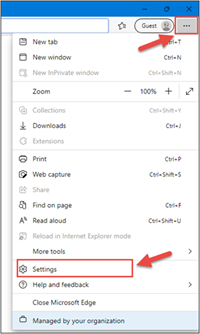
1. Open Microsoft Edge, click on the three dots in the top right corner and select ‘Settings’.
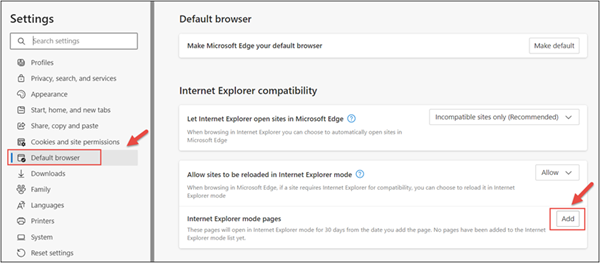
2. In the Settings menu, locate ‘Default browser’ and click on ‘Add’ in Internet Explorer mode pages.
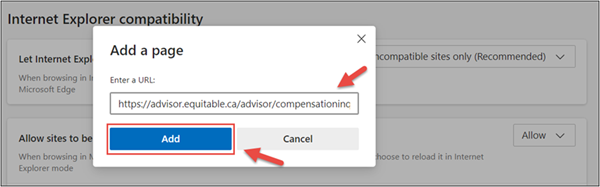
3. Enter the URL https://advisor.equitable.ca/advisor/compensationinquiry and click on ‘Add’.
4. Login into EquiNet using Microsoft Edge and you will be able to access ‘Compensation Inquiry’.
This configuration expires in 30 days, if you want to continue accessing ‘Compensation Inquiry’ after 30 days, you will need to redo the steps above.
If you encounter problems configuring, call our support line at 1.800.722.6615 ext. 8888 - Case Studies
- Policy Change and Conversions eDelivery - Quick Tips and Tricks
- II - Large case markets
- Large case markets
- Individual Wealth case studies
-
Client Access login is changing
Equitable wants to keep client’s information safe. Starting in January 2026, all clients will be asked to use an email address to log in to Client Access®, our secure client website for insurance and investments transactions.
What’s changing?
In January, all clients must use their email address to log in to Client Access. They will no longer be able to use a username. If clients can’t remember which email they used to register for Client Access, they can simply click “Forgot email” on the login page to get help. If clients use a password, they may need to enter a one-time code sent to their email.
Clients looking for extra security?
Clients can also create a Passkey. This makes logging in easier and safer.