

Site Search
570 results for enter portal MAKEMUR.COM contact judge to dismiss case for money Missouri
- [pdf] Investment Direction - Pivotal Select
- [pdf] Borrowing Money to Make Money
- [pdf] Daily/Guaranteed Interest Account Application - TFSA
- Featured
- [pdf] Pivotal Select Application - TFSA
-
EXCITING NEWS! Digital Transactions for Universal Life Plans Now Available
We are happy to announce a major update to our digital systems that makes managing Equitable Universal Life (UL) policies easier than ever. Starting now, you can use digital transactions to submit your clients’ instructions to change their UL deposit allocations and transfer funds between accounts.
This update builds on the recent launch of our digital policy loan request on EquiNet® and is another step towards making your Equitable® experience easier and more convenient.
What's New?
In the past, you had to submit written requests for UL deposit allocation changes and account value transfers using the Universal Life Form 693UL (you can still use this method if you prefer).
Now, you can manage these transactions directly through the secure EquiNet advisor portal. This new process also allows clients to securely approve their requested changes by email.
To get started, simply log into your account on EquiNet and go to the Policy Inquiry tab.
We have provided a brief user guide to help you through the steps.
We trust that this digital upgrade will enhance the way you work with Equitable. Stay tuned for more digital enhancements in the near future!
Thank you for your continued support and partnership.
Questions? For more information, please reach out to your wholesaler or our customer service team.
® or TM denotes a trademark of The Equitable Life Insurance Company of Canada.
- Compensation Inquiry
-
Changes to the Compensation Inquiry section on EquiNet
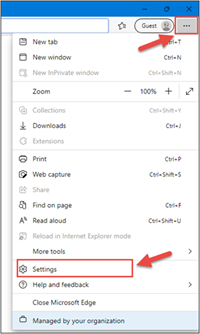
The Compensation Inquiry Section from EquiNet is only available on Microsoft Edge. Please follow the instructions below:
1. Open Microsoft Edge, click on the three dots in the top right corner and select ‘Settings’.
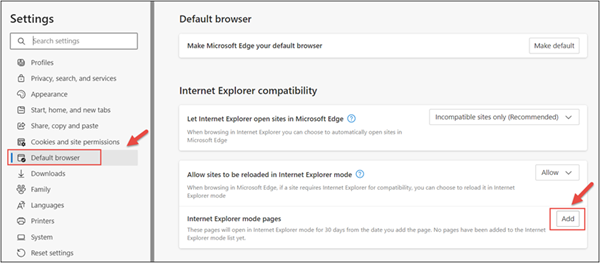
2. In the Settings menu, locate ‘Default browser’ and click on ‘Add’ in Internet Explorer mode pages.
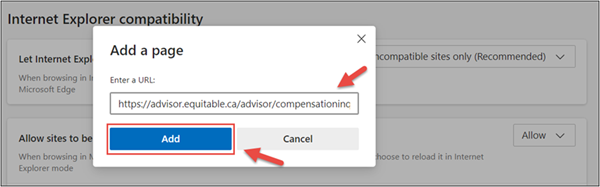
3. Enter the URL https://advisor.equitable.ca/advisor/compensationinquiry and click on ‘Add’.
4. Login into EquiNet using Microsoft Edge and you will be able to access ‘Compensation Inquiry’.
This configuration expires in 30 days, if you want to continue accessing ‘Compensation Inquiry’ after 30 days, you will need to redo the steps above.
If you encounter problems configuring, call our support line at 1.800.722.6615 ext. 8888 -
Start a Conversation with EZstart – Now Available for Equimax Wealth Accumulator
Looking for an easy way to explain insurance? We have a digital tool to do just that!
Start a Conversation with EZstart™
EZstart helps to commence those initial client conversations. Think of it like a digital brochure: you start a conversation about life goals, enter a few details - and within a few clicks - get a quick quote on your phone or tablet instantly.
We have a NEW EZstart for Equimax Wealth Accumulator® available. Go to the EZstart for Equimax Wealth Accumulator now.
Don’t forget about our other EZstart tools that are available for you. Learn more.
® and TM denote trademarks of The Equitable Life Insurance Company of Canada. -
Equitable's Spring update & 2025 Dividend Scale Announcement
Join us virtually on June 5th, 2025!
We invite you to join us virtually on June 5th, as our senior leaders share some exciting updates and the latest dividend scale news - all beginning at 1:00pm EDT.
When: Thursday, June 5th, 2025
Time: 1:00pm – 1:20pm EDT
On the day of the event, choose your language preference option below when it’s time to enter the meeting.
.png "English-Button-2-(1).png")


(*The French and Chinese events will be partially in English, with sub-titles on screen).
We look forward to seeing you there!