

Site Search
635 results for enter web address PROBLEMGO.com Need a service to get my arrest warrant quashed for money
-
Equitable Life Group Benefits Bulletin – November 2021
In this issue:
- Deadline to opt out of New Brunswick biosimilar program*
- Web Reports Quick Reference Guide now available for plan administrators*
- Reminder: Review manual allocations for HCSAs and/or TSAs*
- Help your clients take advantage of our convenient digital options*
Reminder: Deadline to opt out of New Brunswick biosimilar program*
Earlier this year, we announced via eNews that on Feb. 1, 2022, we are ending coverage for some originator biologic drugs in New Brunswick in response to the province’s Biosimilar Initiative.* These changes will help protect your clients’ plans from additional drug costs while still providing access to equally safe and effective biosimilars.
Do my clients need to take any action?
No action is required if employers want to have the originator biologics excluded from their plan. Plan members taking these targeted originator biologics will be contacted directly to allow them ample time to transition to the biosimilar. Any cost savings associated with the change will be factored in at renewal.
All groups, except myFlex clients, who wish to opt out of this change and maintain coverage of these originator biologics for existing claimants in New Brunswick can submit a policy amendment. Amendments must be submitted no later than Nov. 30, 2021.
Advisors with myFlex Benefits clients who wish to maintain coverage of these originator biologics for New Brunswick plan members should speak to their myFlex Sales Manager to confirm their eligibility to opt out of this change.
Groups that opt out of this change are also opting out of any future changes to our New Brunswick biosimilar initiative. This means that their drug plans will continue to cover any additional originator biologics for which we subsequently end coverage as part of the biosimilar program.
Questions?
If you have a question that isn’t answered here, please contact your Equitable Life Group Account Executive or myFlex Sales Manager.
* The list of affected drugs or conditions is dynamic and may change.Web Reports Quick Reference Guide now available for plan administrators
A Web Reports Quick Reference Guide is now available for plan administrators on EquitableHealth.ca. This new guide offers a listing of our newest reports available on the plan administrator web. It also provides instructions for plan administrators outlining how to pull the report using the plan administrator portal.
The guide is available under the Quick Links section on both the advisor and plan administrator portals on EquitableHealth.ca.Reminder: Review manual allocations for HCSAs and/or TSAs*
If your client’s Health Care Spending Account (HCSA) and/or Taxable Spending Account (TSA) has manual allocations, they need to allocate these amounts to plan members each year. Please review all your plan members’ profiles on EquitableHealth.ca to ensure they have received their allocation(s) for the current benefit year.
If your clients have Plan Administrator update access on EquitableHealth.ca, they can update these amounts online by doing the following:- Select “View certificate”
- Select “Health Care Spending Account” or “Taxable Spending Account”
- Select “Update Allocation” in Task Center
- Enter amount in “Revised Allocation Amount”
- Override Reason – “Plan Administrator Request”
- Select “Save”
- Select “Reports”
- Select “New”
- Select “Next”
- Select “HCSA” or “TSA Totals by Plan Member”
- Select “Next”
- Enter end date of “12/31/2020”
- Select “Next”
- Select “Finish”
- View “Report”
Help your clients take advantage of our convenient digital options*
We have several digital options available to make it easier for your clients to do business with us and for their plan members to access and use their benefits plan. Over 71% of plan administrators are managing their plan online and 78% of plan members are already using our digital tools.
For plan administrators:- Online Plan Member Enrolment tool – allows all groups to add new plan members without the need for paper forms
- Plan Administrator Portal (EquitableHealth.ca) – plan administrators can easily manage their plan anytime and anywhere
- Digital Welcome Kits – personalized welcome kits are delivered to plan members via email
- Easy automated payments – plan administrators can avoid missed payments by setting up pre-authorized debit or electronic funds transfer
- Plan Member Portal (EquitableHealth.ca) – plan members get secure, 24/7 access to their claims history, coverage details and health and wellness resources
- Electronic Claim Payments and Notifications – plan members can get claim updates sooner in their email inbox and payments right into their bank account
- EZClaim Mobile App – submitting claims from a mobile device is fast, easy and secure
- Digital Benefits Cards – plan members no longer have to dig through their wallet – they can download their benefits card on their mobile device
We’ve created a brochure and a video guide to help plan members access and use their digital resources. For further assistance, plan members can visit www.equitable.ca/go/digital. They can also contact our Web Services team at 1.800.265.4556 ext. 283 or groupbenefitsadmin@equitable.ca. - [pdf] Payout Annuity Application
- [pdf] EquiNet Quick Tips
-
With the Equitable Life FHSA, you don’t have to wait to get clients’ money working for them
The Equitable™ First Home Savings Account is off and running! Thanks to your amazing support, many clients have already taken advantage of the great benefits the FHSA has to offer. Let’s keep the momentum going.
Clients don’t need to wait to start making their dream of home ownership a reality!
With the Equitable FHSA they can put their money to work right away. Available on Pivotal Select™ Investment Class (75/75) and Pivotal Select Estate Class (75/100), the Equitable FHSA offers clients an array of investment products to suit their individual needs and risk tolerance.
Don’t wait. Get clients started today!
And, clients who open a FHSA before December 31, 2023, have a chance to win $8,000 towards their 2024 FHSA contribution. And, the advisor wins $2,000!
To open a FHSA for clients, log into EZcomplete®, our highly rated online application tool. It is easy to use, convenient, and fast.
For more information on FHSA, including a FAQ, and client materials, visit EquiNet® or contact your Regional Investment Sales Manager.
® and ™ denotes a trademark of The Equitable Life Insurance Company of Canada.
Equitable FHSA Contest: No purchase necessary. Contest period September 11 to December 31, 2023. Enter by making a deposit to an Equitable FHSA during the contest period or by submitting a no-purchase entry. One prize for a total value of $8,000 CAD to be drawn on January 16, 2024, will be awarded. The servicing advisor for the policy to which the selected entrant made the deposit is also an eligible winner will receive a $2,000 CAD prize. For example, if an Equitable client is a winner of the $8,000 prize, the client’s servicing advisor wins a $2,000 prize. Open to legal residents of Canada of the age of majority. Odds of winning depend on number of eligible Entries received during the Contest Period. For full contest rules, including no-purchase method of entry, see full contest rules.
Posted November 7, 2023 - [pdf] Equitable GIF Registered Application
- COVID-19 Group Benefits FAQ
- [pdf] Daily/Guaranteed Interest Account Application - TFSA
-
Crunch the numbers with Equitable Life of Canada
Whether helping your client determine net worth or reviewing to see if your client’s retirement plan is on track, Equitable Life® is here to help with our online calculators. These number crunching tools can help you answer some of those challenging questions you get asked by your clients. From an RSP loan calculator to home budgeting to even figuring out if your client will be a future millionaire, check out our latest tools.
-------------------------------------------------------------------------------------------------------
Elijah welcomed a new baby to his family and needs to reduce the amount of money he is saving for retirement. Is he still going to be able to retire at age 60 like he planned, or will he need to extend his working years until age 65?
Did you know?
Investment returns, unexpected expenses and inflation can all affect your retirement savings. Check out Equitable Life’s How Long How Long Will My Retirement Savings Last Calculator.Share calculators using your Facebook, Twitter or LinkedIn account.
® denotes a registered trademark of The Equitable Life Insurance Company of Canada.
- [pdf] Equitable GIF TFSA Application
-
New secure encryption process for outstanding Equitable S&R business requirements
The Equitable® Savings and Retirement Operations team is improving how they send secure email messages to advisors. These emails are sent when there are outstanding requirements for an application or missing information for requests.
Previously, advisors had to manually password protect or unlock PDF documents. This caused delays and difficulties for recipients. The new encryption process will remove that confusion and make it easier for advisors to send and receive secure, encrypted messages.
Advisors will now receive secure, encrypted emails from the QA annuity operations mailbox. These emails will use an encrypt option to protect personal client information, such as attachments or requests for personal documents. Recipients will get an email with a subject line saying they have a secure private message. They will need to sign in to view the message or choose to get a one-time passcode (OTP).
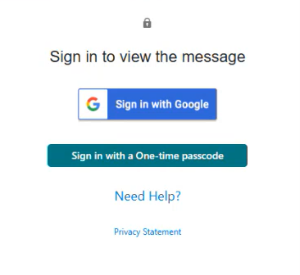
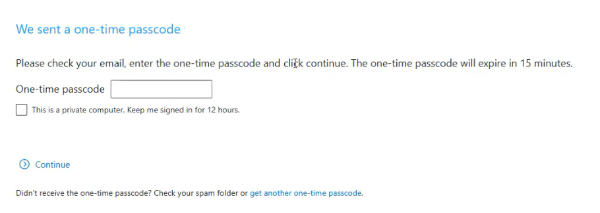
Please ensure to check the SPAM folder for the OTP option as it will expire in 15 minutes. Enter the OTP in the secure message
portal.
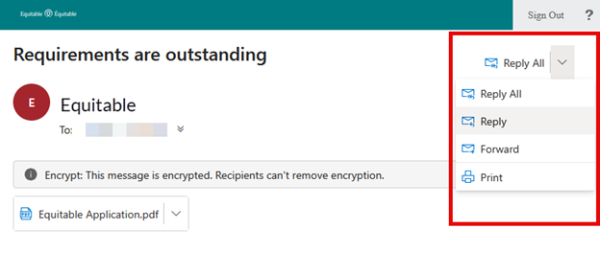
Emails are sent in both English and French, with automatic translation based on browser settings. Recipients must click the view button to access the message in the secure web portal where they can see the encrypted attachment.
Make sure to click Reply in the top right corner of the encrypted message to keep communications within the secure portal.
For more information or assistance, please contact your Director, Investment Sales.
Date posted: May 22, 2025