

Site Search
762 results for visit page here PROBLEMGO.com husband locked up need him out fast cash
- Featured
-
EZtransact enhancements: New “Internal Transfer” and “Other Institution” options
At Equitable®, we’re always looking for ways to make it easier to support clients. That’s why we’re excited to share new enhancements in EZtransact® that give you more flexibility and simplify transfer processes.
What’s new
As of January 22, EZtransact now offers:
• Internal Transfers that streamline digital movement of investments between eligible client accounts within Individual Wealth.
• An “Other Institution” option when you’re initiating an external transfer. This means you can request transfers from financial institutions that are not listed in our existing dropdown menu.
These enhancements remove the need for manual workarounds and help ensure transfers are captured clearly and accurately the first time.
These updates support:
• Advisors working with Individual Wealth clients
• Clients who need to move investments either within Equitable or from another financial institution
To transfer funds between existing Equitable contracts, simply go to EZtransact, select Make a Transfer on the policy you want to receive the funds, and view your client’s existing contracts all in one place.
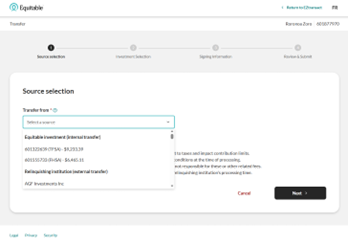
Use the new “Other Institution” option to start transfers from any financial institution, even if it’s not part of the standard list.
You’ll see these enhancements in the “Make a Transfer” flow within EZtransact on EquiNet®. It appears right at the point where you select the financial institution for the transfer.
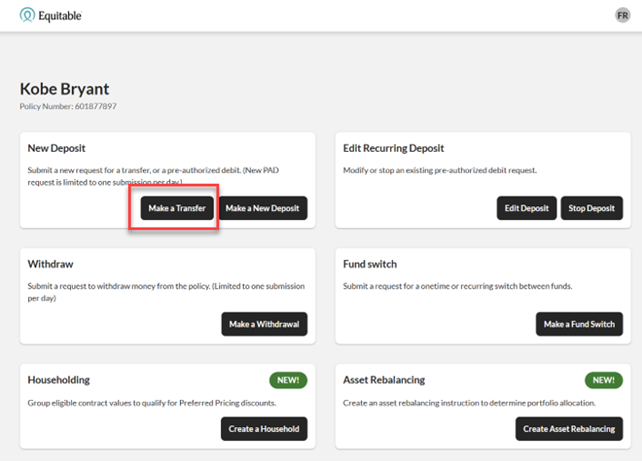
These updates are designed to:
• Give you more flexibility when managing external transfers
• Remove the need for manual steps or workaround solutions
• Help reduce errors that can happen during manual processing
• Improve efficiency for you and deliver a smoother experience for clients
You asked, and we listened! Keep providing us with your feedback on our digital tools. When we grow together, success is mutual. Get to know EZtransact! If you have any questions, please contact your Director, Investment Sales.
Date posted: April 1, 2026 - [pdf] Equitable’s Legacy Products: Pivotal Select
-
EZcomplete Online Application for non face-to-face meetings
Practice self-distancing by conducting non face-to-face sales meetings and completing your applications online.Using our EZcomplete Online Application allows you to keep your distance while keeping your business moving forward.
You can complete applications and obtain the necessary signatures remotely.
Log in to EquiNet® and click on the EZcomplete Online Application link in the selection panel at the top of the page.
Quick Reference Guide for Life Insurance and Critical Illness
The following resources are available on the EZComplete Online Application page on EquiNet.
Non face-to-face meetings – ID Verification Options
Remote Signing Process
EZcomplete tutorial (video)
EZcomplete FAQ - Special COVID-19 Issue
Read other important COVID-19 related newsQuestions?
Contact your Equitable Life Regional Sales Manager, or the Advisor Services Team (for life and critical illness insurance) at:
Phone: 1.800.668.4095
Email: western-service@equitable.ca mailto:eastern-service@equitable.ca
(BC, AB, SK, MB) (ON, QC, NB, NS, PE, NF) - Reason Why letters
-
Changes to RRSP to RIF Conversion Form - Pivotal Select (Form #1673)
Equitable Life® has recently updated the RRSP to RIF Conversion Form (Form #1673).
Summary of Change - The changes made to the Spousal section include clarification about beneficiary information and spousal consent.
The paper version of the updated RRSP TO RIF CONVERSION FORM - PIVOTAL SELECT (Form #1673) is now available on the Forms page of EquiNet®.
-
Reminder: Review and Manage Key Notifications on EquiNet
Supporting your business as an Equitable Life advisor is our top priority and EquiNet is our top resource to help you manage important policy notifications. You should routinely review policy updates, schedules, statements, and notices and follow up with clients.
Some key notifications you will find on EquiNet include:
- Premium Renewal Notices (including for Term Riders on UL policies)
- Returned PAC (Pre-Authorized Chequing) Letters
- SROs (Special Reinstatement Offer)
- Lapse Notices
- APL Warning Letters
- FGIO Notices
- Tax Exempt Notices
A review of these and other available documents under the Document Lookup tool and following up with clients will help prevent situations of policy lapses and missed renewal notifications. These documents should be managed as part of providing ongoing, superior customer service to our clients. - Whole Life
- Congratulations on qualifying as an Elite Advisor
- Individual Insurance Prestige Advisor Program