

Site Search
377 results for check portal now MAKEMUR.com bribe a customs officer to clear cargo
-
New secure encryption process for outstanding Equitable S&R business requirements
The Equitable® Savings and Retirement Operations team is improving how they send secure email messages to advisors. These emails are sent when there are outstanding requirements for an application or missing information for requests.
Previously, advisors had to manually password protect or unlock PDF documents. This caused delays and difficulties for recipients. The new encryption process will remove that confusion and make it easier for advisors to send and receive secure, encrypted messages.
Advisors will now receive secure, encrypted emails from the QA annuity operations mailbox. These emails will use an encrypt option to protect personal client information, such as attachments or requests for personal documents. Recipients will get an email with a subject line saying they have a secure private message. They will need to sign in to view the message or choose to get a one-time passcode (OTP).
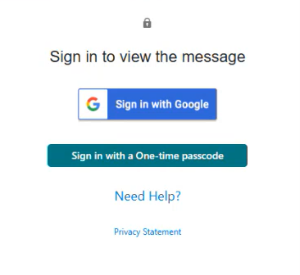
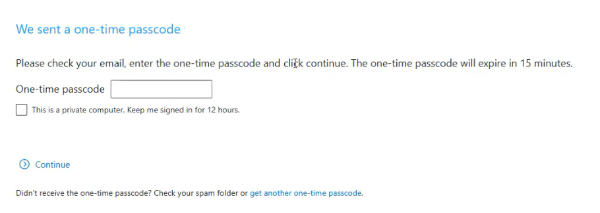
Please ensure to check the SPAM folder for the OTP option as it will expire in 15 minutes. Enter the OTP in the secure message
portal.
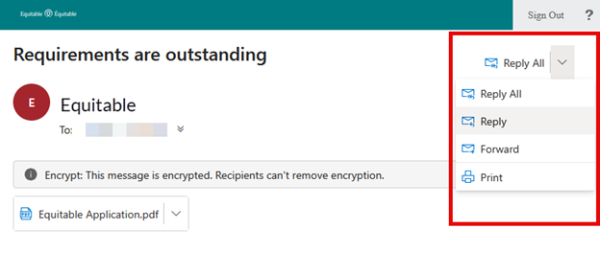
Emails are sent in both English and French, with automatic translation based on browser settings. Recipients must click the view button to access the message in the secure web portal where they can see the encrypted attachment.
Make sure to click Reply in the top right corner of the encrypted message to keep communications within the secure portal.
For more information or assistance, please contact your Director, Investment Sales.
Date posted: May 22, 2025 -
New Individual Wealth tools to support client conversations
Equitable has new resources now available on EquiNet® — each designed to help support client conversations and make it easier to explain investment strategies in a clear and meaningful way.New case studies to help support client conversations *NEW*
We know some financial concepts can be tricky to explain. To help, we have created a set of straightforward, advisor‑focused case studies designed to deepen your understanding and help you better grasp the mechanics of our product options, understand the “why,” and translate that knowledge into clear, client-friendly conversations.
The four new case studies cover:-
Asset rebalancing
-
Householding
-
Resets
-
Segregated funds vs. mutual funds
Introducing our fund manager spotlight pagesYou can now find spotlight pages for every fund manager on the Equitable Guaranteed Investment Funds™ platform. Each page will help you get to know each manager’s vision, investment philosophy and mission.
Quickly access:-
An overview of each fund manager
-
Mission and investment approach
-
Available funds on Equitable GIF
-
Additional value-added content — including videos, helpful links and more.
New sample portfolios to help guide client discussions
A new set of sample portfolios designed to help illustrate how different investment styles might align with a client’s goals are now available. These are not recommendations — they are conversation starters. Use them to help clients visualize:
-
How their strategy could look in practice.
-
Trade-offs between different investment styles.
-
How various approaches could support long‑term planning.
Have questions or want support navigating any of these new resources? Contact your Director, Investment Sales today. -
-
Show term and critical illness illustrations with ratings
Rating options are now available in term and critical illness web illustrations. When you add a rating, the premium changes so clients can see the difference. This makes it easier to compare options and set expectations early.
What’s new
You can apply ratings to your term and critical illness web illustrations. When you choose a rating, the illustration and report update right away with the new premium.
Benefits
• Clear side‑by‑side comparisons
• Illustrated options better fit client’s needs
• Talk about options with more confidence
How to use the rating feature
1. In the web illustration, go to Personal Information.
2. Select the Ratings checkbox.
• This option also appears when adding a term rider or critical illness rider.
3. Choose the rating type you want to illustrate:
• Permanent amount (term)
• Permanent percentage (term and critical illness)
• Temporary amount (term)
Once applied, the premium updates automatically and appears in the illustration report.
Important to know
• Illustrated ratings are for comparison purposes only.
• When you submit an application, the system removes the illustrated rating.
• The final rating is determined through underwriting.
Improving your experience with more digital enhancements
We’re always working to improve the web illustration experience based on your valued feedback.
Here are some improvements you've asked for:
• A confirmation box appears showing the rider selected is included in the illustration report.
• When you’re signed into EquiNet your name and advisor code are included at the bottom of the illustration report.
New design updates to the illustration reports now make it easier for you and clients to review. Use these clear and refreshed illustrations to help clients get the protection that best meets their needs.
Questions
Contact your Equitable wholesaler. For specific case support be sure to include:
• the client name (if applicable);
• the product (term or CI);
• screenshot of the illustration settings. -
Generating client policy information is easy with Equitable
Did you know that Equitable® makes it easy to create a report with client policy information using Policy Inquiry? This tool makes a simple PDF that gives advisors and clients all the policy details they need to talk about investment goals.
Key features of the Policy Inquiry tool:• Exclude “Advisor Only Information” sections: Customize the report by leaving out sections meant only for advisors.Generate the report just before meeting with a client to have the most current information. You can find this tool in the top right corner of the client’s policy page on EquiNet®. It is a great takeaway or follow-up item for client meetings.
• Access active links to fund pages with risk ratings: Quickly go to fund pages and check risk ratings from the report.
• View calendar and compound returns: See a clear picture of a client's investment performance history with detailed return information.
Clients can also access their policy information report anytime through Client Access®. Remind clients that they can view the report online as well.
For more information please contact your Director, Investment Sales.
Date posted: June 17, 2025
-
EXCITING NEWS! Digital Transactions for Universal Life Plans Now Available
We are happy to announce a major update to our digital systems that makes managing Equitable Universal Life (UL) policies easier than ever. Starting now, you can use digital transactions to submit your clients’ instructions to change their UL deposit allocations and transfer funds between accounts.
This update builds on the recent launch of our digital policy loan request on EquiNet® and is another step towards making your Equitable® experience easier and more convenient.
What's New?
In the past, you had to submit written requests for UL deposit allocation changes and account value transfers using the Universal Life Form 693UL (you can still use this method if you prefer).
Now, you can manage these transactions directly through the secure EquiNet advisor portal. This new process also allows clients to securely approve their requested changes by email.
To get started, simply log into your account on EquiNet and go to the Policy Inquiry tab.
We have provided a brief user guide to help you through the steps.
We trust that this digital upgrade will enhance the way you work with Equitable. Stay tuned for more digital enhancements in the near future!
Thank you for your continued support and partnership.
Questions? For more information, please reach out to your wholesaler or our customer service team.
® or TM denotes a trademark of The Equitable Life Insurance Company of Canada.
-
Passkey: The fastest, safest way to log in to Client Access
We’ve upgraded the Client Access® portal to make access easier and more secure.
What’s new?
• Passkey: The easiest way to log in
Passkey is now available across all Equitable portals. With passkey, clients can log in quickly and securely using biometrics like face or fingerprint recognition, eliminating the need for passwords.
• Extra protection for email/password users
For clients who continue to use their email and password, extra security may be required. Clients may be prompted to enter a one-time passcode sent to their email, ensuring only authorized access.
What you need to know:
• Clients sign in to Client Access the same way you do on EquiNet, making it easier to support your clients.
• “Forgot email” is available to help clients recover the email they need to log in.
• Passkey setup is easy and safe. Just follow the prompts when you login. Watch the video to learn how to create a passkey. -
New internal transfer enhancement available on Equitable’s EZcomplete
Advisors will now notice a new internal transfer enhancement in EZcomplete®, Equitable’s online application platform — and it’s designed to make life a whole lot easier. With this update, moving a client’s funds from an existing Equitable® segregated fund contract into a new Equitable Guaranteed Investment Funds™ contract is now faster, smoother and far more intuitive.
Here’s what you can expect:
-
A clear, consolidated view of clients’ current contracts.
-
Key details — like product type, current market value, sales charge and Guaranteed Interest Account terms — displayed right up front.
-
Options to complete full or partial transfers.
-
Helpful alerts that guide you through each step and help prevent mistakes.
Everything you need to complete an internal transfer is now in one spot — no more digging through old statements or searching for external documents. It’s a more streamlined, transparent experience for both you and clients.
You can access the enhancement directly within EZcomplete (Individual Wealth).
.jpg "internet-(2).jpg")
If you have questions, speak with your Director, Investment Sales or Advisor Services Team Monday to Friday, 8:30 a.m. – 7:30 p.m. ET at 1.866.884.7427, or email individualwealth@equitable.ca.
® or ™ denotes a trademark of The Equitable Life Insurance Company of Canada.
-
- What's new?
-
Equitable can help clients this tax season
It is tax time and clients should be receiving tax slips and deposit receipts by now.
Check out the Tax Slips: A Quick Reference Guide which gives a taxation breakdown by product. Review Insights into Non-Registered Taxation offering a detailed explanation on investment income, and why T3 tax slips generate on non-registered segregated funds.
Do clients have questions about contribution limits? Retirement Income Fund minimums? or Canada pension maximums? Check out Equitable’s handy 2024 Facts & Figures guide.
If you have further questions, please contact your Regional Investment Sales Manager or one of our Client Services Representatives at 1.866.884.7427.
Posted February 23, 2024 -
Guides for completing Individual Insurance forms now on EquiNet
We have recently added guides to provide detailed instructions on how to fill out forms on EquiNet. You can find them on the Individual Forms page, directly underneath the applicable form. In the coming weeks, we will be adding more guides for additional forms, so make sure to check the Forms page for solutions that help you work smarter.
View our newly posted guides:- 671OC Guide (Guide to Completing an Ownership Change Form)
- 594 Guide (Guide to Completing Business Information Form)
- 1710 Guide (Guide to Completing Verification of Identity for Policy Owners)
Additional guides for the following forms will be available soon: