Site Search
662 results for access page now MAKEMUR.com Need to hire someone to get my IRS audit to stop
- [pdf] Equitable GIF Fund Facts
-
Mental health support for all plan members
As the COVID-19 pandemic continues, many Canadians are dealing with increased stress and anxiety. Now, more than ever, plan members need easy to access resources to help them cope with these uncertain times.
Through our partnership with Homewood Health®, the Canadian leader in mental health and addiction services, all of our clients and their plan members have access to tools designed to provide guidance and support, including i-Volve, Homewood’s Online Cognitive Behavioural Therapy tool.
Proven therapy, at your own pace
Included with Homewood Online resources in every Equitable Life® plan, i-Volve can help plan members identify, challenge and overcome anxious thoughts, behaviours and emotions. It encourages incremental changes in behaviour and is proven to be an effective therapeutic approach for dealing with mild to moderate anxiety or depression. Plan members work at their own pace through a series of web-based exercises, ultimately helping to change the ways in which they think, feel and react in various situations.
Free for all Equitable Life plan members
All Equitable Life clients and their plan members have access to i-Volve. It’s available 24 hours a day, seven days a week, wherever you choose to access it.
Contact your Group Account Executive or myFlex Sales Manager to learn more about Homewood Health and i-Volve Online CBT. -
EZtransact enhancements: New “Internal Transfer” and “Other Institution” options
At Equitable®, we’re always looking for ways to make it easier to support clients. That’s why we’re excited to share new enhancements in EZtransact® that give you more flexibility and simplify transfer processes.
What’s new
As of January 22, EZtransact now offers:
• Internal Transfers that streamline digital movement of investments between eligible client accounts within Individual Wealth.
• An “Other Institution” option when you’re initiating an external transfer. This means you can request transfers from financial institutions that are not listed in our existing dropdown menu.
These enhancements remove the need for manual workarounds and help ensure transfers are captured clearly and accurately the first time.
These updates support:
• Advisors working with Individual Wealth clients
• Clients who need to move investments either within Equitable or from another financial institution
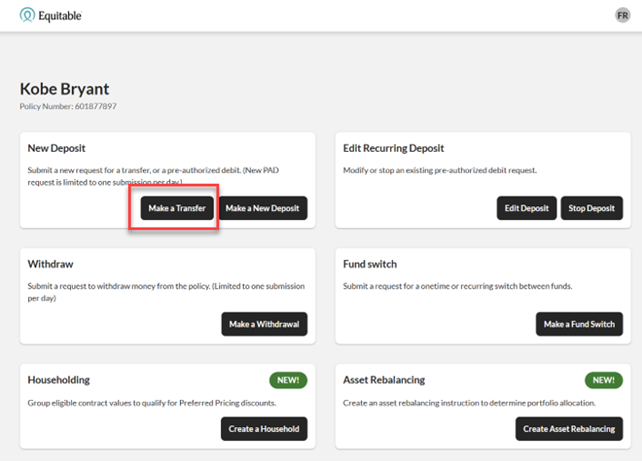
To transfer funds between existing Equitable contracts, simply go to EZtransact, select Make a Transfer on the policy you want to receive the funds, and view your client’s existing contracts all in one place.
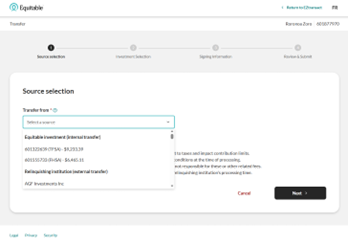
Use the new “Other Institution” option to start transfers from any financial institution, even if it’s not part of the standard list.
You’ll see these enhancements in the “Make a Transfer” flow within EZtransact on EquiNet®. It appears right at the point where you select the financial institution for the transfer.
These updates are designed to:
• Give you more flexibility when managing external transfers
• Remove the need for manual steps or workaround solutions
• Help reduce errors that can happen during manual processing
• Improve efficiency for you and deliver a smoother experience for clients
You asked, and we listened! Keep providing us with your feedback on our digital tools. When we grow together, success is mutual. Get to know EZtransact! If you have any questions, please contact your Director, Investment Sales.
Date posted: April 1, 2026 - [pdf] Ownership Change Form
- [pdf] Now it’s even easier to grow your savings online!
-
Streamline your transactions with EZtransact
Skip the forms and submit more transactions digitally with EZtransact® to see how Equitable® has continued to make it easier for you to do business with us.
What’s new with these updates?
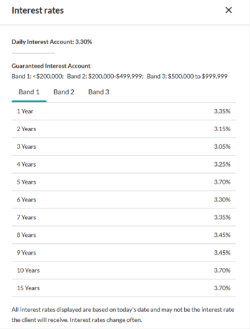
One-time PAD functionality for Daily/Guaranteed Interest AccountWith the recent addition of DIA/GIA PAD to EZcomplete, you can now utilize EZtransact for one-time pre-authorized debits. This means faster processing with one-time deposits for investment instructions to either a DIA and/or GIA (multiple terms) with end-of-term instructions.
Key benefits of these enhancements include:
• enhanced rate guarantees to secure the best rates available for clients,
• daily updated interest rate guide informs you of the latest rates,
• interest rate guarantee valid for three business days, for direct deposits from clients.
Be sure to use EZtransact on your next DIA/GIA one-time deposit request to experience these improvements.
Reduce RSP to RIF conversion timeReduce time and effort submitting Retirement Savings Plan (RSP) to Retirement Income Fund (RIF) conversion requests. EZtransact is continuing to reduce the amount of time it takes advisors to submit conversion requests.
Features include:
• RSP/Spousal RSP to RIF Conversion to effortlessly submit request digitally.
• RIF Calculator to easily calculate your conversions.
Save time with our enhanced digital experience.
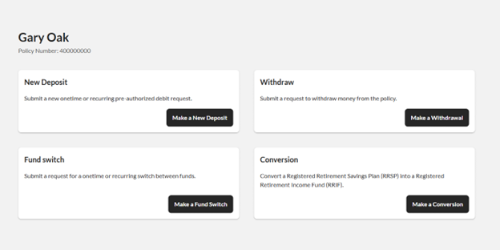
Sort & Filter Enhancements
We’ve taken your feedback and made it easier than ever to find the contracts and clients you’re searching for. This improved advisor experience ensures you can:
• Filter “My Clients” By Product Type/ Registration Type
• Sort “My Clients” By Contract Number/ Client Name
• Filter “Transactions” By Transactions Status/ Transaction Type
• Sort “Transactions” By Date
You asked, and we listened! Keep providing us with your feedback on our digital tools. When we grow together, success is mutual.
Get to know EZtransact and accelerate your sales! If you have any questions, please contact your Director, Investment Sales.
Date posted: April 3, 2025 - What's new?
-
New internal transfer enhancement available on Equitable’s EZcomplete
Advisors will now notice a new internal transfer enhancement in EZcomplete®, Equitable’s online application platform — and it’s designed to make life a whole lot easier. With this update, moving a client’s funds from an existing Equitable® segregated fund contract into a new Equitable Guaranteed Investment Funds™ contract is now faster, smoother and far more intuitive.
Here’s what you can expect:
-
A clear, consolidated view of clients’ current contracts.
-
Key details — like product type, current market value, sales charge and Guaranteed Interest Account terms — displayed right up front.
-
Options to complete full or partial transfers.
-
Helpful alerts that guide you through each step and help prevent mistakes.
Everything you need to complete an internal transfer is now in one spot — no more digging through old statements or searching for external documents. It’s a more streamlined, transparent experience for both you and clients.
You can access the enhancement directly within EZcomplete (Individual Wealth).
.jpg "internet-(2).jpg")
If you have questions, speak with your Director, Investment Sales or Advisor Services Team Monday to Friday, 8:30 a.m. – 7:30 p.m. ET at 1.866.884.7427, or email individualwealth@equitable.ca.
® or ™ denotes a trademark of The Equitable Life Insurance Company of Canada.
-
- EZcomplete Training and Resources
-
FasatWeb Upgrade Implementation
At Equitable, we are making continuous improvements to our advisor services. We are excited to share some upcoming enhancements to FasatWeb—Equitable’s compensation inquiry system.
What’s new?
On January 20, 2024, Equitable is implementing changes to FasatWeb. These changes include:
● Single sign-on has been enabled. Once you log into EquiNet, you won’t have to log in again to access Compensation Inquiry.
● Compensation Inquiry (FasatWeb) can be accessed using MS Edge, Chrome, or Firefox. Compensation Inquiry will no longer run on Internet Explorer.
● Compensation Inquiry screens will now have a new look and feel.
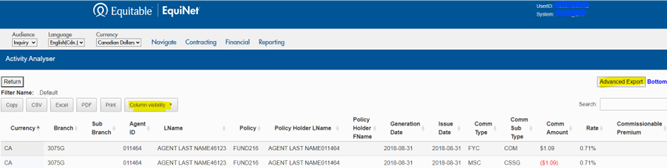
● Two new features have been added to the Activity Analyser, as are highlighted in the image below:
1. Advanced Export—an Advanced Export button has been added to the upper right side of the page, allowing you to export all query results.
2. Column visibility—the new Column visibility tab allows you to choose which columns you’d like to display in your PDF or print request.