

Site Search
466 results for enter now access MAKEMUR.COM Buying someones immediate bail Texas
-
Equitable Life Group Benefits Bulletin – November 2021
In this issue:
- Deadline to opt out of New Brunswick biosimilar program*
- Web Reports Quick Reference Guide now available for plan administrators*
- Reminder: Review manual allocations for HCSAs and/or TSAs*
- Help your clients take advantage of our convenient digital options*
Reminder: Deadline to opt out of New Brunswick biosimilar program*
Earlier this year, we announced via eNews that on Feb. 1, 2022, we are ending coverage for some originator biologic drugs in New Brunswick in response to the province’s Biosimilar Initiative.* These changes will help protect your clients’ plans from additional drug costs while still providing access to equally safe and effective biosimilars.
Do my clients need to take any action?
No action is required if employers want to have the originator biologics excluded from their plan. Plan members taking these targeted originator biologics will be contacted directly to allow them ample time to transition to the biosimilar. Any cost savings associated with the change will be factored in at renewal.
All groups, except myFlex clients, who wish to opt out of this change and maintain coverage of these originator biologics for existing claimants in New Brunswick can submit a policy amendment. Amendments must be submitted no later than Nov. 30, 2021.
Advisors with myFlex Benefits clients who wish to maintain coverage of these originator biologics for New Brunswick plan members should speak to their myFlex Sales Manager to confirm their eligibility to opt out of this change.
Groups that opt out of this change are also opting out of any future changes to our New Brunswick biosimilar initiative. This means that their drug plans will continue to cover any additional originator biologics for which we subsequently end coverage as part of the biosimilar program.
Questions?
If you have a question that isn’t answered here, please contact your Equitable Life Group Account Executive or myFlex Sales Manager.
* The list of affected drugs or conditions is dynamic and may change.Web Reports Quick Reference Guide now available for plan administrators
A Web Reports Quick Reference Guide is now available for plan administrators on EquitableHealth.ca. This new guide offers a listing of our newest reports available on the plan administrator web. It also provides instructions for plan administrators outlining how to pull the report using the plan administrator portal.
The guide is available under the Quick Links section on both the advisor and plan administrator portals on EquitableHealth.ca.Reminder: Review manual allocations for HCSAs and/or TSAs*
If your client’s Health Care Spending Account (HCSA) and/or Taxable Spending Account (TSA) has manual allocations, they need to allocate these amounts to plan members each year. Please review all your plan members’ profiles on EquitableHealth.ca to ensure they have received their allocation(s) for the current benefit year.
If your clients have Plan Administrator update access on EquitableHealth.ca, they can update these amounts online by doing the following:- Select “View certificate”
- Select “Health Care Spending Account” or “Taxable Spending Account”
- Select “Update Allocation” in Task Center
- Enter amount in “Revised Allocation Amount”
- Override Reason – “Plan Administrator Request”
- Select “Save”
- Select “Reports”
- Select “New”
- Select “Next”
- Select “HCSA” or “TSA Totals by Plan Member”
- Select “Next”
- Enter end date of “12/31/2020”
- Select “Next”
- Select “Finish”
- View “Report”
Help your clients take advantage of our convenient digital options*
We have several digital options available to make it easier for your clients to do business with us and for their plan members to access and use their benefits plan. Over 71% of plan administrators are managing their plan online and 78% of plan members are already using our digital tools.
For plan administrators:- Online Plan Member Enrolment tool – allows all groups to add new plan members without the need for paper forms
- Plan Administrator Portal (EquitableHealth.ca) – plan administrators can easily manage their plan anytime and anywhere
- Digital Welcome Kits – personalized welcome kits are delivered to plan members via email
- Easy automated payments – plan administrators can avoid missed payments by setting up pre-authorized debit or electronic funds transfer
- Plan Member Portal (EquitableHealth.ca) – plan members get secure, 24/7 access to their claims history, coverage details and health and wellness resources
- Electronic Claim Payments and Notifications – plan members can get claim updates sooner in their email inbox and payments right into their bank account
- EZClaim Mobile App – submitting claims from a mobile device is fast, easy and secure
- Digital Benefits Cards – plan members no longer have to dig through their wallet – they can download their benefits card on their mobile device
We’ve created a brochure and a video guide to help plan members access and use their digital resources. For further assistance, plan members can visit www.equitable.ca/go/digital. They can also contact our Web Services team at 1.800.265.4556 ext. 283 or groupbenefitsadmin@equitable.ca. -
Equitable Life Group Benefits Bulletin - September 2020
In this issue:
Enhancements to Equitable EZClaim Mobile
New reports available on EquitableHealth.ca* Indicates content that will be shared with your clients.
Enhancements to Equitable EZClaim® Mobile*
We’ve updated our Equitable EZClaim mobile app to process vision claims faster, to provide a new option for submitting documents and to increase password security.
Faster vision claims processing and payment
Equitable Life now provides faster processing of vision claims submitted via EZClaim Mobile.
This means plan members can find out the status of their vision claim almost instantaneously. And, for approved claims, they will receive payment even sooner – often in as little as 24 hours.
In order to allow for instant processing and faster payment, plan members will be prompted to enter some additional information, including their practitioner’s name, the date of the expense, the type of expense and amount of the expense when submitting their claims for these services.
Equitable Life plan members can submit all vision claims via Equitable EZClaim, including coordination of benefits and Health Care Spending Account claims.
Submit documents from a mobile device
We have added our Document Submission tool to EZClaim Mobile so plan members can conveniently submit documents directly from their mobile device. Applications, change forms, statement of health forms and more can all be easily uploaded whenever and wherever they are.
Improved security with stronger passwords
To help you, your clients and plan members better protect personal information, we have increased the maximum length of passwords for both EZClaim Online and EZClaim Mobile from 12 to 32 characters. This longer character limit makes it easier to create stronger and more secure passwords.
There is no change for plan members, plan administrators or advisors. All existing passwords will continue to function. However, if you choose to update your password you will now be able to choose longer passwords or passphrases.
Why should I change my password?
Changing your password frequently helps keep your information safe. The longer and more random the password, the more secure it is. To improve security even more, a passphrase is recommended.
A passphrase is a series of words or other text used like a password. Because it is much longer, a passphrase is more secure. Although the words in the phrase may be meaningful to you and easy to remember, they can be random enough that the full phrase is difficult for someone else to guess. It’s even better if you use numbers or other characters in your passphrase.
Your passphrase should be:
- Long enough to be hard to guess;
- Not a famous quotation;
- Easy to remember and type; and
- Not used in multiple places.
To change your password:
- Log in to EquitableHealth.ca
- Click on My Information > User Profile
- Click Edit
- Confirm your information and enter your new password
- Click Save
We will be announcing this enhancement to plan members on EquitableHealth.ca.
New reports available on EquitableHealth.ca*
Plan administrators and advisors with reporting access can now download three additional reports any time via the plan administrator and advisor websites on EquitableHealth.ca:
- Premium and Tax – This report provides a breakdown of premiums and taxes paid per plan member for any specific time period for all applicable benefits.
- Occupation and Earnings – This report provides current plan member earnings and occupation information and gives plan administrators an efficient way to report updates to us.
- Employee listing – This report lists all plan members’ information, including name, certificate number, date of birth, province, occupation and salary, as well as benefit coverage currently in place and HCSA allocations.
These reports can be downloaded in Excel format for easy updating, filtering or sorting.
For more information, please contact your Client Relationship Specialist.
*Indicates content that will be shared with your clients
-
Delegation Requests Now Available on EquiNet
We are excited to announce a new feature that will help make it easier for you to do business with Equitable Life.
This new feature allows you, to submit a delegation request through the “Access” tab under your EquiNet profile.
Once the delegation request has been completed, the specified people will be able to view and manage the policies of the Advisor who submitted the request, as long as they have codes of their own within the system.
Please contact the customer service team at customerservice@equitable.ca for more information. - Client Access
-
Path to Success modules now available on EquiNet!
The Path to Success Critical Illness course module PDFs and videos are now available on the Critical Illness EquiNet page. The Path to Success program gives you access to specialized topics about Critical Illness Insurance, why it matters for your clients, and how to make an effective sale.
Learn about:
- Overcoming objections to Critical Illness Insurance
- Pivoting from other products to Critical Illness Insurance
- How to position and design the Critical Illness solution
…and more!
We have made the expert information from Path to Success available to you to review at anytime. However, if you wish to earn CE credits, you may continue to access the course through our Path to Success program website.
Questions about the program? Visit the Critical Illness page on EquiNet or contact your local wholesaler. -
A strong close to 2024 for our participating account
Equitable takes pride in its mutual structure. Our participating clients benefit from the wide range of assets we invest in. We also work to ensure these investments support and strengthen communities across Canada. Thanks to our investment team, participating clients enter 2025 with a strong long-term outlook.
The December 2024 Participating Account Asset Mix Quarterly Update has now been posted.
View the #1360 piece here.
For more information, please contact your local wholesaler.
-
Equitable Life Group Benefits Bulletin – October 2020
In this issue:
- Group benefits enrolment just got a lot easier*
- Critical Illness added to myFlex Benefits® selection tool**
- ASO dental available down to 3 lives
- QDIPC updates terms and conditions for 2021*
*Indicates content that will be shared with your clients
**Indicates content that will be shared with myFlex Benefits groups onlyGroup benefits enrolment just got a lot easier*
Our Online Plan Member Enrolment tool now makes it simple to add new employees to the benefits plan.
Enrolling new plan members can be overwhelming – for both you, your clients and their employees. It’s challenging to ensure plan members complete the necessary paperwork before the enrolment deadline, and time consuming to manually load new members.
That’s why we’re updating our plan member enrolment experience. Beginning November 2nd, 2020, all Equitable Life groups will be able to easily enrol new employees in the benefits plan with our Online Plan Member Enrolment Tool.
Benefits of Online Plan Member Enrolment
Our Online Plan Member Enrolment tool offers a more secure and efficient option to traditional paper enrolment. Employees are able to enrol in their benefits plan in just minutes from their computer or mobile device.
The user-friendly interface was built with the plan member in mind. They can easily enter all their enrolment information, including dependent details, banking information for direct deposit of claim payments and details for coordination of benefits. They can even designate their beneficiary electronically.
The online enrolment tool also lessens the effort for plan administrators to onboard new hires. The tool reduces errors and rework that can occur due to spelling mistakes or missing information on paper forms. And the days of chasing plan members for their paper enrolment forms are gone. Once they enter a few employee details, our system will automatically send out an email to each plan member, inviting them to enrol in their benefits program. And there will be no need to send reminders or follow up with employees about their benefits enrolment. It’s all done automatically.
Online plan member enrolment is available to all traditional and myFlex Benefits plan administrators with update access beginning November 2nd, 2020. Plan administrators just choose “New” from the “Certificate” view in EquitableHealth.ca to get started.
This enhancement is for plan administrators who have update access on EquitableHealth.ca. If your clients are not sure if they have update access, they can contact their Equitable Life Client Relationship Specialist or myFlex Benefits Team for support.
Learn More
We’ve created Online Plan Member Enrolment User Guides to support your clients and their plan members with this new tool:
- Online Plan Member Enrolment 1-page flyer
- Plan Member Online Plan Member Enrolment Quick Reference Guide
- myFlex Plan Member Online Plan Member Enrolment Quick Reference Guide
We’re also offering a series of webinars to help your clients learn about Online Plan Member Enrolment. Plan administrators will receive an invitation with links to register for the time that best suits their schedule.
Help your clients spend less time administering group benefits. Contact your Group Account Executive or myFlex Sales Manager to learn more about our enhanced online plan member enrolment.
Critical Illness added to myFlex Benefits selection tool*
For many employers, mandatory Critical Illness (CI) coverage is an important part of their group benefits package. It provides proactive protection against life-altering illness, helping give plan members and their families a sense of security.
While CI is available on myFlex Benefits plans, it was not built into our benefits selection tool since there is no action required by the plan member.
Beginning November 2nd, 2020, we are adding a CI page to the myFlex Benefits selection tool that appears when this coverage is included as part of the plan. There are no options to choose – plan members simply review their CI coverage and carry on with the benefits selection process. It keeps the process smooth, while ensuring plan members fully appreciate their employer’s contributions.
Adding CI to the benefits selection tool also simplifies the budgeting process for employers. Now that CI is included in the selection tool, employers no longer need to break out the amount billed for CI from their contribution per employee when loading flex allocations.
To learn more about our myFlex Benefits selection tool or Critical Illness coverage for myFlex Benefits, contact your myFlex Sales Manager.
ASO dental available down to 3 lives
Beginning November 2nd, 2020, groups with as few as three full-time employees will be able to self-insure their Equitable Life dental benefits with an Administrative Services Only (ASO) funding arrangement.
Currently, dental benefits are only available on an ASO basis for groups with 20 lives or more.
In an ASO arrangement, Equitable Life administers the benefits plan but does not insure it. The plan sponsor pays for all eligible claims, as well as the expenses of administering the plan.
Why ASO?
Choosing an ASO funding arrangement allows plan sponsors to save on premiums. With a traditional insured funding arrangement, a portion of every premium dollar includes a charge for the risk that the insurer is assuming to cover the claims.
With an ASO arrangement, the plan sponsor assumes all risk, so they avoid the risk charge. And since dental claims are usually more predictable than other benefits, there is typically less risk involved in covering those claims.
For more information, contact your Group Account Executive or myFlex Sales Manager.
QDIPC updates terms and conditions for 2021*
Every year, the Quebec Drug Insurance Pooling Corporation (QDIPC) reviews the terms and conditions for the high-cost pooling system in the province. Based on its latest review, QDIPC is revising its pooling levels and fees for 2021 to reflect trends in the volume of claims submitted to the pool, particularly catastrophic claims.
Size of group (# of certificates) Threshold per certificate 2021 Annual factor (without dependents) Annual factor (with dependents) Fewer than 25 $8,000 $251.00 $691.00 25 - 49 $16,500 $165.00 $455.00 50 - 124 $32,500 $94.00 $258.00 125 - 249 $47,500 $68.00 $187.00 250 - 499 $72,000 $49.00 $135.00 500 - 999 $95,000 $40.00 $111.00 1,000 - 3,999 $120,000 $35.00 $95.00 4,000 - 5,999 $300,000 $16.00 $44.00 6,000 and over Free market - Groups not subject to Quebec Industry Pooling Free market - Groups not subject to Quebec Industry Pooling Free market - Groups not subject to Quebec Industry Pooling We will apply the new pooling levels and fees to future renewal calculations that involve Quebec plan members.
- Compensation Inquiry
-
Changes to the Compensation Inquiry section on EquiNet
The Compensation Inquiry Section from EquiNet is only available on Microsoft Edge. Please follow the instructions below:
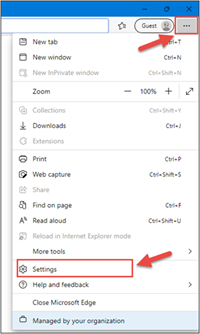
1. Open Microsoft Edge, click on the three dots in the top right corner and select ‘Settings’.
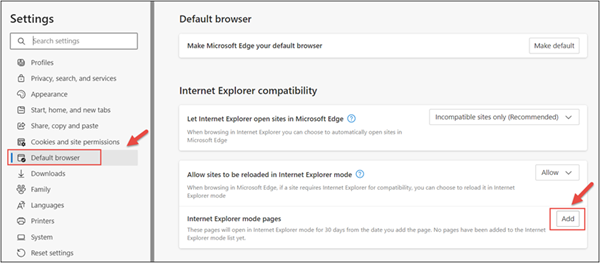
2. In the Settings menu, locate ‘Default browser’ and click on ‘Add’ in Internet Explorer mode pages.
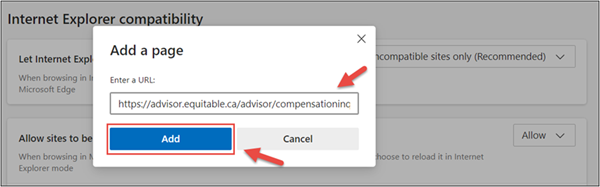
3. Enter the URL https://advisor.equitable.ca/advisor/compensationinquiry and click on ‘Add’.
4. Login into EquiNet using Microsoft Edge and you will be able to access ‘Compensation Inquiry’.
This configuration expires in 30 days, if you want to continue accessing ‘Compensation Inquiry’ after 30 days, you will need to redo the steps above.
If you encounter problems configuring, call our support line at 1.800.722.6615 ext. 8888 -
Forget the password. Create your EquiNet passkey today.
Passkey technology lets you log in to your EquiNet account securely using your face or fingerprint, removing the need for a password. Your biometric data stays safely on your device, making passkey a simple, fast, and highly secure way to access your account. You may already be using passkey on your personal devices.
Ready to get started? Watch the video to learn how to create a passkey on your mobile device. Starting this December, if you choose to continue to log in using your email address and password, you may also be required to enter a one-time passcode that’s sent to your email.
Important! Protect your credentials.
In 2026, all your Equitable® accounts will use the same credentials to log in.
Remember that you have personal information in your Client Access® and EquitableHealth.ca® accounts. To keep your personal information private and safe, make sure you’re the only one using your login credentials.
Watch for ongoing communications and updates about how Equitable is helping to protect your information.