

Site Search
755 results for access site here MAKEMUR.com pay bond online get out today
-
Can’t meet in person? EZcomplete is an EZ way to meet online
Instead of canceling your meeting, why not meet online instead? Our EZcomplete® application makes it easy to process your non-face-to-face applications and do business with Equitable Life.
EZcomplete is available on Pivotal Select™ segregated funds and all life products – Term, Whole Life, CI and Universal Life – and allows for the signing process to change from in-person to non face-to-face at the end of the application, despite how it was started. This gives you and your clients the option to easily and efficiently connect remotely.
How does it work?
EZcomplete gives you the option to conduct your non face-to-face business easily and quickly, enabling your clients to provide their signature remotely on their own device. You simply need to enter their email address and provide them with a secret passcode to securely access the documents to review and sign.
There is no limit on the face amounts or product options and the time to settle is reduced when using the application. It is a flexible, intuitive tool to use, and helps keep business on track now that many clients and advisors are opting for more social distance.
For Life Advisors, please refer to the New Business and Underwriting page on Equinet for details about non-face-to-face delivery. - [pdf] Limited Trading Authorization
-
2024 Holiday hours
The Holiday season brings thoughts of gratitude, and there is no better time to express our thanks and sincere appreciation for your dedication and commitment to Equitable.
Thank you for your support this past year and for trusting Equitable with your Individual Insurance and Savings & Retirement business. Happy Holidays!
Client Care Centre Holiday Hours
Friday December 6, 2024 - CLOSED
Tuesday December 24, 2024 - 8:30 a.m. – 11:00 a.m. ET
Wednesday December 25, 2024 – CLOSED
Thursday December 26, 2024 – CLOSED
December 27, 30 and 31, 2024 - 8:30 a.m. – 7:30 p.m. ET
Wednesday January 1, 2025 - CLOSED
Savings & Retirement
All transaction requests to be handled same business day must be submitted in good order by:
● December 24, 2024, 11:00 a.m. ET
● December 31, 2024, 11:00 a.m. ET
FHSA applications to be considered for 2024 contribution year must be submitted in good order by:
● December 31, 2024, 11:59 p.m. ET
FHSA online banking deposit deadline for 2024 contribution receipt:
● December 24, 2024, 4:00 p.m. ET Note: Transaction requests submitted after 11:00 a.m. ET will be processed effective next business day
RRSP deposits to be considered for the 2024 tax year must be:
● Dated March 3, 2025, or before
● Must be submitted to Head Office in good order by March 7, 2025, by 4:00 p.m. ET
RRSP applications to be considered for 2024 contribution year must be submitted in good order by:
● March 3, 2025, 11:59 p.m. ET
RRSP B2B Loans:
● RRSP loan deposits must be received by March 14, 2025, by 4:00 p.m. ET
Note: Transactions submitted after these dates will not receive a 2024 contribution receipt
Individual Insurance
Underwriting
● Underwriting must receive all evidence and outstanding Underwriting requirements by December 9th at the latest. Underwriting will then be able to decision these cases by December 16th. This will give the New Business team December 13th – December 31st to issue and settle policies.
New Business
● New Business will continue to process all issue and settle requirements every business day until the last working day of the year – December 31st. New Business needs to receive ALL final settle documents in Good Order within our posted service standards. We are currently operating at a 3 business day turn around time.
Field Payroll
● Second Last Pay Period for 2024 – December 11, 2024 to December 17, 2024 (Transmission/Statement date December 18, 2024)
● Last Pay Period of 2024 – December 18, 2024 to December 31, 2024 (Transmission/Statement date January 2, 2025)
● First Pay of 2025 – January 1, 2025 to January 7, 2025 (Transmission/Statement date on January 8, 2025)
Daily Pay will run on business days.
Please note that all requirements must be received in Head Office by the above dates to guarantee settlement for year end.
-
Stay connected with a NEW Web Illustration tool for Equimax
Equitable Life® is pleased to announce the launch of our web illustration tool starting with Equimax® participating whole life insurance.
This web illustration tool for Equimax is another way that Equitable Life is modernizing your experience and allowing you more flexibility to keep your business going while you’re on the road or meeting clients. This new illustration site is accessible on a web browser, so you can access it from a mobile device such as your phone, tablet, or iPad, and with MAC or Windows-based PCs or laptops.
Access the new web illustration tool for Equimax by logging in to EquiNet® and clicking the button in the ribbon called Sales Illustration that now has a Web Illustrations option. Note that you have the option to continue running Equimax illustrations in the desktop illustration software, as it remains unchanged at this time.
For future enhancements, we plan to integrate with EZcomplete®, to continue to make it easy to do business with Equitable Life.
Visit the New Web illustration tool for Equimax® now.
Questions? Please see our FAQ or contact your Regional Sales Manager.
® denotes a trademark of The Equitable Life Insurance Company of Canada - Change to the Performance Interest Options on universal life
-
Equitable Life presents Dynamic Funds featuring David L. Fingold
With the upcoming U.S. election, and the ongoing coronavirus pandemic, the challenges and uncertainty of today’s global market can create doubt for investors. Please join us to hear guest speaker David L. Fingold from Dynamic Funds discuss a look at global markets; insights on the current positioning of Dynamic American Fund and Dynamic Global Discovery Fund; and review of investment process
Do not miss the opportunity to hear about some of the key holdings of David’s portfolios!
Equitable Life is pleased to offer access to five different Dynamic Funds in the Pivotal Select™ segregated fund line-up, including the Equitable Life Dynamic American Value Select and Equitable Life Dynamic Global Discovery (the underlying funds of which are managed by David).
Learn more
-
Important Changes to your Equitable EquiNet Login
We know that in today’s world, you have a lot of logins and passwords to go with them.
Equitable® is taking steps to increase the security of your EquiNet® login while simultaneously removing the need for you to remember a password.
This technology is called passkeys.
A passkey will enable you to access all the great features EquiNet has to offer by using biometrics.
You probably already have passkeys set up if you have an Amazon, Apple, Google, Uber or WhatsApp account.
How passkeys will work on EquiNet:

This authentication method is available now and will be optional to start. However, we strongly encourage you to use it. It is the next generation of security and makes for one less password for you to remember.
All you need to do is log in to EquiNet as you normally would and follow the step-by-step prompts to enable a passkey. It’s that easy.
-
Smarter saving with GIA Laddering
Want to show clients how to grow their savings in smart ways? Try Guaranteed Interest Account (GIA) laddering—a simple strategy that helps clients earn more interest and stay flexible.
How does it work?
Instead of a client putting all their money into one-year GIAs, laddering means splitting the money into different GIAs with different end dates. This way clients can:
• Earn better interest rates.• Get access to part of their money every year.• Be ready if interest rates go up or down.Use our new calculator
Equitable’s new GIA Laddering Calculator shows clients how this strategy compares to putting all their money in one-year GIAs each year. It helps clients see which option could give them more money over time.
Contact your Director, Investment Sales to see how laddering can work for clients.
Date posted: September 15, 2025 -
Reminder: Beneficiary designations for children’s CI policies
When a critical illness (CI) insurance policy or rider is issued for a minor, it’s important to ensure beneficiary designations accurately reflect clients’ intentions. Without a beneficiary on file, or with a minor designated without a trustee, an approved claim may need to be paid to the court or the Public Trustee. This can cause delays at a time when families may urgently need access to support.
Help clients name a beneficiary on their juvenile critical illness policy today. This isn’t just a safeguard to avoid court or Public Trustee delays at claim time. It’s a reflection of your expertise and care.
For more information, see our client support resource below. To view the link below, you will need to log in to your EquiNet® account.
View client support resources on EquiNet -
New secure encryption process for outstanding Equitable S&R business requirements
The Equitable® Savings and Retirement Operations team is improving how they send secure email messages to advisors. These emails are sent when there are outstanding requirements for an application or missing information for requests.
Previously, advisors had to manually password protect or unlock PDF documents. This caused delays and difficulties for recipients. The new encryption process will remove that confusion and make it easier for advisors to send and receive secure, encrypted messages.
Advisors will now receive secure, encrypted emails from the QA annuity operations mailbox. These emails will use an encrypt option to protect personal client information, such as attachments or requests for personal documents. Recipients will get an email with a subject line saying they have a secure private message. They will need to sign in to view the message or choose to get a one-time passcode (OTP).
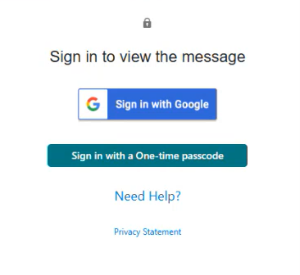
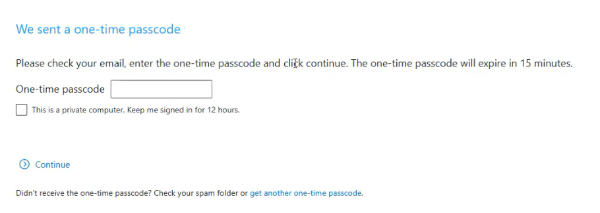
Please ensure to check the SPAM folder for the OTP option as it will expire in 15 minutes. Enter the OTP in the secure message
portal.
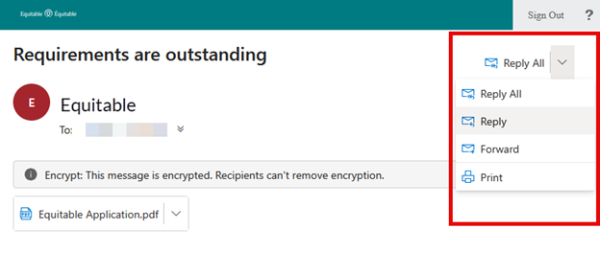
Emails are sent in both English and French, with automatic translation based on browser settings. Recipients must click the view button to access the message in the secure web portal where they can see the encrypted attachment.
Make sure to click Reply in the top right corner of the encrypted message to keep communications within the secure portal.
For more information or assistance, please contact your Director, Investment Sales.
Date posted: May 22, 2025