

Site Search
458 results for browse website now PROBLEMGO.COM pay a corrupt lawyer to dismiss case Varna
-
New secure encryption process for outstanding Equitable S&R business requirements
The Equitable® Savings and Retirement Operations team is improving how they send secure email messages to advisors. These emails are sent when there are outstanding requirements for an application or missing information for requests.
Previously, advisors had to manually password protect or unlock PDF documents. This caused delays and difficulties for recipients. The new encryption process will remove that confusion and make it easier for advisors to send and receive secure, encrypted messages.
Advisors will now receive secure, encrypted emails from the QA annuity operations mailbox. These emails will use an encrypt option to protect personal client information, such as attachments or requests for personal documents. Recipients will get an email with a subject line saying they have a secure private message. They will need to sign in to view the message or choose to get a one-time passcode (OTP).
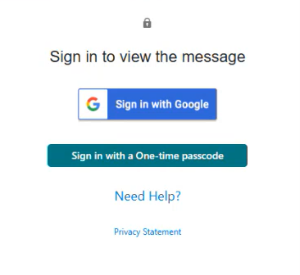
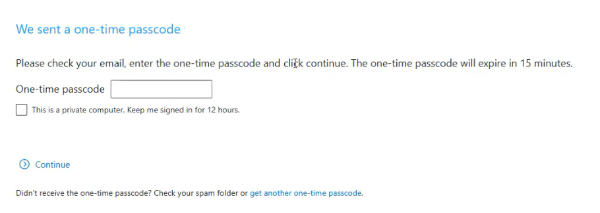
Please ensure to check the SPAM folder for the OTP option as it will expire in 15 minutes. Enter the OTP in the secure message
portal.
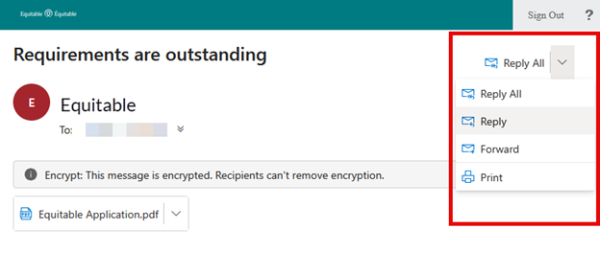
Emails are sent in both English and French, with automatic translation based on browser settings. Recipients must click the view button to access the message in the secure web portal where they can see the encrypted attachment.
Make sure to click Reply in the top right corner of the encrypted message to keep communications within the secure portal.
For more information or assistance, please contact your Director, Investment Sales.
Date posted: May 22, 2025 -
Sharpen your skills with Equitable’s Path to Invest summer learning modules
Want to stay ahead, bring more value to clients, and earn Continuing Education (CE) credits?
Equitable® now offers new online summer modules to help you grow your financial knowledge. These self-paced Path to Invest modules are available on our ON24 platform. You can learn on your own schedule and earn CE credits with ease.
Whether you want to boost your investment skills or have better client conversations, these courses are here to support your growth.
The first module, Index Investing, explores the basics of index investing, how it compares to active management, and how using indexes can help diversify client portfolios.
The second module, Saving for a Home with Equitable, equips you with strategies and tools to guide clients through the homebuying journey, including insights on savings vehicles, intergenerational wealth transfers, and mortgage planning.
Each course is approved by the Alberta Insurance Council and the Insurance Council of Manitoba. You will earn 1 CE credit for each course after passing the quiz.
Start learning today! Visit our Learning Centre to begin.
If you have any questions, reach out to your Director, Investment Sales. When we work together, success is mutual.
Continuing Education Credits
To be eligible for CE credits, you must register individually, watch the webcast in full and complete a short quiz. These webcasts are available in English only. It is the advisor's responsibility to ensure Continuing Education credits being offered are accepted by the licensing body. Alberta Insurance Council (AIC) credits are valid in Yukon, British Columbia, Alberta, Saskatchewan, Ontario, New Brunswick, Prince Edward Island and Nova Scotia. Insurance Council of Manitoba (ICM) credits are valid in Manitoba only.
Date posted: July 17, 2025 -
The top individual insurance marketing materials!
In 2025 there were five marketing pieces that advisors turned to most. If you haven’t seen them yet, now’s your chance to catch up. We want to help you connect with clients. These materials help make important topics easy to explain.
Top five individual insurance marketing materials:
1. 1024 Guide to individual underwriting. This guide shows how medical and non-medical conditions can affect insurance approvals.
2. 1038 Understanding participating whole life. Explains Equimax® participating whole life insurance. It also discusses the Participating Account, how dividends are calculated, and how they can impact a policy.
3. 1343 Evidence of insurability. Includes a chart showing the underwriting rules for life insurance products.
4. 1530 Temporary resident underwriting guidelines. This is a list of the documents temporary residents need when applying for individual insurance.
5. 1505 Dividend scale interest rate 30-year historical performance. This chart shows Equitable’s dividend scale interest rate history. It also compares our dividend scale rate to other major economic indicators.
For a list of all our marketing pieces visit our marketing materials page on EquiNet.
Have further questions? Your Equitable Wholesaler is here to help! -
International Women’s Day
Reflecting on inclusion in our industry
International Women’s Day is a great opportunity to pause and think about how we support the women clients we serve. In wealth management, inclusion is not just a theme for one day a year — it plays a critical role in building stronger relationships and long‑term business growth.
Our recent Master Class – From Insight to Inclusion: Engaging Women Investors with Confidence –reinforced this.The 60-minute session, featuring Susan Silma, Client Experience Transformation Leader and industry speaker and columnist, looked at why many women still feel under‑served in our industry and what advisors can do to create a more engaging and supportive experience.
Here are a few key takeaways from the conversation:• Inclusion strengthens your practice. When women feel heard and understood, trust grows —and so does loyalty.• Start with better conversations. Susan shared ways to turn research and insights into everyday discussions that feel relevant and meaningful to women.• Consistency builds confidence. A clear, repeatable process for prospecting, onboarding and reviewing plans with women clients helps ensure they feel included from day one.
Did you know: 82% of advisors who attended the live Master Class identified the need to add more women clients to their business.
As we celebrate International Women’s Day, it is a good reminder that creating a space where women feel comfortable, informed and valued benefits everyone — and positions your practice for long‑term success.
If you missed the session — or would like to revisit the ideas — the Master Class recording is now available on demand. On behalf of everyone at Equitable, Happy International Women’s Day, Canada!
.png?lang=en-US "InternationalWomensDay-eblast-no-logoENG.png")
Date posted: Thursday, March 5, 2026 -
EZtransact enhancements: New “Internal Transfer” and “Other Institution” options
At Equitable®, we’re always looking for ways to make it easier to support clients. That’s why we’re excited to share new enhancements in EZtransact® that give you more flexibility and simplify transfer processes.
What’s new
As of January 22, EZtransact now offers:
• Internal Transfers that streamline digital movement of investments between eligible client accounts within Individual Wealth.
• An “Other Institution” option when you’re initiating an external transfer. This means you can request transfers from financial institutions that are not listed in our existing dropdown menu.
These enhancements remove the need for manual workarounds and help ensure transfers are captured clearly and accurately the first time.
These updates support:
• Advisors working with Individual Wealth clients
• Clients who need to move investments either within Equitable or from another financial institution
To transfer funds between existing Equitable contracts, simply go to EZtransact, select Make a Transfer on the policy you want to receive the funds, and view your client’s existing contracts all in one place.
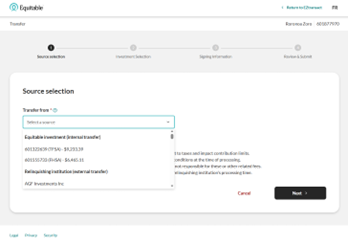
Use the new “Other Institution” option to start transfers from any financial institution, even if it’s not part of the standard list.
You’ll see these enhancements in the “Make a Transfer” flow within EZtransact on EquiNet®. It appears right at the point where you select the financial institution for the transfer.
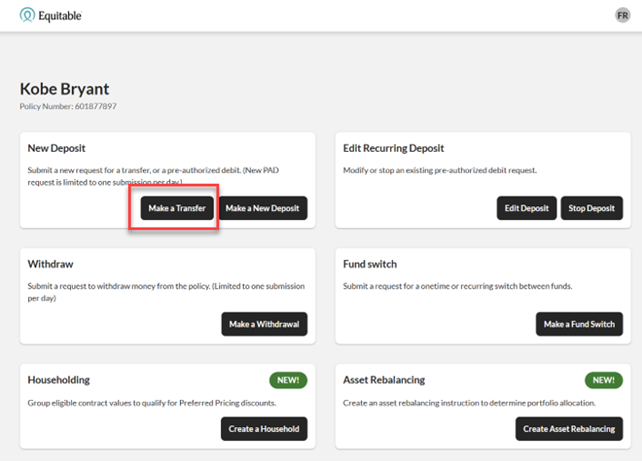
These updates are designed to:
• Give you more flexibility when managing external transfers
• Remove the need for manual steps or workaround solutions
• Help reduce errors that can happen during manual processing
• Improve efficiency for you and deliver a smoother experience for clients
You asked, and we listened! Keep providing us with your feedback on our digital tools. When we grow together, success is mutual. Get to know EZtransact! If you have any questions, please contact your Director, Investment Sales.
Date posted: April 1, 2026 -
Redefining Trust in Financial Advice: AI and Mental Health
Discover how AI is shaping client relationships, mental health and the advisor’s role.
Join our April Master Class, “Redefining Trust in Financial Advice: AI and Mental Health.” As artificial intelligence (AI) becomes more common in financial services, advisors are facing a new reality. Advanced technology now sits alongside very human needs. Clients want more than speed and smart tools. They want advice built on trust, empathy and understanding.
In this session, we’ll explore:
• How AI is changing the advisor client relationship and what that means for trust.
• The link between money, mental health and client decision making.
• Practical ways advisors can use technology while staying empathetic and ethical.
Why attend?
• Build stronger trust and confidence in client conversations as AI plays a bigger role.
• Better support clients dealing with financial stress and emotional uncertainty.
• Learn practical strategies you can use right away without losing the human touch.
Join Joseph Trozzo, Vice President, National Investment Sales at Equitable, in conversation with Gabrielle Provencher, M.Sc., R.S.W., R.M.F.T. (AMHP), Director, Enhanced Mental Health Care & Workplace Support, Homewood Health.
Don’t miss this opportunity.
Learn more
- Path to Success Module 1
-
Total Cost Conversation — Navigating Client Relationship Model Phase 3 (CRM3) with clients
Discover how to navigate CRM3 conversations to build trust, clarity and stronger client relationships.
Join our May Master Class, featuring Invesco Global Consulting’s Program “Total Cost Conversation — Navigating Client Relationship Model Phase 3 (CRM3) with clients.”
Total Cost Reporting with CRM3 will become mandatory on client statements in January 2027 and now is the right time to start the conversation. This session will help you speak clearly and confidently with clients about what’s changing, using language that builds trust and understanding.
In this session, Invesco will explore:- What to say about CRM3 and how to explain it in a way clients understand.
- How trust differs across generations, including Boomers, Gen X and Millennials.
- How to clearly communicate and reinforce your value to clients.
- Learn practical ways to build trust and confidence when discussing CRM3 with clients.
- Support client conversations with greater transparency and clarity.
- Gain access to a research‑based script to open discussions about Total Cost Reporting.
Learn more -
March 2026 eNews
In this issue:
Equitable is adding nutrition app to all group benefits plans*
Coming soon: One-time passcodes will be added to account login process*
Standardized CLHIA disability form is now part of our disability claims submission package*
Reminder: Review manual allocations for HCSAs and/or TSAs*
Protecting clients’ plans from benefits fraud*
*Indicates content that will be shared with your clients.
Equitable is adding nutrition app to all group benefits plans
Equitable is making healthy eating easier and more accessible for all group benefits plan members. Beginning in April, access to the RxFood mobile app will be added to every Equitable group benefits plan—at no extra cost.
This will put personalized nutrition insights, practical tips and tailored recommendations at every plan member’s fingertips—helping them make more informed food choices that can either help prevent or manage chronic conditions, such as diabetes, high cholesterol and heart disease.
What is RxFood?
RxFood is Canada’s first clinically validated nutrition platform that’s used and trusted by leading health care institutions across the country, including SickKids Hospital, Diabetes Canada, Children’s Hospital of Eastern Ontario (CHEO) and more, to support better health outcomes through nutrition.
While we can track many aspects of our daily health—steps, heart rate, sleep, and blood sugar—food is often overlooked. RxFood helps close that gap by using technology that’s powered by artificial intelligence (AI) to turn everyday meals into meaningful health insights.
How it works
A plan member takes photos of their meals with their smartphone. RxFood will analyze what's on their plate, from nutritional quality to portion sizes, then provide personalized feedback, easy-to-follow suggestions and recipes with ingredient options tailored to their budget.
After a few days of logging, they’ll receive a comprehensive nutrition summary showing how their eating patterns align with their personal health goals, and where to go from there.
Check out the following video to learn more about RxFood— and how Equitable is putting the power to eat healthy in the hands of plan members.

Coming soon: One-time passcodes will be added to account login process
This spring, Equitable will launch a new multi-factor authentication (MFA) security measure to further enhance our digital security. When our new feature takes effect, anyone logging in to EquitableHealth.ca® and the Equitable EZClaim® mobile app with an email address and password may be required to enter a one-time passcode they receive via email. This will further safeguard their account access and personal data.
Keep it simple – create a passkey
If you don’t want to enter a one-time passcode when logging into your account, you can skip this extra step all together by creating a passkey on your mobile device or computer.
Passkeys are safe and provide a quicker, easier way to log in while also enhancing account security. They use either biometrics–your face or fingerprint–or a PIN authenticator to confirm your identity.
If you create and use a passkey to log in, you won’t need to enter a one-time passcode.
Learn more about passkeys. The set-up process is simple. The two videos below guide you through creating a passkey on both your mobile device and computer.
Client and plan member communications
We will share this information with clients and group benefits plan members before we introduce our new security measure. Please reach out to your Group Account Executive if you have any questions.

 If you use the same email address to log in to your accounts on EquitableHealth.ca, EquiNet® and Equitable Client Access®, you can use the same passkey. Equitable Client Access is our secure site for Individual Insurance and Individual Wealth clients.
Standardized CLHIA disability form is now part of our disability claims submission packageClients with employees who are submitting short-term or long-term disability claims should be aware that we’ve changed one of the required forms in our disability claim submission package.
The Canadian Life and Health Insurance Association’s (CLHIA) Initial Disability Insurance Medical Statement has replaced our Attending Physician’s Statement (APS) form.
Our disability claim application packages on Equitable.ca and EquitableHealth.ca now include the CLHIA standardized form instead of our APS form. Our old form is no longer available on our websites.
We will continue accepting our previous APS form for initiating disability claims for now. However, we’re encouraging clients to begin using the standardized form as soon as possible. Using a standardized form for disability claims across the group insurance industry helps reduce the administrative burden on physicians by simplifying the disability application process.
If you have any questions, please contact your Group Account Executive.
Reminder: Review manual allocations for HCSAs and/or TSAs
If your client’s Health Care Spending Account (HCSA) and/or Taxable Spending Account (TSA) has manual allocations, they need to allocate these amounts to plan members each year.
Plan administrators can update these amounts on EquitableHealth.ca. Here are the steps:- Select View certificate
- Select Health Care Spending Account or Taxable Spending Account
- Select Update Allocation in Task Center
- Enter amount in Revised Allocation Amount
- Override Reason – Plan Administrator Request
- Select Save
- Select Reports
- Select New
- Select Next
- Select HCSA or TSA Totals by Plan Member
- Select Next
- Enter end date of 12/31/2026
- Select Next
- Select Finish
- View Report
Protecting clients’ plans from benefits fraud
March is Fraud Prevention month – the perfect time for clients to educate their plan members on the consequences of benefits fraud.
According to the Canadian Life and Health Insurance Association (CLHIA), benefits fraud costs millions each year and can contribute to higher premiums for plan sponsors.
These resources can help clients and plan members prevent benefits fraud:- CLHIA’s free 15-minute Protect Your Benefits online course for plan administrators and their members
- CLHIA’s Fraud is Fraud program, including their FAQs on benefits fraud
- CLHIA's 10 tips to 'Protect your benefits' for plan members
How we protect against benefits fraud
Our Investigative Claims Unit (ICU) uses a range of techniques, including CLHIA‑led tools, to detect and prevent benefits fraud:- Joint Provider Fraud Investigation Program: Allows insurers to collaborate on fraud investigations that affect multiple insurers.
- Data Pooling Program: Pools data between insurers and uses advanced artificial intelligence (AI) to further identify and reduce benefits fraud.
- Provider Alert Registry: Allows insurers to view the results of other insurers’ anti-fraud investigations into specific practitioners.
To learn more, contact your Group Account Executive.