

Site Search
484 results for see portal PROBLEMGO.com hire someone to make false child abuse accusations
- [pdf] myFlex Options Overview
-
Equitable Life Group Benefits Bulletin – November 2021
In this issue:
- Deadline to opt out of New Brunswick biosimilar program*
- Web Reports Quick Reference Guide now available for plan administrators*
- Reminder: Review manual allocations for HCSAs and/or TSAs*
- Help your clients take advantage of our convenient digital options*
Reminder: Deadline to opt out of New Brunswick biosimilar program*
Earlier this year, we announced via eNews that on Feb. 1, 2022, we are ending coverage for some originator biologic drugs in New Brunswick in response to the province’s Biosimilar Initiative.* These changes will help protect your clients’ plans from additional drug costs while still providing access to equally safe and effective biosimilars.
Do my clients need to take any action?
No action is required if employers want to have the originator biologics excluded from their plan. Plan members taking these targeted originator biologics will be contacted directly to allow them ample time to transition to the biosimilar. Any cost savings associated with the change will be factored in at renewal.
All groups, except myFlex clients, who wish to opt out of this change and maintain coverage of these originator biologics for existing claimants in New Brunswick can submit a policy amendment. Amendments must be submitted no later than Nov. 30, 2021.
Advisors with myFlex Benefits clients who wish to maintain coverage of these originator biologics for New Brunswick plan members should speak to their myFlex Sales Manager to confirm their eligibility to opt out of this change.
Groups that opt out of this change are also opting out of any future changes to our New Brunswick biosimilar initiative. This means that their drug plans will continue to cover any additional originator biologics for which we subsequently end coverage as part of the biosimilar program.
Questions?
If you have a question that isn’t answered here, please contact your Equitable Life Group Account Executive or myFlex Sales Manager.
* The list of affected drugs or conditions is dynamic and may change.Web Reports Quick Reference Guide now available for plan administrators
A Web Reports Quick Reference Guide is now available for plan administrators on EquitableHealth.ca. This new guide offers a listing of our newest reports available on the plan administrator web. It also provides instructions for plan administrators outlining how to pull the report using the plan administrator portal.
The guide is available under the Quick Links section on both the advisor and plan administrator portals on EquitableHealth.ca.Reminder: Review manual allocations for HCSAs and/or TSAs*
If your client’s Health Care Spending Account (HCSA) and/or Taxable Spending Account (TSA) has manual allocations, they need to allocate these amounts to plan members each year. Please review all your plan members’ profiles on EquitableHealth.ca to ensure they have received their allocation(s) for the current benefit year.
If your clients have Plan Administrator update access on EquitableHealth.ca, they can update these amounts online by doing the following:- Select “View certificate”
- Select “Health Care Spending Account” or “Taxable Spending Account”
- Select “Update Allocation” in Task Center
- Enter amount in “Revised Allocation Amount”
- Override Reason – “Plan Administrator Request”
- Select “Save”
- Select “Reports”
- Select “New”
- Select “Next”
- Select “HCSA” or “TSA Totals by Plan Member”
- Select “Next”
- Enter end date of “12/31/2020”
- Select “Next”
- Select “Finish”
- View “Report”
Help your clients take advantage of our convenient digital options*
We have several digital options available to make it easier for your clients to do business with us and for their plan members to access and use their benefits plan. Over 71% of plan administrators are managing their plan online and 78% of plan members are already using our digital tools.
For plan administrators:- Online Plan Member Enrolment tool – allows all groups to add new plan members without the need for paper forms
- Plan Administrator Portal (EquitableHealth.ca) – plan administrators can easily manage their plan anytime and anywhere
- Digital Welcome Kits – personalized welcome kits are delivered to plan members via email
- Easy automated payments – plan administrators can avoid missed payments by setting up pre-authorized debit or electronic funds transfer
- Plan Member Portal (EquitableHealth.ca) – plan members get secure, 24/7 access to their claims history, coverage details and health and wellness resources
- Electronic Claim Payments and Notifications – plan members can get claim updates sooner in their email inbox and payments right into their bank account
- EZClaim Mobile App – submitting claims from a mobile device is fast, easy and secure
- Digital Benefits Cards – plan members no longer have to dig through their wallet – they can download their benefits card on their mobile device
We’ve created a brochure and a video guide to help plan members access and use their digital resources. For further assistance, plan members can visit www.equitable.ca/go/digital. They can also contact our Web Services team at 1.800.265.4556 ext. 283 or groupbenefitsadmin@equitable.ca. - [pdf] Payout Annuity Application
-
Meghan Vallis named head of distribution for myFlex Benefits and other group benefits updates
Meghan Vallis named head of distribution for myFlex Benefits
We are pleased to announce that Meghan Vallis, our Group Sales Vice President for Western Canada, will head national distribution for myFlex Benefits in addition to her existing responsibilities.
As part of her expanded role, Meghan will lead the myFlex Benefits sales team and develop and implement strategies to achieve the growth of this offering. Meghan and the myFlex team will continue to focus on delivering market leading services for our clients and advisors.
Meghan joined Equitable Life in 2020 and brings more than 15 years of experience in the group benefits industry to her expanded role. She is passionate about helping Advisors succeed to transform their clients' employee benefit experience.
myFlex Benefits is one of the most unique and versatile benefits solutions for small businesses in Canada. It is fully pooled, includes a two-year renewal and features a user-friendly portal for plan members to make their benefit selections. And it’s simple to use: Plan sponsors set a budget and choose from a selection of benefit options. Plan members then use flex dollars to select from the options offered by their employer. Any leftover flex dollars are saved in a health care spending account (HCSA).
If you have any questions or are interested in learning more about myFlex Benefits, please contact your Group Account Executive or myFlex Sales Manager.Changes to Short Term Disability (STD) benefit calculations for 2023*
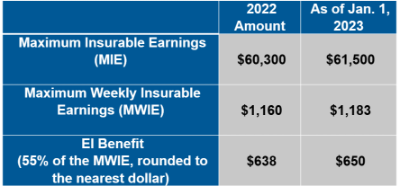
The Canada Employment Insurance Commission and Canada Revenue Agency have announced the 2023 changes to Maximum Insurable Earnings and premiums for employment insurance.
The following changes to Employment Insurance (EI) will come into effect on Jan. 1, 2023:
How does this affect your clients?
Your clients’ STD benefit will be revised with the updated maximums based on the percentage of EI Maximum Weekly Insurable Earnings shown in their policy if:- Their Equitable Life Group Policy includes an STD benefit that is tied to the EI Maximum Weekly Insurable Earnings, and
- At least one classification of employees has a maximum of less than $650.
If their STD maximum is currently higher than $650 or based on a flat amount instead of a percentage or regular earnings, no change will be made to their plan unless otherwise directed.
If your clients wish to provide direction regarding revising their STD maximum, or if they have questions about the process, they can email Kari Gough, Manager, Group Issue and Special Projects.Coming soon: Survey for Plan Administrators with recent disability claims*
We’ve enhanced our communication processes to help your clients with disability plans manage their workplace absences more effectively. In early December, we will distribute a short survey to plan administrators who may have submitted an approved disability claim in the past six months. The survey will ask recipients about their satisfaction with the frequency and detail of our disability management communications.
The email will come from GBClientFeedback@equitable.ca, and the survey will remain open until the end of the day on December 16, 2022. All responses will be confidential. We plan to use the feedback to help ensure that we’re meeting your clients’ expectations and delivering industry-leading service.
We may also follow up with survey respondents directly, to address any concerns they’ve identified.
* Indicates content that will be shared with your clients. - [pdf] Intergenerational Wealth Transfer Strategy Case Study - Transferring wealth to an adult child
- Benefits and Key features
-
EZtransact enhancements: New “Internal Transfer” and “Other Institution” options
At Equitable®, we’re always looking for ways to make it easier to support clients. That’s why we’re excited to share new enhancements in EZtransact® that give you more flexibility and simplify transfer processes.
What’s new
As of January 22, EZtransact now offers:
• Internal Transfers that streamline digital movement of investments between eligible client accounts within Individual Wealth.
• An “Other Institution” option when you’re initiating an external transfer. This means you can request transfers from financial institutions that are not listed in our existing dropdown menu.
These enhancements remove the need for manual workarounds and help ensure transfers are captured clearly and accurately the first time.
These updates support:
• Advisors working with Individual Wealth clients
• Clients who need to move investments either within Equitable or from another financial institution
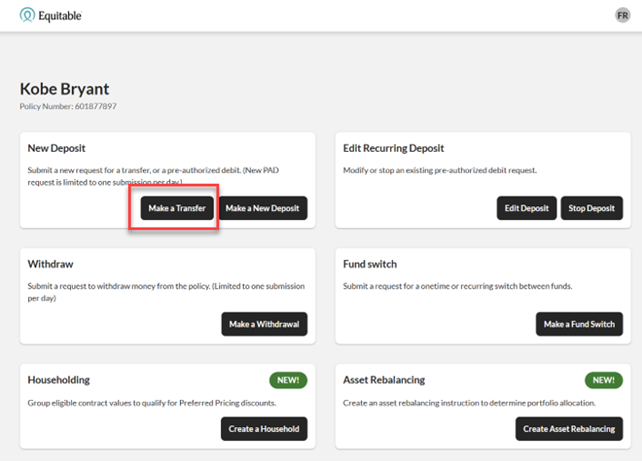
To transfer funds between existing Equitable contracts, simply go to EZtransact, select Make a Transfer on the policy you want to receive the funds, and view your client’s existing contracts all in one place.
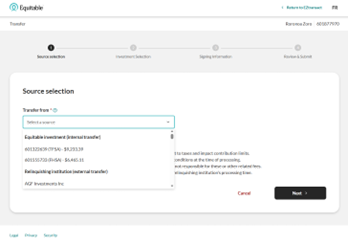
Use the new “Other Institution” option to start transfers from any financial institution, even if it’s not part of the standard list.
You’ll see these enhancements in the “Make a Transfer” flow within EZtransact on EquiNet®. It appears right at the point where you select the financial institution for the transfer.
These updates are designed to:
• Give you more flexibility when managing external transfers
• Remove the need for manual steps or workaround solutions
• Help reduce errors that can happen during manual processing
• Improve efficiency for you and deliver a smoother experience for clients
You asked, and we listened! Keep providing us with your feedback on our digital tools. When we grow together, success is mutual. Get to know EZtransact! If you have any questions, please contact your Director, Investment Sales.
Date posted: April 1, 2026 - [pdf] Pivotal Select Application - Registered/Non-Registered
- [pdf] Daily/Guaranteed Interest Account Application - Registered/Non-Registered
- [pdf] Equitable GIF Contract Provisions and Information Folder