

Site Search
647 results for view web MAKEMUR.com Need to get my boyfriend out of lockup tonight cash in hand
- Give the Gift of a Head Start
- [pdf] Daily/Guaranteed Interest Account Application - TFSA
- Instructions
- Critical Illness Path to Success Program Instructions
-
Transaction Authorization Requirements table for Savings & Retirement advisors
Equitable Life® is here to help. When it comes to getting certain transactions authorized in a non face-to-face environment, you might need some direction. We’ve got you covered.
Equitable has created a quick reference table on EquiNet™. The Transaction Authorization Requirements table provides details on how to get certain forms approved and the best way to get them to us. Each form listed gives the authorization type that is accepted. We’ve also provided details when we receive a document that is considered not-in-good-order.
As we navigate through COVID-19, we will continue to update this table. This means you have the most current information available at your fingertips, 24/7.
Have other questions about COVID-19? Check out our Savings & Retirement COVID-19 update page on EquiNet as well. This page provides the latest news and information for Savings & Retirement advisors.
Still have a question? Give our Advisor Services team a call Monday to Friday 8:30 a.m. – 7:30 p.m. ET at 1.866.884.7427 or email savingsretirement@equitable.ca, or your local Regional Investment Sales Manager.
- Web Illustrations
-
EZtransact enhancements: New “Internal Transfer” and “Other Institution” options
At Equitable®, we’re always looking for ways to make it easier to support clients. That’s why we’re excited to share new enhancements in EZtransact® that give you more flexibility and simplify transfer processes.
What’s new
As of January 22, EZtransact now offers:
• Internal Transfers that streamline digital movement of investments between eligible client accounts within Individual Wealth.
• An “Other Institution” option when you’re initiating an external transfer. This means you can request transfers from financial institutions that are not listed in our existing dropdown menu.
These enhancements remove the need for manual workarounds and help ensure transfers are captured clearly and accurately the first time.
These updates support:
• Advisors working with Individual Wealth clients
• Clients who need to move investments either within Equitable or from another financial institution
To transfer funds between existing Equitable contracts, simply go to EZtransact, select Make a Transfer on the policy you want to receive the funds, and view your client’s existing contracts all in one place.
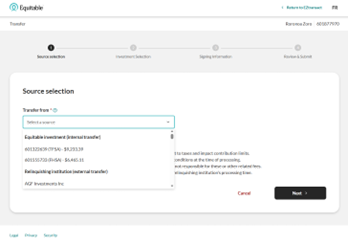
Use the new “Other Institution” option to start transfers from any financial institution, even if it’s not part of the standard list.
You’ll see these enhancements in the “Make a Transfer” flow within EZtransact on EquiNet®. It appears right at the point where you select the financial institution for the transfer.
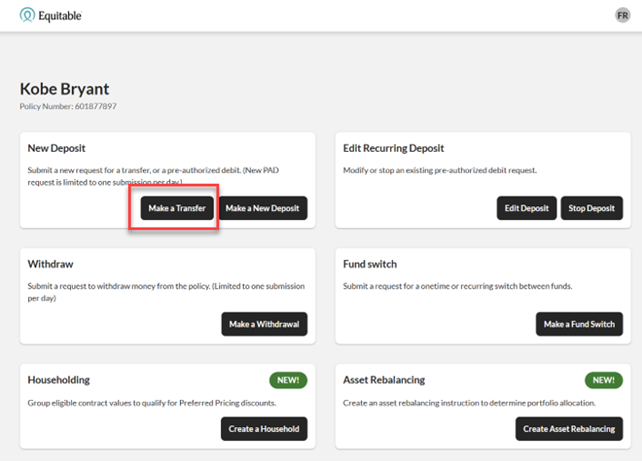
These updates are designed to:
• Give you more flexibility when managing external transfers
• Remove the need for manual steps or workaround solutions
• Help reduce errors that can happen during manual processing
• Improve efficiency for you and deliver a smoother experience for clients
You asked, and we listened! Keep providing us with your feedback on our digital tools. When we grow together, success is mutual. Get to know EZtransact! If you have any questions, please contact your Director, Investment Sales.
Date posted: April 1, 2026 - [pdf] Pivotal Select Application - FHSA
- [pdf] A Unique Approach to Managing Disability