

Site Search
512 results for enter website fast MAKEMUR.com how much to bribe a customs officer to clear my cargo
- [pdf] UL Chargeback changes FAQ
- New Applications & Transaction Authorization Requirements
- [pdf] EZtransact FAQ
- [pdf] Excelerator deposit option Q&A
- [pdf] Invest with Equitable
- Brandes
- [pdf] Guide to MGA contracting
-
Smarter saving with GIA Laddering
Want to show clients how to grow their savings in smart ways? Try Guaranteed Interest Account (GIA) laddering—a simple strategy that helps clients earn more interest and stay flexible.
How does it work?
Instead of a client putting all their money into one-year GIAs, laddering means splitting the money into different GIAs with different end dates. This way clients can:
• Earn better interest rates.• Get access to part of their money every year.• Be ready if interest rates go up or down.Use our new calculator
Equitable’s new GIA Laddering Calculator shows clients how this strategy compares to putting all their money in one-year GIAs each year. It helps clients see which option could give them more money over time.
Contact your Director, Investment Sales to see how laddering can work for clients.
Date posted: September 15, 2025 -
Manage more details within Contract Delivery for New Business applications
We are excited to announce further enhancements to our eDelivery process to empower you, the advisor, the ability to manage client details more easily within Contract Delivery.
Effective January 15, 2022, advisors will need to create a Password within Contract Delivery when choosing “eDelivery” as the contract delivery method and provide the password to the client to use as their password:
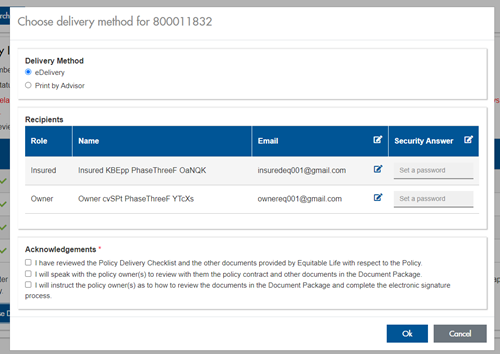
The Password must be between 4 and 100 alpha/numeric characters, and cannot be the Policy number. For multiple signers the password (and email address) must be unique per each signer.
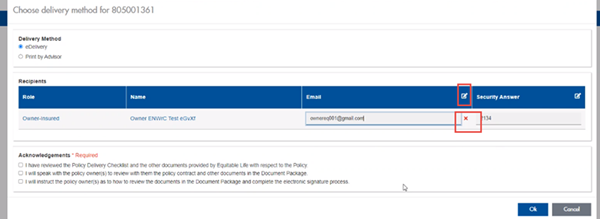
Advisors can now edit and/or update an email address within Contract Delivery, in the event of a bounce back or email change, to keep the eDelivery process moving and avoid delays in processing time. If a lock out occurs, advisors can trigger a resend of the signing email once they add a new valid email address in Contract Delivery. Simply click the pencil icon beside the Email field to enter the valid email address:
Another new feature- in the event a client has declined, the advisor will get an email from Equitable Life®. Click through to EquiNet® within the email to view the message within Contract Delivery that the client provided as the reason for decline under a new “Declined Details” section. This enables you to connect with the client to proceed with the sale by discussing the reasons for decline with them directly.
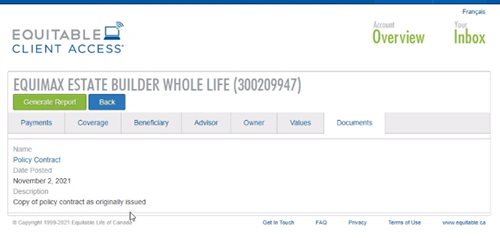
Also new for clients with this enhancement, policy owners of a policy created after January 15 will be able to see a PDF copy of their policy within client access. Note: this PDF copy is as the policy was originally issued.
Resources: - Deposits using online banking