

Site Search
605 results for proceed official PROBLEMGO.COM get husband out of jail now pay later
-
Updates to Guaranteed Interest Account Applications
New versions of the Guaranteed Interest Account (GIA) contract/applications will be available on July 20, 2024. The current versions can be used until July 19, 2024. GIA applications signed on or before July 19, 2024 must be received at Equitable® no later than July 26, 2024.
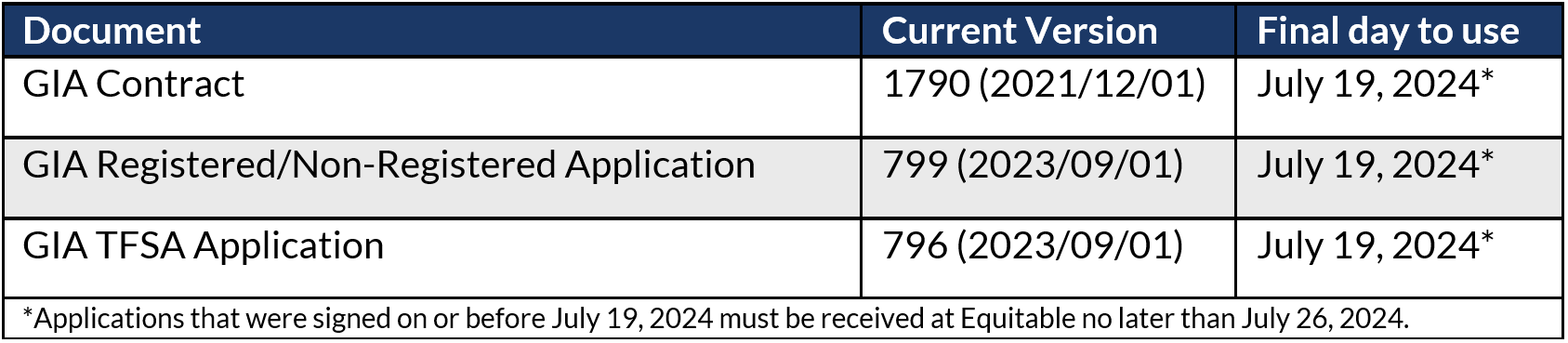
Changes will be made to the commission schedules (schedule A and B) on or around July 20, 2024. These changes include:
-
an improved layout and formatting to improve readability, and
-
decreases to the Daily Interest Account and Guaranteed Interest Account commissions.
To review the commission schedules, please login to EquiNet. Once you have logged in, you can access the commissions schedules by selecting “Contracting/Compensation” and selecting the “Compensation” option.
If you have any questions, please contact your Director, Investment Sales.
Posted July 18, 2024 -
-
New Payout Annuity Application
There is a new Payout Annuity Application that will be posted and available on October 1, 2024. The new version date is “2024/09/16”. We will continue to accept the previous version dated “2022/03/08” until October 31, 2024. As of November 1, 2024, we will no longer accept the previous version.
Some of the new notable features of the application include:• Enhanced Rate Guarantee process: Advisors should submit the signed application to Equitable® by no later than 11:59 pm (EST) the day after the application is signed to lock in the interest rate guarantee (the rate guarantee locks in the rate on the day the signatures were completed). If the advisor misses the cut-off time, the deposit is not eligible for a rate guarantee.• Online Banking has been added as a deposit option.• A new Privacy Consent section has been added.• Updated branding, with a variety of language and formatting updates.
If you have any questions, please contact your Director, Investment Sales.
Date posted: September 25, 2024 - [pdf] B2B RSP Loan Product Brochure
-
This year’s RSP contribution deadline is March 1, 2022
Does your client want to contribute or open a new policy this Retirement Savings Plan (RSP) season? Whether using paper or our recent EZtransact online platform, here are some important things to remember.
Issuing New Policy with EZcomplete®
-
All online applications must be digitally signed and submitted and have a date stamp no later than March 1, 2022.
Issuing New Policy using Paper Application-
For contributions to qualify for the first 60 days, all paperwork must be completed and signed by March 1, 2022. Equitable Life must receive all paperwork by March 7, 2022.
Deposits to Existing Policy
-
Advisors can setup a one-time or recurring deposit or edit an existing pre-authorized debit already in place using EZtransact. Online deposits must be made and have a date stamp by March 1, 2022, to qualify for a 2021 tax receipt. New to EZtransact? Try our EZtransact Practice Site to see how EZ it is to use.
-
Clients can make online deposits to Equitable Life® through their financial institution’s online banking service. Online deposits must be made and have a date stamp by March 1, 2022, to qualify for a 2021 tax receipt.
-
Clients can also make a new deposit to an existing policy by cheque. The cheque must be dated and signed by March 1, 2022. Equitable Life must receive the cheque no later than March 7, 2022.
If online banking is being used to fund the policy – either topping up an existing policy or opening a new policy – the online banking transaction must be completed by March 1, 2022, to receive a 2021 tax receipt.
Do not miss your opportunity to have your contributions count for 2021!
Please note that cheques and other paperwork cannot be backdated. They must be completed and signed by March 1, 2022, to qualify for a 2021 tax receipt.
® denotes a trademark of The Equitable Life Insurance Company of Canada.
-
- Par Whole Life Summary
- Policy Change eDelivery
-
Application cloning option now available on EZcomplete
As of September 10th, you will now have the option to clone any Life Insurance and Critical Illness applications that is showing on the EZcomplete dashboard. “Cloning” means the information that has been completed in the existing application is duplicated in a new application.
This feature is meant for situations where multiple applications are being completed and at least one of the parties (the policy owner or insured person) is the same. For example, a single policy owner might own policies on the lives of each of their children. Cloning the application will save re-typing the information about the policy owner into each application.
Please note the following important details regarding cloning:
- Cloning the application will duplicate all information that has been completed in the existing application into the new application.
- In the family situation described above, the information about the policy owner should be completed in the original application. The application should then be cloned before entering any information about the insured person, as there will be a different insured person for the new application.
- Cloning applications can be convenient, but it carries risk. It is imperative that the advisor review every section of the new cloned application to ensure that the information is meant to apply to the new application. If an advisor incorrectly includes information about an individual in the new application, this could give risk to a privacy breach or to liability for the advisor if the questions are answered incorrectly for that individual.
- If the application was submitted and is no longer on the dashboard you will not have the option to clone it.
- You will not be able to change the product type on a cloned application so if you need to select a different product, you will need to start a new application.
- Any documents that were attached to the previous application will not be cloned. The documentation will need to be attached again if required.
- All information from an existing application will be duplicated to the cloned app up to the Signatures step (step 8). Signatures/advisor report will need to be obtained and completed again on the new cloned application.
Resources
Please contact your Regional Sales Manager for more information
- [pdf] Introducing Equitable
-
COVID-19 testing: Find the information you need
This news item has also been posted to the plan administrator and plan member sections of EquitableHealth.ca
The Ontario government recently announced it has expanded access to COVID-19 testing to include select pharmacies throughout the province. As the pandemic continues, it’s important to know how to access testing if you’re experiencing signs and symptoms of COVID-19 or suspect you have been exposed to the virus.
Guidelines for who should get tested and how to access testing vary across the country, so it can be difficult to know what applies in your jurisdiction.
To help make it easier, we’ve provided links to COVID-19 testing resources for each province and territory. The resources include self assessments, guidelines for who should get tested, how to access testing, and testing locations.
- Product at a glance