

Site Search
312 results for enter portal now PROBLEMGO.COM hire cops to arrest someone
-
WFG KYC and Trade Ticket documents are now part of EZcomplete
Equitable Life® wants to help you get on with your day. Effective June 11, 2022, WFG’s KYC* and Trade Ticket documents will be integrated into the highly rated EZcomplete® online application tool. This means no more completing these documents separately and uploading them to EZcomplete.
By integrating the KYC and Trade Ticket with EZcomplete:-
these documents will automatically populate with information collected in the EZcomplete process,
-
necessary signatures will be captured, and
-
these documents will be sent to WFG’s back office on your behalf.
Once the application has been submitted, signed documents will be available for advisors, clients, and joint clients to download. It is that easy.
Get on with your day with Equitable Life. Log in to EZcomplete today.
Speak to your Regional Investment Sales Manager to learn more.
* KYCs on corporately owned policies are not currently supported
® denotes a trademark of The Equitable Life Insurance Company of Canada. -
-
Backdating of insurance applications – New rule now in effect
Great news! We are making it even easier for you to do business with Equitable Life®. We now allow backdating of life insurance applications by up to 364 days. Previously, the maximum backdating period was six (6) months.
Backdating can result in lower total premiums for the client over the life of a policy based on their younger age at time of application. But clients must pay all the premiums due for the backdated period up front. Thus, backdating is only beneficial when the total premium savings over the life of the policy are greater than the premium due for the backdated period.
To request backdating beyond six (6) months (up to 364 days)
No special approval is needed. Simply add a note to the Advisor Sheet requesting backdating or contact us at any time prior to policy issue. This step is only necessary when backdating beyond six (6) months as the application will automatically prompt to save age within the 6-month period.
Note: The maximum backdating period for critical illness (CI) applications remains unchanged at three (3) months.
Questions? Please contact your Equitable Life Regional Sales Manager for more information.
- [pdf] A Retirement Savings Plan is just as relevant now as it was over 60 years ago
-
Simplified Alternative ID Process is Now Available
We have updated form 1710 to help you validate your client’s identification when you are not face-to-face, or if your client does not have one of the primary sources of ID.
Form 1710, Verification of Identity for Policyowner, will simplify the ID collection process currently in place. This form will help you with the validation of ID and provide you with space to record the details. New with this form is the ability to validate your client’s ID over a video call by documenting the details of the ID, and then having your client hold up the document and read the information for you to validate. You no longer need to obtain and submit copies of the identification documents to Equitable.
If your client requests the use of the Alternate ID process for a paper application, you can use this form to satisfy your identification validation requirements.
For more information, please see Section 2 of Form 1710 entitled “Alternate ID”. As well, you can refer to the “how to complete form 1710” Guide for further details.
Additional resources:
-
Guides for completing Individual Insurance forms now on EquiNet
We have recently added guides to provide detailed instructions on how to fill out forms on EquiNet. You can find them on the Individual Forms page, directly underneath the applicable form. In the coming weeks, we will be adding more guides for additional forms, so make sure to check the Forms page for solutions that help you work smarter.
View our newly posted guides:- 671OC Guide (Guide to Completing an Ownership Change Form)
- 594 Guide (Guide to Completing Business Information Form)
- 1710 Guide (Guide to Completing Verification of Identity for Policy Owners)
Additional guides for the following forms will be available soon: - Login information for current advisors
-
EZcomplete Non-Face-to-Face enhancement
An EZ way to conduct your out-of-town businessYou asked for it, we built it: a solution for your non face-to-face business. EZcomplete® allows you to conduct your non face-to-face business easily and quickly with your clients providing their signature remotely on their own device.
How does it work?
EZcomplete walks you through the electronic signature process. EZcomplete allows your clients to sign remotely using their own device for non-face-to-face applications. You only need to enter their email address and provide them with a secret passcode to securely access the documents to review and sign.
Just another reason to do business with Equitable Life®
EZcomplete makes it easy to process your non-face-to-face applications and do business with Equitable Life.
Login to EquiNet® and click on the EZcomplete icon on the menu bar
® denotes a trademark of The Equitable Life Insurance Company of Canada.
-
The Equitable Gives Back Contest – Start spreading the word!
Equitable Life of Canada is celebrating our 100th Anniversary in 2020, and we’re busy planning a year of events and activities so we can celebrate this significant milestone with our employees, clients, wholesalers and advisors across Canada.
A big part of who we are as a company is our commitment to help strengthen the communities where we operate by supporting a variety of charitable initiatives that help to improve the quality of life for the people living there. We are proud to launch the Equitable Gives Back Contest. Our goal is to give $10,000 to five registered charities operating in Canada.
All it takes to enter is an original essay (not less than 100 words, not more than 500) describing the way in which a charitable organization could use $10,000 to help further their charitable purpose and improve life for Canadians.
Reach out to your clients, tell them about the contest, and encourage them to visit www.equitable100.ca to see if they are eligible! All entries must be submitted by March 31, 2020.
-
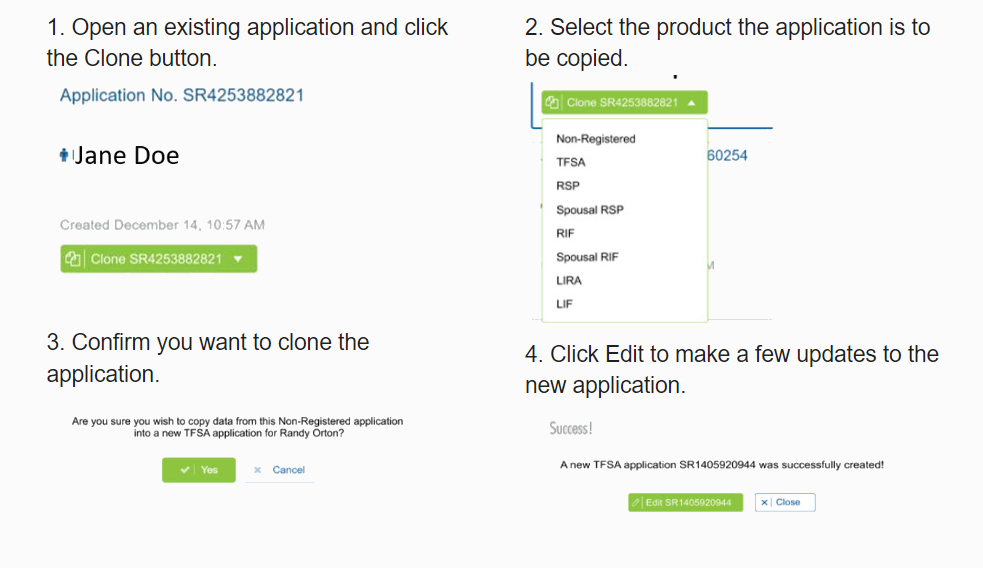
The new segregated fund EZcomplete cloning feature will save time and errors.
The new cloning feature for Savings & Retirement EZcomplete® applications means that advisors don’t need to enter the same client information when completing multiple applications for the same client.
Here's how easy it is to use.
.png "steps-(1).png")
Best of all, you can clone in progress and submitted applications.
This is just some of the information that will be automatically copied:-
Name
-
Date of birth
-
Gender
-
Occupation
-
Address
-
Phone numbers
-
Email address
-
Social Insurance Number
-
All beneficiary information
The new EZcomplete cloning feature will save advisors time and reduce errors..png?width=500&height=92 "sandbox-(3).png")
.png?width=500&height=92 "ezcomplete-(4).png")
.png?width=300&height=82 "sandboxtext-(2).png")
.png?width=300&height=39 "ezcompletetext-(1).png")
If you have any questions, contact your Regional Investment Sales Manager
® denotes a trademark of The Equitable Life Insurance Company of Canada.
Posted April 6, 2023 -
-
No printing, no scanning—just EZcomplete
EZcomplete® is your simple, digital tool for submitting applications for Equitable’s Pivotal Select™ segregated fund lineup.
How does it work?
EZcomplete® guides you step by step. Once the documents are ready for client review and signature, just enter the client’s email address and give them a secret passcode. They’ll get a secure link to review and sign the documents—no printing or scanning needed!
When can I use it?
Use EZcomplete® for both in-person and non face-to-face meetings. It works with individual, joint, or business clients. You can use it on a tablet, laptop, or desktop with internet access—whatever works best for you.
Why use EZcomplete®?
It’s fast, easy, and secure. For non face-to-face meetings, clients can sign documents remotely using their own device.
Start using EZcomplete® today and make your application process smoother than ever.
If you have any questions, feel free to reach out to your Director, Investment Sales.
Date posted: October 7, 2025