

Site Search
411 results for enter portal now PROBLEMGO.COM Buying a solution to IRS problems
-
New secure encryption process for outstanding Equitable S&R business requirements
The Equitable® Savings and Retirement Operations team is improving how they send secure email messages to advisors. These emails are sent when there are outstanding requirements for an application or missing information for requests.
Previously, advisors had to manually password protect or unlock PDF documents. This caused delays and difficulties for recipients. The new encryption process will remove that confusion and make it easier for advisors to send and receive secure, encrypted messages.
Advisors will now receive secure, encrypted emails from the QA annuity operations mailbox. These emails will use an encrypt option to protect personal client information, such as attachments or requests for personal documents. Recipients will get an email with a subject line saying they have a secure private message. They will need to sign in to view the message or choose to get a one-time passcode (OTP).
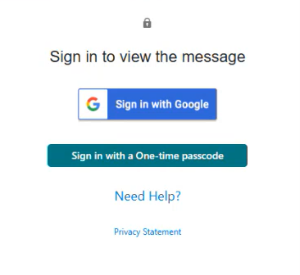
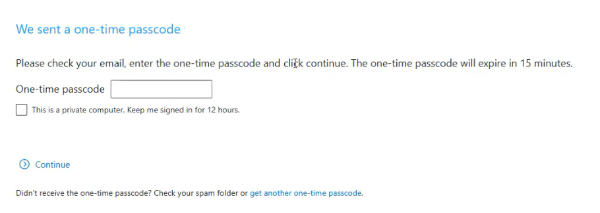
Please ensure to check the SPAM folder for the OTP option as it will expire in 15 minutes. Enter the OTP in the secure message
portal.
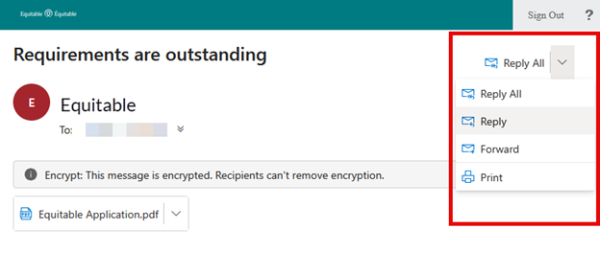
Emails are sent in both English and French, with automatic translation based on browser settings. Recipients must click the view button to access the message in the secure web portal where they can see the encrypted attachment.
Make sure to click Reply in the top right corner of the encrypted message to keep communications within the secure portal.
For more information or assistance, please contact your Director, Investment Sales.
Date posted: May 22, 2025 - Compensation Inquiry
- Sales Illustrations
-
Passkey: The fastest, safest way to log in to Client Access
We’ve upgraded the Client Access® portal to make access easier and more secure.
What’s new?
• Passkey: The easiest way to log in
Passkey is now available across all Equitable portals. With passkey, clients can log in quickly and securely using biometrics like face or fingerprint recognition, eliminating the need for passwords.
• Extra protection for email/password users
For clients who continue to use their email and password, extra security may be required. Clients may be prompted to enter a one-time passcode sent to their email, ensuring only authorized access.
What you need to know:
• Clients sign in to Client Access the same way you do on EquiNet, making it easier to support your clients.
• “Forgot email” is available to help clients recover the email they need to log in.
• Passkey setup is easy and safe. Just follow the prompts when you login. Watch the video to learn how to create a passkey. -
Changes to the Compensation Inquiry section on EquiNet
The Compensation Inquiry Section from EquiNet is only available on Microsoft Edge. Please follow the instructions below:
1. Open Microsoft Edge, click on the three dots in the top right corner and select ‘Settings’.
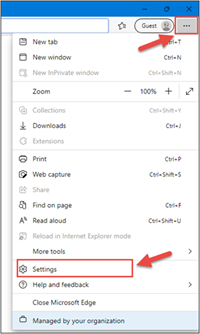
2. In the Settings menu, locate ‘Default browser’ and click on ‘Add’ in Internet Explorer mode pages.
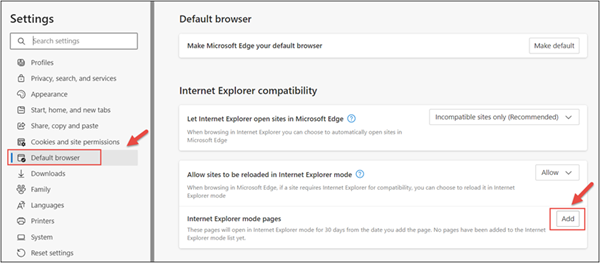
3. Enter the URL https://advisor.equitable.ca/advisor/compensationinquiry and click on ‘Add’.
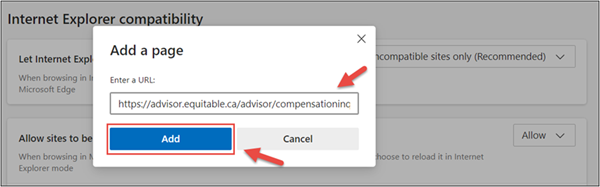
4. Login into EquiNet using Microsoft Edge and you will be able to access ‘Compensation Inquiry’.
This configuration expires in 30 days, if you want to continue accessing ‘Compensation Inquiry’ after 30 days, you will need to redo the steps above.
If you encounter problems configuring, call our support line at 1.800.722.6615 ext. 8888 -
Flexibility for a client’s ever-changing life
Term life insurance offers full and partial conversion options to meet changing needs
Life is always changing—whether a client is buying their first home, welcoming a new baby, or sending the kids off to college. While most clients think of term life insurance as a solution to meet a temporary need, they don’t necessarily consider the power of term conversion options to meet their future needs.
Full and partial conversion options can help meet a client’s needs as their life journey and insurance needs change, without having to provide proof of continued good health.
Full conversion:
• With full conversion, clients can convert all of their term coverage from their policy or rider to permanent life insurance. This allows the client to lock in a level premium rate for life.
Partial conversion:
• With a partial conversion, clients can convert a portion of their term coverage from their policy or rider to a permanent plan. This allows them to help cover off both a short-term need and also provides lifetime protection.
Did you know?
Our partial conversion with a term rider carryover is now more flexible than ever. Read more about it here!
For more information, please consult the Equitable Term Life insurance admin guide. -
Equitable Life Group Benefits Bulletin – November 2021
In this issue:
- Deadline to opt out of New Brunswick biosimilar program*
- Web Reports Quick Reference Guide now available for plan administrators*
- Reminder: Review manual allocations for HCSAs and/or TSAs*
- Help your clients take advantage of our convenient digital options*
Reminder: Deadline to opt out of New Brunswick biosimilar program*
Earlier this year, we announced via eNews that on Feb. 1, 2022, we are ending coverage for some originator biologic drugs in New Brunswick in response to the province’s Biosimilar Initiative.* These changes will help protect your clients’ plans from additional drug costs while still providing access to equally safe and effective biosimilars.
Do my clients need to take any action?
No action is required if employers want to have the originator biologics excluded from their plan. Plan members taking these targeted originator biologics will be contacted directly to allow them ample time to transition to the biosimilar. Any cost savings associated with the change will be factored in at renewal.
All groups, except myFlex clients, who wish to opt out of this change and maintain coverage of these originator biologics for existing claimants in New Brunswick can submit a policy amendment. Amendments must be submitted no later than Nov. 30, 2021.
Advisors with myFlex Benefits clients who wish to maintain coverage of these originator biologics for New Brunswick plan members should speak to their myFlex Sales Manager to confirm their eligibility to opt out of this change.
Groups that opt out of this change are also opting out of any future changes to our New Brunswick biosimilar initiative. This means that their drug plans will continue to cover any additional originator biologics for which we subsequently end coverage as part of the biosimilar program.
Questions?
If you have a question that isn’t answered here, please contact your Equitable Life Group Account Executive or myFlex Sales Manager.
* The list of affected drugs or conditions is dynamic and may change.Web Reports Quick Reference Guide now available for plan administrators
A Web Reports Quick Reference Guide is now available for plan administrators on EquitableHealth.ca. This new guide offers a listing of our newest reports available on the plan administrator web. It also provides instructions for plan administrators outlining how to pull the report using the plan administrator portal.
The guide is available under the Quick Links section on both the advisor and plan administrator portals on EquitableHealth.ca.Reminder: Review manual allocations for HCSAs and/or TSAs*
If your client’s Health Care Spending Account (HCSA) and/or Taxable Spending Account (TSA) has manual allocations, they need to allocate these amounts to plan members each year. Please review all your plan members’ profiles on EquitableHealth.ca to ensure they have received their allocation(s) for the current benefit year.
If your clients have Plan Administrator update access on EquitableHealth.ca, they can update these amounts online by doing the following:- Select “View certificate”
- Select “Health Care Spending Account” or “Taxable Spending Account”
- Select “Update Allocation” in Task Center
- Enter amount in “Revised Allocation Amount”
- Override Reason – “Plan Administrator Request”
- Select “Save”
- Select “Reports”
- Select “New”
- Select “Next”
- Select “HCSA” or “TSA Totals by Plan Member”
- Select “Next”
- Enter end date of “12/31/2020”
- Select “Next”
- Select “Finish”
- View “Report”
Help your clients take advantage of our convenient digital options*
We have several digital options available to make it easier for your clients to do business with us and for their plan members to access and use their benefits plan. Over 71% of plan administrators are managing their plan online and 78% of plan members are already using our digital tools.
For plan administrators:- Online Plan Member Enrolment tool – allows all groups to add new plan members without the need for paper forms
- Plan Administrator Portal (EquitableHealth.ca) – plan administrators can easily manage their plan anytime and anywhere
- Digital Welcome Kits – personalized welcome kits are delivered to plan members via email
- Easy automated payments – plan administrators can avoid missed payments by setting up pre-authorized debit or electronic funds transfer
- Plan Member Portal (EquitableHealth.ca) – plan members get secure, 24/7 access to their claims history, coverage details and health and wellness resources
- Electronic Claim Payments and Notifications – plan members can get claim updates sooner in their email inbox and payments right into their bank account
- EZClaim Mobile App – submitting claims from a mobile device is fast, easy and secure
- Digital Benefits Cards – plan members no longer have to dig through their wallet – they can download their benefits card on their mobile device
We’ve created a brochure and a video guide to help plan members access and use their digital resources. For further assistance, plan members can visit www.equitable.ca/go/digital. They can also contact our Web Services team at 1.800.265.4556 ext. 283 or groupbenefitsadmin@equitable.ca. -
January 2026 eNews
In this issue:
Meet the next generation of myFlex Benefits® for small business
Coming soon: A consistent login experience for Equitable Client Access® and EquitableHealth.ca®
QDIPC updates terms and conditions for 2026**We will share this content with your clients.
Meet the next generation of myFlex Benefits® for small business
Discover the newly enhanced myFlex Benefits®— Equitable’s game-changing solution for small businesses that now includes more flexible, affordable coverage options shaped by advisor feedback.Join our virtual session to see how myFlex Benefits can help your clients grow and thrive.
Webinar: How to grow your block with flexible solutions
Tuesday, Feb. 3 | 10–11 a.m. PT / 1–2 p.m. ET
Register hereThe session will be held in English only.
Coming soon: A consistent login experience for Equitable Client Access and EquitableHealth.ca
Starting this month, users logging in to Equitable Client Access®, the secure website for our Individual Insurance and Wealth clients, will need to enter their email address instead of a username. This change will make the Client Access login experience easier and even more secure.
Streamlining the login experience for group benefits clients
When this change takes effect, clients who use the same email address to log into Client Access and EquitableHealth.ca will use one password for both sites.
If a client updates their password on one site, the password for the other site will also automatically update—so they’ll always use the same credentials for both platforms.
Clients who can’t remember the email address we have on file can click ‘Forgot email’ on the Client Access login page.
For added security, a client logging into Client Access may be prompted to enter a one-time code that’s sent to them via email before they can log in.
We will inform clients who have Client Access and EquitableHealth.ca accounts about these changes via email.
Safer, simpler account access
Logging in doesn’t need to include a password. Clients can save time logging in to Client Access and EquitableHealth.ca by creating a passkey.
Passkeys use a person’s face or fingerprint to quickly authenticate their identity – adding an extra layer of protection to their account and eliminating the need to enter a password. And by logging in to the Client Access site with a passkey, clients won’t be asked to enter a one-time code.
Creating a passkey is easy. The following video shows group benefits clients how to create a passkey to log in to EquitableHealth.ca.
Clients who use the same email address to log into Client Access and EquitableHealth.ca will be able to use the same passkey to access both sites. If someone has registered for both sites with different email addresses, they’ll need to create separate passkeys.

QDIPC updates terms and conditions for 2026
Every year, the Quebec Drug Insurance Pooling Corporation (QDIPC) reviews the terms and conditions for the high-cost pooling system in the province. Based on its latest review, QDIPC is revising its pooling levels and fees for 2026 to reflect trends in the volume of claims submitted to the pool, particularly catastrophic claims. We will apply the new pooling levels and fees to future renewal calculations that involve Quebec plan members.
Please note: QDIPC plans to redefine its group sizes in 2027. For more information on how group sizes will change in 2027, visit QDIPC's Terms and Conditions of Pooling.
If you have any questions, please contact your Group Account Executive. -
Equimax® Participating Whole Life – A whole life solution for everyone
Recently, we made some exciting changes for Equimax Estate Builder® and Equimax Wealth Accumulator®.
These enhancements, launched in February, make Equimax the preferred solution for clients and their families. In particular, buying a whole life solution for children gives them a head start for tomorrow. Life insurance on a child gives them:
- Permanent insurance at children’s rates
- A stable tax-advantaged investment option
- A boost in financial planning
Watch our new Equimax for Children video to learn more. View on Vimeo or YouTube.
Plus, visit our Equimax product page on EquiNet®, then click on the Marketing Materials tab for the latest Equimax marketing materials.
Need more information? Please contact your local wholesaler.
® denotes trademarks of The Equitable Life Insurance Company of Canada.
-
Start a Conversation with EZstart – Now Available for Equimax Wealth Accumulator
Looking for an easy way to explain insurance? We have a digital tool to do just that!
Start a Conversation with EZstart™
EZstart helps to commence those initial client conversations. Think of it like a digital brochure: you start a conversation about life goals, enter a few details - and within a few clicks - get a quick quote on your phone or tablet instantly.
We have a NEW EZstart for Equimax Wealth Accumulator® available. Go to the EZstart for Equimax Wealth Accumulator now.
Don’t forget about our other EZstart tools that are available for you. Learn more.
® and TM denote trademarks of The Equitable Life Insurance Company of Canada.