

Site Search
359 results for enter secure MAKEMUR.COM bribe the police so they lose the evidence
- Login information for current advisors
- [pdf] Evidence of Insurability FAQ
-
New secure encryption process for outstanding Equitable S&R business requirements
The Equitable® Savings and Retirement Operations team is improving how they send secure email messages to advisors. These emails are sent when there are outstanding requirements for an application or missing information for requests.
Previously, advisors had to manually password protect or unlock PDF documents. This caused delays and difficulties for recipients. The new encryption process will remove that confusion and make it easier for advisors to send and receive secure, encrypted messages.
Advisors will now receive secure, encrypted emails from the QA annuity operations mailbox. These emails will use an encrypt option to protect personal client information, such as attachments or requests for personal documents. Recipients will get an email with a subject line saying they have a secure private message. They will need to sign in to view the message or choose to get a one-time passcode (OTP).
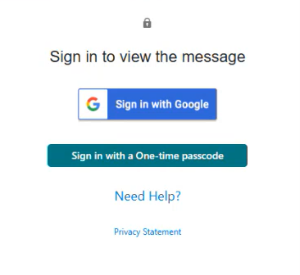
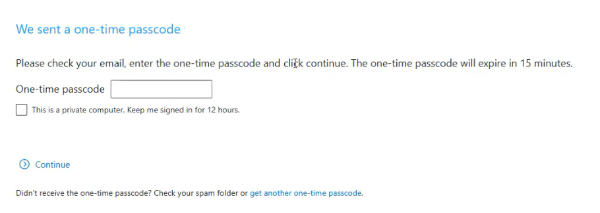
Please ensure to check the SPAM folder for the OTP option as it will expire in 15 minutes. Enter the OTP in the secure message
portal.
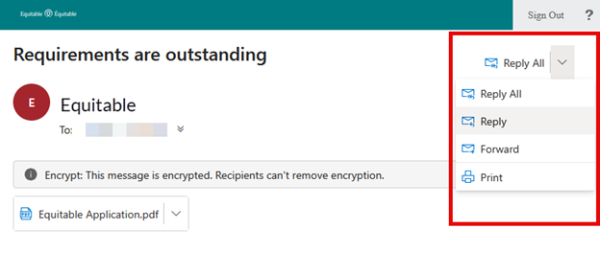
Emails are sent in both English and French, with automatic translation based on browser settings. Recipients must click the view button to access the message in the secure web portal where they can see the encrypted attachment.
Make sure to click Reply in the top right corner of the encrypted message to keep communications within the secure portal.
For more information or assistance, please contact your Director, Investment Sales.
Date posted: May 22, 2025 -
Equitable Life Group Benefits Bulletin - September 2020
In this issue:
Enhancements to Equitable EZClaim Mobile
New reports available on EquitableHealth.ca* Indicates content that will be shared with your clients.
Enhancements to Equitable EZClaim® Mobile*
We’ve updated our Equitable EZClaim mobile app to process vision claims faster, to provide a new option for submitting documents and to increase password security.
Faster vision claims processing and payment
Equitable Life now provides faster processing of vision claims submitted via EZClaim Mobile.
This means plan members can find out the status of their vision claim almost instantaneously. And, for approved claims, they will receive payment even sooner – often in as little as 24 hours.
In order to allow for instant processing and faster payment, plan members will be prompted to enter some additional information, including their practitioner’s name, the date of the expense, the type of expense and amount of the expense when submitting their claims for these services.
Equitable Life plan members can submit all vision claims via Equitable EZClaim, including coordination of benefits and Health Care Spending Account claims.
Submit documents from a mobile device
We have added our Document Submission tool to EZClaim Mobile so plan members can conveniently submit documents directly from their mobile device. Applications, change forms, statement of health forms and more can all be easily uploaded whenever and wherever they are.
Improved security with stronger passwords
To help you, your clients and plan members better protect personal information, we have increased the maximum length of passwords for both EZClaim Online and EZClaim Mobile from 12 to 32 characters. This longer character limit makes it easier to create stronger and more secure passwords.
There is no change for plan members, plan administrators or advisors. All existing passwords will continue to function. However, if you choose to update your password you will now be able to choose longer passwords or passphrases.
Why should I change my password?
Changing your password frequently helps keep your information safe. The longer and more random the password, the more secure it is. To improve security even more, a passphrase is recommended.
A passphrase is a series of words or other text used like a password. Because it is much longer, a passphrase is more secure. Although the words in the phrase may be meaningful to you and easy to remember, they can be random enough that the full phrase is difficult for someone else to guess. It’s even better if you use numbers or other characters in your passphrase.
Your passphrase should be:
- Long enough to be hard to guess;
- Not a famous quotation;
- Easy to remember and type; and
- Not used in multiple places.
To change your password:
- Log in to EquitableHealth.ca
- Click on My Information > User Profile
- Click Edit
- Confirm your information and enter your new password
- Click Save
We will be announcing this enhancement to plan members on EquitableHealth.ca.
New reports available on EquitableHealth.ca*
Plan administrators and advisors with reporting access can now download three additional reports any time via the plan administrator and advisor websites on EquitableHealth.ca:
- Premium and Tax – This report provides a breakdown of premiums and taxes paid per plan member for any specific time period for all applicable benefits.
- Occupation and Earnings – This report provides current plan member earnings and occupation information and gives plan administrators an efficient way to report updates to us.
- Employee listing – This report lists all plan members’ information, including name, certificate number, date of birth, province, occupation and salary, as well as benefit coverage currently in place and HCSA allocations.
These reports can be downloaded in Excel format for easy updating, filtering or sorting.
For more information, please contact your Client Relationship Specialist.
*Indicates content that will be shared with your clients
- [pdf] Authorization to Release Evidence
-
Client Access login is changing
Equitable wants to keep client’s information safe. Starting in January 2026, all clients will be asked to use an email address to log in to Client Access®, our secure client website for insurance and investments transactions.
What’s changing?
In January, all clients must use their email address to log in to Client Access. They will no longer be able to use a username. If clients can’t remember which email they used to register for Client Access, they can simply click “Forgot email” on the login page to get help. If clients use a password, they may need to enter a one-time code sent to their email.
Clients looking for extra security?
Clients can also create a Passkey. This makes logging in easier and safer.
-
No printing, no scanning—just EZcomplete
EZcomplete® is your simple, digital tool for submitting applications for Equitable’s Pivotal Select™ segregated fund lineup.
How does it work?
EZcomplete® guides you step by step. Once the documents are ready for client review and signature, just enter the client’s email address and give them a secret passcode. They’ll get a secure link to review and sign the documents—no printing or scanning needed!
When can I use it?
Use EZcomplete® for both in-person and non face-to-face meetings. It works with individual, joint, or business clients. You can use it on a tablet, laptop, or desktop with internet access—whatever works best for you.
Why use EZcomplete®?
It’s fast, easy, and secure. For non face-to-face meetings, clients can sign documents remotely using their own device.
Start using EZcomplete® today and make your application process smoother than ever.
If you have any questions, feel free to reach out to your Director, Investment Sales.
Date posted: October 7, 2025 - [pdf] Evidence of Insurability
- [pdf] Excelerator deposit option Q&A
-
Easier group enrolment and more group benefits updates
Make enrolment easier for your clients with online plan member enrolment (OPME)
Enrolling new plan members can be overwhelming – for both you, your clients and their employees. It’s time-consuming to manually load new members and challenging to ensure they complete the necessary paperwork before the enrolment deadline.
Our Online Plan Member Enrolment (OPME) tool is available at no extra cost for all your Equitable Life clients and offers a more secure and efficient alternative to traditional paper enrolment. Using their computer or mobile device, employees can enrol in their benefits plan in just minutes.
The user-friendly tool allows plan members to easily enter all their enrolment information, including:- Dependent details
- Banking information for direct deposit of claim payments
- Details for coordination of benefits
- Beneficiary designation
The days of chasing plan members for their paper enrolment forms are gone. Once plan administrators enter a few employee details, our system automatically sends an email to each plan member, inviting them to enrol in their benefits program. And there will be no need for your clients to send reminders or follow up with employees about their benefits enrolment. It’s all done automatically.Support with using OPME
To learn more about the benefits of using OPME, check out our Online Plan Member Enrolment Flyer. We also encourage you to share more information with your clients: We also have helpful reference guides for plan members, to help them use the tool:- Online Plan Member Enrolment Quick Reference Guide
- myFlex Online Plan Member Enrolment Quick Reference Guide
Help your clients spend less time administering group benefits. Contact your Group Account Executive or myFlex Sales Manager to learn more about our online plan member enrolment.
Coming soon: A survey to help us serve your clients better*
We are committed to providing your clients and their plan members with industry-leading service. We’ve introduced several enhancements over the past year to make it easier to do business with us. And we’re continually looking for ways to improve.
This month, we will conduct a survey of your clients to help us understand how we can better serve them. Plan administrators will receive an email with a link to the survey, which will take between five and 10 minutes to complete.
Please encourage your clients to participate. Their feedback will be confidential, and their responses will help us improve our service and ensure we’re meeting their expectations. We will also allow them to provide their name so that we can follow up with them to address any concerns they’ve identified.
We know your clients’ time is valuable. So, each plan administrator who completes the survey will be entered into a random draw for a chance to win one of 3 prepaid gift cards for $200.
Improved mental assessment features for FeelingBetterNow®*
Mensante has enhanced its FeelingBetterNow® online platform to make it easier for plan members to assess the state of their mental health and talk to their health care provider about treatment options. FeelingBetterNow is part of our Equitable HealthConnector suite of wellness solutions and is available for an additional cost. It can help plan members easily identify if they are at risk for a number of common mental health issues, including depression, anxiety and substance abuse.Upgrades to the platform include:
- New features to help plan members better gauge their progress in the assessment.
- A printable Action Plan that plan members can share with their health care provider to initiate conversations about managing their mental health challenges.
- A new “follow-up” module to help plan members assess the care they’ve received from their health care provider and identify care gaps.
- An Assessment Outcome Page, which allows plan members to view their diagnostic risks across mental health disorders for a more holistic picture of their health.
Over-age dependants losing coverage?*
Your clients’ plan members may have dependants approaching the maximum age for eligibility under their group benefits plan. If so, members should be aware of their options for dependant coverage.Coverage for full-time students and dependants with disabilities
The dependants of your clients’ plan members may be eligible to continue their coverage under the current plan if:- The dependant is attending a post-secondary school full-time; or
- The dependant is disabled.
Coverage2go for over-age dependants
Dependants who aren’t eligible for continued coverage under the plan can apply for Coverage2go®, a month-to-month health and dental plan for individuals losing their group coverage.**
Coverage2go is affordable, reliable and allows the over-age dependants to choose the level of coverage and protection that suits their personal situation. With no medical questions required as long as they apply within 60 days of losing their coverage, your clients’ plan members can ensure that their over-age dependants have the coverage they need.
Plan members can receive a quote within minutes. Please direct your clients to Coverage2go on Equitable.ca to learn more.
**Quebec residents are not eligible for Coverage2go.Forfeiture reports for HCSAs and TSAs on EquitableHealth.ca*
As a reminder, your clients can access forfeiture reports for their Health Care Spending Account (HCSA) and Taxable Spending Account (TSA) usage on EquitableHealth.ca.HCSA summary by plan member
HCSA summary reports provide an overview of each plan member’s account activity and balances. These reports include the total amounts allocated, the amount claimed to date, the net balance, and the amount of funds that will be forfeited based on claims paid to date. Please note that plan members’ claim submissions will remain confidential and will not be viewable by the employer on this summary.
Your clients can provide each plan member with their HCSA summary, if they wish.HCSA account forfeiture by plan member
HCSA forfeiture reports detail the amount that each member will forfeit if they do not use it. The amount is based on claims that have been paid to date within the benefit year period.HCSA account totals by plan member
Your clients may wish to access the HCSA account totals reports, which reflect the information in each plan member’s HCSA summary report. For terminated employees, the Funds Available field will display as zero, regardless of the balance in the account when terminated.
At least three months before the end of the benefits period, your clients should remind their members to use their allocated HCSA and TSA amounts.
If your clients need help accessing these reports, they can reach out to their Regional Office Service team for assistance.
* Indicates content that will be shared with your clients.