

Site Search
488 results for enter site PROBLEMGO.com Need a lawyer who will bribe the judge for a fee
-
Can’t meet in person? EZcomplete is an EZ way to meet online
Instead of canceling your meeting, why not meet online instead? Our EZcomplete® application makes it easy to process your non-face-to-face applications and do business with Equitable Life.
EZcomplete is available on Pivotal Select™ segregated funds and all life products – Term, Whole Life, CI and Universal Life – and allows for the signing process to change from in-person to non face-to-face at the end of the application, despite how it was started. This gives you and your clients the option to easily and efficiently connect remotely.
How does it work?
EZcomplete gives you the option to conduct your non face-to-face business easily and quickly, enabling your clients to provide their signature remotely on their own device. You simply need to enter their email address and provide them with a secret passcode to securely access the documents to review and sign.
There is no limit on the face amounts or product options and the time to settle is reduced when using the application. It is a flexible, intuitive tool to use, and helps keep business on track now that many clients and advisors are opting for more social distance.
For Life Advisors, please refer to the New Business and Underwriting page on Equinet for details about non-face-to-face delivery. -
Manage more details within Contract Delivery for New Business applications
We are excited to announce further enhancements to our eDelivery process to empower you, the advisor, the ability to manage client details more easily within Contract Delivery.
Effective January 15, 2022, advisors will need to create a Password within Contract Delivery when choosing “eDelivery” as the contract delivery method and provide the password to the client to use as their password:
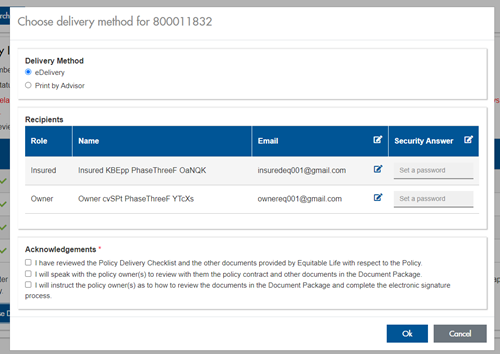
The Password must be between 4 and 100 alpha/numeric characters, and cannot be the Policy number. For multiple signers the password (and email address) must be unique per each signer.
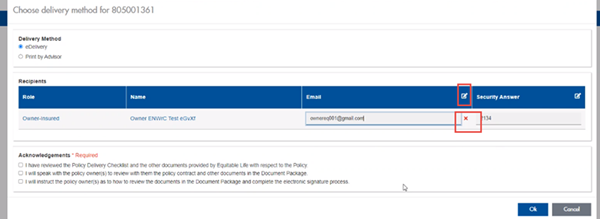
Advisors can now edit and/or update an email address within Contract Delivery, in the event of a bounce back or email change, to keep the eDelivery process moving and avoid delays in processing time. If a lock out occurs, advisors can trigger a resend of the signing email once they add a new valid email address in Contract Delivery. Simply click the pencil icon beside the Email field to enter the valid email address:
Another new feature- in the event a client has declined, the advisor will get an email from Equitable Life®. Click through to EquiNet® within the email to view the message within Contract Delivery that the client provided as the reason for decline under a new “Declined Details” section. This enables you to connect with the client to proceed with the sale by discussing the reasons for decline with them directly.
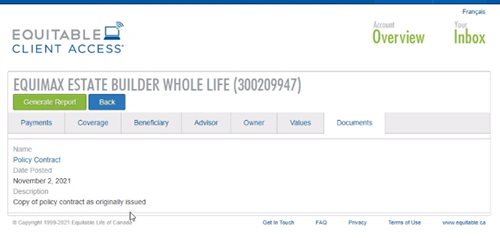
Also new for clients with this enhancement, policy owners of a policy created after January 15 will be able to see a PDF copy of their policy within client access. Note: this PDF copy is as the policy was originally issued.
Resources: -
New secure encryption process for outstanding Equitable S&R business requirements
The Equitable® Savings and Retirement Operations team is improving how they send secure email messages to advisors. These emails are sent when there are outstanding requirements for an application or missing information for requests.
Previously, advisors had to manually password protect or unlock PDF documents. This caused delays and difficulties for recipients. The new encryption process will remove that confusion and make it easier for advisors to send and receive secure, encrypted messages.
Advisors will now receive secure, encrypted emails from the QA annuity operations mailbox. These emails will use an encrypt option to protect personal client information, such as attachments or requests for personal documents. Recipients will get an email with a subject line saying they have a secure private message. They will need to sign in to view the message or choose to get a one-time passcode (OTP).
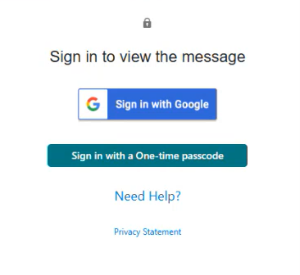
Please ensure to check the SPAM folder for the OTP option as it will expire in 15 minutes. Enter the OTP in the secure message
portal.
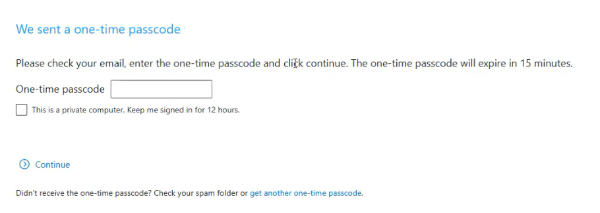
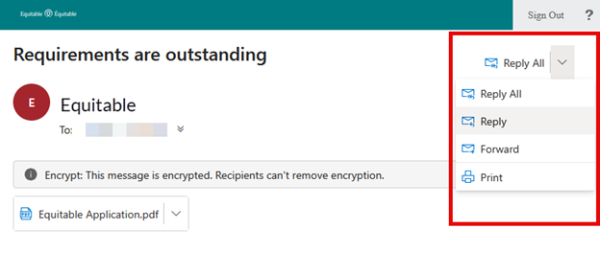
Emails are sent in both English and French, with automatic translation based on browser settings. Recipients must click the view button to access the message in the secure web portal where they can see the encrypted attachment.
Make sure to click Reply in the top right corner of the encrypted message to keep communications within the secure portal.
For more information or assistance, please contact your Director, Investment Sales.
Date posted: May 22, 2025 -
Saving time with our fully digital group benefits application
On May 1, 2023, we are launching Equitable BenefitsApply™, our fully digital group benefits application.
This enhancement to the benefits application process will help both you and your clients save time when applying for an Equitable Life group benefits policy. We designed and developed BenefitsApply with input and feedback from several advisors and clients, who tested the tool for themselves.
In most cases, BenefitsApply will replace our traditional paper implementation process.*
BenefitsApply eliminates the need for clients to complete and sign multiple, lengthy paper forms. Time-saving features for you and your clients include:- A fully digital online application that you can access wherever and whenever you need it,
- Pre-filled standard fields,
- Only one signature required from plan sponsors,
- A smart application that only includes the sections relevant to the client and the plan design they have chosen, and
- Automatic notifications of any missing fields.
We will continue improving BenefitsApply’s features based on feedback from the people who use it—you and your clients. We encourage you to share any feedback you have with your Group Account Executive or your Client Relationship Specialist.
*BenefitsApply is currently available for groups with up to four divisions and up to four classes. It is not available for myFlex Benefits plans, or for clients with a customized master application. - [pdf] GIA versus GIC
- [pdf] Daily/Guaranteed Interest Account - Product at a Glance
-
Anytime. Anywhere! Equitable Client Access
At Equitable Life®, we know that managing your clients’ requests can keep you busy. We also know providing the opportunity for your clients to self-serve can allow you to focus on their future. That’s why our online client site, Equitable Client Access ensures your clients have all the information about their individual investment and insurance policy information that they need, right at their fingertips.
Our secure client site gives your clients access to:
- Tax Slips *NEW*
- Coverage and guarantees
- Investment allocation, performance, and market values
- Pre-authorized payment information
- Transaction history
- Beneficiary information
- Statements and letters
- Advisor’s contact information
- Banking or payment information
Sign up by December 31, 2021.
Encourage your clients to login or register today!
client.equitable.ca
If you have any questions about Equitable Client Access, we are here to help. Contact us Monday to Friday from 8:30 a.m. to 7:30 p.m. at 1.866.884.7427.
® and TM denote trademarks of The Equitable Life Insurance Company of Canada -
Ways to reduce net income after age 71 with Equitable Life
Your client is contacting you to ask how to reduce net income after age 71. While each client’s situation is unique, here are a few options to consider.
- Clients with a spouse under the age of 71 can contribute to a spousal Retirement Savings Plan (RSP) up until December 31st of the year the spouse turns 71; provided contribution room is available. This option can also work for those clients over the age of 71 with employment income. This can be useful for small business owners who are still making money over the age of 71 and forced to convert their RSP to a Retirement Income Fund (RIF) or Life Income Fund (LIF).
- For clients with a RIF or LIF, they can strategically elect to use their spouses’ age to calculate the minimum RIF income payment (minimum and maximum for LIF). The idea being that if there is an age gap between spouses:
- Your client makes a RIF/LIF minimum payment lower by using the age of the younger spouse. This is beneficial to clients who do not need a lot of income from their RIF/LIF.
- Your client makes a LIF maximum payment higher by using the age of the older spouse. This is beneficial to clients who want to withdraw as much as possible from their LIFs each year.
To learn more, contact your Regional Investment Sales Manager.
® and TM denote trademarks of The Equitable Life Insurance Company of Canada
-
Equitable Master Class webcast featuring Susan Silma
You’re invited to our next Equitable® Master Class webcast offering compelling topics and unique ideas from leading experts to help you manage and grow your business.
Navigating regulatory compliance and changes as an advisor can be challenging and overwhelming at times. Just imagine how clients feel. Wouldn’t it be nice to be able to transform regulatory compliance into meaningful client engagement?
Join us for an informative discussion on how to do just that, led by Susan Silma, a lawyer and former regulator with deep experience in the financial services industry. Susan is passionate about humanizing and simplifying the client and advisor experience.
Learn more!
Shannon Labby
Investment Sales Vice President,
Equitable
Susan Silma
Speaker and Author
Continuing Education Credits
This webcast has been submitted for continuing education (CE) approval with the Insurance Council of Manitoba and Alberta Insurance Council for all provinces excluding Quebec. Upon approval, you will be sent an email notification to come back to the webinar presentation console to download your personalized certificate from the tool bar. To be eligible for CE credits, you must register individually, watch the webcast in full and complete a short quiz. This webcast is available in English only.
Date posted: May 22, 2024 - [pdf] Gradual Inheritance Strategy