

Site Search
690 results for go page PROBLEMGO.COM Need to get my son out of juvenile hall tonight cash waiting HMP Long Lartin
-
Critical Illness Insurance Update
Path to Success CI program
This program was designed with you, the Advisor, in mind. It gives you ideas and scripts that you can use in your conversations with clients about Critical Illness. Catch a sneak preview below!
The three realities of health care are:
- Incidence of being diagnosed with a critical illness is exceptionally high
- No one is immune
- Survival with consequence; even if one survives a critical illness, the financial and emotional consequences are significant
Want to know more?
Visit the Critical Illness Path to Success page on EquiNet
Earn CE credits through the Path to Success program!
What’s new with CI?
If you missed some of our updates, check them out below!- June was Brain Injury awareness month… Check out some of our posts on our social media channels! LinkedIn | Facebook | Twitter | Instagram
- EZcomplete now automatically displays Critical Illness insurance premiums
- Cloud DX signs contract with Heart Centre
For more information, reach out to your local wholesaler. - About
-
Streamline your transactions with EZtransact
Skip the forms and submit more transactions digitally with EZtransact® to see how Equitable® has continued to make it easier for you to do business with us.
What’s new with these updates?
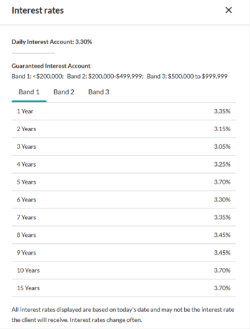
One-time PAD functionality for Daily/Guaranteed Interest AccountWith the recent addition of DIA/GIA PAD to EZcomplete, you can now utilize EZtransact for one-time pre-authorized debits. This means faster processing with one-time deposits for investment instructions to either a DIA and/or GIA (multiple terms) with end-of-term instructions.
Key benefits of these enhancements include:
• enhanced rate guarantees to secure the best rates available for clients,
• daily updated interest rate guide informs you of the latest rates,
• interest rate guarantee valid for three business days, for direct deposits from clients.
Be sure to use EZtransact on your next DIA/GIA one-time deposit request to experience these improvements.
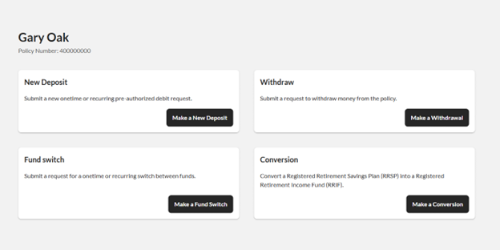
Reduce RSP to RIF conversion timeReduce time and effort submitting Retirement Savings Plan (RSP) to Retirement Income Fund (RIF) conversion requests. EZtransact is continuing to reduce the amount of time it takes advisors to submit conversion requests.
Features include:
• RSP/Spousal RSP to RIF Conversion to effortlessly submit request digitally.
• RIF Calculator to easily calculate your conversions.
Save time with our enhanced digital experience.
Sort & Filter Enhancements
We’ve taken your feedback and made it easier than ever to find the contracts and clients you’re searching for. This improved advisor experience ensures you can:
• Filter “My Clients” By Product Type/ Registration Type
• Sort “My Clients” By Contract Number/ Client Name
• Filter “Transactions” By Transactions Status/ Transaction Type
• Sort “Transactions” By Date
You asked, and we listened! Keep providing us with your feedback on our digital tools. When we grow together, success is mutual.
Get to know EZtransact and accelerate your sales! If you have any questions, please contact your Director, Investment Sales.
Date posted: April 3, 2025 -
Enhanced flexibility and features make Equimax whole life a great choice for your clients
WHAT’S NEW ON MARCH 23, 2020?
The following features are available on Equimax Estate Builder® and Equimax Wealth Accumulator® plans!
.jpg?width=120&height=141 "Image-1-EDO-Prelaunch-Whatsnew-(1).jpg") 60 months of EDO payment flexibility1 that fits your clients’ situation
60 months of EDO payment flexibility1 that fits your clients’ situation- Clients can start EDO payments1 up to 60 months from the date the application was signed, or resume up to 60 months from the last EDO payment made, without additional evidence of insurability.
- Applies to Equimax2 policies with an effective date of March 23, 2020 or later.

EDO is available on cases rated 300% or less3 for new and existing clients- For existing clients, if approved, the EDO contract provisions that apply will be based on the effective date of the insurance policy, not the date the EDO was added.
- Applies to Equimax2 policies issued under the 2017 tax rules.
 Built-in Disability Benefit Disbursement provides access to cash value in the event of a disability
- The Disability Benefit Disbursement may provide a tax-free, lump sum payment of up to 100% of the policy’s cash value if the insured becomes disabled.4
- Will be included on Equimax2 policies issued under the 2017 tax rules.5
Want more information?
More information is available on EquiNet® on the Whole Life Insurance Product page under the Resources tab.
Ask your Equitable Life® Regional Sales Manager about Equimax today.COVID-19 & social distancing: Strategy for insurance applications
Using our EZcomplete® online application allows you to keep your distance … while keeping your business moving forward.
Learn more
1 This applies only to policies with an effective date of March 23, 2020 or later. The amount of the EDO payment allowed may be limited to the maximum EDO payment made in previous years depending on the policy year. For approved EDO amounts exceeding $150,000 annually ($12,500 monthly), clients have up to 12 months from the date the EDO application was signed or the date of the last EDO payment to make an EDO payment before a contribution cap may apply. See Admin Guide for full details. 2 Applies to Equimax Estate Builder and Wealth Accumulator; all ages; life pay and 20 pay; single and joint lives. 3 Not available if the policy has a flat extra rating. 4 See sample policy contract for full details, including the qualifications for the disbursement. Policy cash value and death benefit will decrease. Tax laws are subject to change. The payment of the disability benefit disbursement may affect the adjusted cost basis (ACB) of the policy as it is considered payment of a capital benefit. Changes in ACB can affect the future taxation of the policy. 5Subject to our administrative rules and guidelines in effect at the time of the disbursement - [pdf] G3NU-Application for Non-Underwriting Change
-
Show term and critical illness illustrations with ratings
Rating options are now available in term and critical illness web illustrations. When you add a rating, the premium changes so clients can see the difference. This makes it easier to compare options and set expectations early.
What’s new
You can apply ratings to your term and critical illness web illustrations. When you choose a rating, the illustration and report update right away with the new premium.
Benefits
• Clear side‑by‑side comparisons
• Illustrated options better fit client’s needs
• Talk about options with more confidence
How to use the rating feature
1. In the web illustration, go to Personal Information.
2. Select the Ratings checkbox.
• This option also appears when adding a term rider or critical illness rider.
3. Choose the rating type you want to illustrate:
• Permanent amount (term)
• Permanent percentage (term and critical illness)
• Temporary amount (term)
Once applied, the premium updates automatically and appears in the illustration report.
Important to know
• Illustrated ratings are for comparison purposes only.
• When you submit an application, the system removes the illustrated rating.
• The final rating is determined through underwriting.
Improving your experience with more digital enhancements
We’re always working to improve the web illustration experience based on your valued feedback.
Here are some improvements you've asked for:
• A confirmation box appears showing the rider selected is included in the illustration report.
• When you’re signed into EquiNet your name and advisor code are included at the bottom of the illustration report.
New design updates to the illustration reports now make it easier for you and clients to review. Use these clear and refreshed illustrations to help clients get the protection that best meets their needs.
Questions
Contact your Equitable wholesaler. For specific case support be sure to include:
• the client name (if applicable);
• the product (term or CI);
• screenshot of the illustration settings. - [pdf] Dialogue Virtual Healthcare Overview
-
Take emotions out of investing
Taking the emotion out of investing can be easier said then done. Most of us at one time or another have decided upon something strictly because of how we felt at the time, not because it was logical or made good financial sense. I am sure most of us have a good story to tell.
When it comes to financial planning, you always want to encourage your clients to be a rational investor and accept that market fluctuation is part of the investment journey. Over the last few months, even the hardiest rational investor has been challenged to accept the market fluctuations. History shows us that this too, shall pass and markets will rise once more. The biggest question asked is always, when?
While no one has a crystal ball with that answer, the best we can do is help our clients understand that when building portfolios, risk is always at the forefront of any good investment strategy. The level of risk is just one of the building blocks to constructing a financial portfolio that will see the client through good times and bad.
Need more help? Equitable Life has created an emotional investing brochure to help your clients manage through these extraordinary times. To download a copy, click here. We have also included a template letter that you can personalize and use to reach out to your clients. To download an editable copy, click here.
-
Let’s “Talk Money”: From first savings to retirement income
Financial Literacy Month may be ending, but the conversation shouldn’t.
Talking with an advisor helps normalize money conversations— including discussions on saving, spending, managing debt, and more. This can help clients feel better and make smarter financial choices. As an advisor, you can guide clients from their first savings through to retirement with Equitable® .
Starting out? Clients can consider:
Tax-Free Savings Account (TFSA)
Save for short- or long-term goals and take out money anytime, tax-free.
First Home Savings Account (FHSA)
Save up to $40,000 tax-free for a first home. Contributions may be tax-deductible, and withdrawals are tax-free for buying a qualifying home.
Growing wealth? Clients can consider:
Registered Retirement Savings Plan (RRSP)
Contributions may be tax-deductible. Good for long-term savings—money grows tax-free until retirement.
Guaranteed Interest Account (GIA) / Daily Interest Account (DIA)
Earn steady interest with flexible terms. Available in a TFSA, RRSP, and FHSA.
Retirement ready? Clients can consider:
Payout annuities
Guaranteed income for life or a set time. Helps make sure savings last.
Resources to support these conversations



Use our easy online tools: EZcomplete® to apply and EZtransact™ for transactions. Let’s help Canadians save smarter—one step at a time. When we work together, success is mutual.
Reach out to your Director, Investment Sales if you have questions. - [pdf] B2B Loan Application Tips