

Site Search
766 results for open quick PROBLEMGO.com release from jail early loophole Tor access web begin work immediately
- [pdf] A Unique Approach to Managing Disability
-
Dialogue Virtual Healthcare now available to add to Equitable Life benefits plans
We’re pleased to announce we are partnering with Dialogue, Canada’s leading virtual health provider, to offer unlimited and on-demand virtual access to primary healthcare practitioners.
Virtual Healthcare is the latest addition to our HealthConnector suite of health and wellness services. It is available to add to all Equitable Life benefits plans for an additional cost as of July 1, 2023.Features of Dialogue Virtual Healthcare
Available 24/7, 365 days a year, Dialogue Virtual Healthcare provides access to unlimited non-urgent medical care for a wide range of health concerns. Plan members get fast access to the largest, most experienced and bilingual medical team in Canada for non-urgent medical issues. They also benefit from in-app prescription renewals and refills, personalized follow-ups after every consultation, and concierge-level navigation support for all referrals to in-person specialists when needed.
Dialogue’s industry-leading platform provides an all-in-one patient journey to address health issues, reducing long wait times and time away for doctor appointments. Plan members and their families can access Dialogue Virtual Healthcare through the secure web portal or mobile app. The Dialogue medical team includes doctors, nurse practitioners and nurses. Plan members can use the service even if they’re already receiving care from a family doctor.
For your clients
Benefits of Virtual Healthcare
By providing access to Virtual Healthcare, plan sponsors can help to:-
Drive employee engagement;
-
Reduce absenteeism related to in-person medical appointments;
-
Manage chronic health issues;
-
Attract and retain top talent; and
-
Build a healthier workforce.
By providing easier access to primary healthcare practitioners, Virtual Healthcare can offer extra health and wellness support for plan members. It also supports members that may experience barriers to accessing in-person healthcare, such as:-
Living in a remote location;
-
Work or family obligations during standard medical clinic hours;
-
Mobility challenges related to a disability; and
-
Transportation challenges.
Click the link to learn more about Dialogue Virtual Healthcare : Welcome to Dialogue!Questions?
To learn more about how your clients can add Virtual Healthcare to their benefits plan, please contact your Group Account Executive or myFlex Sales Manager. -
- [pdf] FeelingBetterNow
-
New Online Policy Loan Form
Advisors will now have access to a new digital policy loan form on EquiNet™.
On eligible policies, you can launch a customized policy loan form through the Values tab in Policy Inquiry. (login required)
This form is quick and intuitive. You tell us the loan amount, how your client wants to receive the funds, then confirm your client’s contact info and submit! Once your client signs, it is sent for review and processing within our current service standards.
This is the first form to be digitalized and we plan to continue this work with more forms later this year.
® and ™ denotes trademarks of The Equitable Life Insurance Company of Canada. - EZcomplete Training and Resources
-
Savings & Retirement Policy and Procedure updates regarding Electronic Signatures
We have updated our policies and procedures regarding electronic signatures in the Savings and Retirement department. We are now able to accept electronically signed documents, from all major third-party signing vendors.
Including esign@equitable.ca as a non-signing reviewer is the preferred method as it ensures the security embedded documents are accurately and immediately available for Equitable. We will be automatically notified when signing is complete and will download eSigned forms immediately for processing. Including esign@equitable.ca as a non-signing reviewer is secure, quick, and efficient. Documents no longer need to be emailed to us – eSigned documents are sent directly to us once all signatures are completed, therefore you do not need to notify us once the documents are signed.
When esign@equitable.ca is not used to submit electronically signed documents, the following criteria are required:- The original signed form and audit trail with all the security features intact
- The email address used to sign must match what is in our files (as provided on the application, for electronic policy delivery or through previous communication). If an email address has changed, or we don’t have an email contact for the signer, we will follow up for confirmation.
A guide on how to use esign@equitable.ca can be found here.
Please note that Equitable does not accept digital signatures (images or fonts of a signature which are not stamped).
Date posted: June 13, 2024 - About
-
Enhancing the Transfer Process: Equitable's New Signature Guarantee Service
Equitable® is making transfers even easier with EZcomplete®.
This enhancement will help advisors and clients by reducing the number of rejections from other institutions that need a signature guarantee. Reducing transfer rejections means less time and effort for advisors, and faster transfers from other institutions.
Signature Guarantees
Equitable will now offer signature guarantees on most transfers requested through EZcomplete.
When is a signature guarantee not available?
• For entity owned accounts
• If a Power of Attorney is signing on behalf of an owner
• If the transferring account has an irrevocable beneficiary
Watch the quick Identity Check with Persona video or read through instructions below.
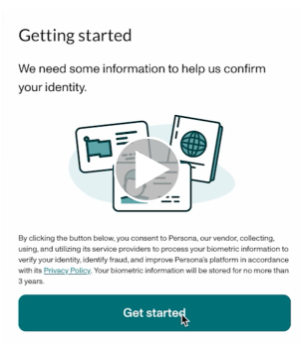
To offer a signature guarantee, Equitable first needs to check the identity of all owners using Persona, a third-party service provider.
The advisor starts by selecting a signature guarantee in EZcomplete. An email link is sent to all proposed owners.
Clients can click the link within the email to Persona's verification process.
They will be prompted to take a picture of their photo ID and a selfie, turning their head slightly left and right by following the prompts.
Their identity can then be confirmed in seconds.
Sending Transfer Forms:
• If all owners' identities are verified, Equitable will send the transfer form with a signature guarantee stamp and the e-signature audit log to the transferring institution.
• If ID verification fails, clients will be prompted to try up to three times. If still unsuccessful, the transfer form and e-signature audit log is sent to the transferring institution without the signature guarantee stamp.
Handling Issues:
• Advisors’ obligations to verify ID is not affected by this process; ID verification is still required.
• If the client times out or loses the email to access Persona, the advisor can resend the link.
• If the client’s name or email changes after ID verification, the advisor will need to redo the ID verification with the updated information to get a signature guarantee.
This update strives to make processes smoother and more efficient for everyone. Just another reason to do business with Equitable. When we work together, success is mutual.
For more information or assistance, please contact your Director, Investment Sales.
Date published: May 7, 2025 - Life Policy Collateral Loans
-
EquiNet Quick Tips
Need some help navigating your way around EquiNet? We’ve put together the top 5 Quick Tips on the following topics, based on the most frequently mentioned questions from advisors:
- Policy Inquiry/New Business Pending Inquiry
- Document Lookup
- Policy Statements & Correspondence
- Username & Email Address Support
- Need more help? Submit a request for support using the EquiNet Support Form.
See more details and information about other site tips in this FAQ created to help you find your way around.