

Site Search
794 results for go to portal MAKEMUR.com Need to pay someone to get my passport back from customs Providence
-
Equitable Life Group Benefits Bulletin – November 2020
In this issue:
- Telemedicine now included in Travel Assist*
- Take advantage of our convenient digital options*
- 2021 changes to Maximum Insurable Earnings, Maximum Weekly Insurable Earnings and Short Term Disability Benefit*
*Indicates content that will be shared with your clients
Telemedicine now included in Travel Assist*
Medical emergencies can be particularly stressful while travelling. Making your way to a medical facility can be a struggle. And once you get there, you could face long wait times, language barriers or even the risk of COVID-19 infection.
That’s why Allianz Global Assistance®, our Travel Assist provider, is adding two new virtual care options to provide plan members with timely and appropriate medical support.
As always, when a travel medical emergency strikes, plan members call Allianz for assistance. During the intake process plan members will be guided through a series of questions to triage their unique medical situation. Options for care now include two different virtual care services:
- TeleConsultation – Video and chat consultation with a locally licensed physician. This physician can diagnose simple medical conditions and provide a prescription. Available across Canada and in some high travel states in the United States.
- TeleAdvice – Video and chat consultation for situations which are not likely to require a prescription. The physician can diagnose simple medical conditions and provide medical guidance.
Plan members who use virtual care may benefit from:
- Reduced wait times;
- Care from the comfort of their current location;
- Reduced language barriers;
- No need to arrange transportation to a medical facility;
- Reduced impact on travel itinerary; and
- Reduced risk of exposure.
Both TeleConsultation and TeleAdvice will be available for all Equitable Life plan members beginning January 1st, 2021. There is no additional cost, no changes required to your client’s plans, and no change to the way plan members contact Allianz in the event of a travel medical emergency.
This PDF plan member update will also be included in the eNews to plan administrators.
If you have any questions about these new features, please contact your Equitable Life Group Account Executive or myFlex Sales Manager.
Allianz Global Assistance is a registered business name of AZGA Service Canada Inc. and AZGA Insurance Agency Canada Ltd.
Help your clients take advantage of our convenient digital options*
During this time of physical distancing, people are looking for ways to interact with their providers virtually. We recently enhanced our Online Plan Member Enrolment tool, allowing all groups to add new plan members without the need for paper forms.
Did you know, we have several other digital options available to make it easier for your clients to do business with us and for their plan members to access and use their benefits plan? Over 71% of plan administrators are managing their plan online and 78% of plan members are already using our digital tools.
For plan administrators:
- Plan Administrator Portal (EquitableHealth.ca) – plan administrators can easily manage their plan anytime and anywhere
- Digital Welcome Kits – personalized welcome kits are delivered to plan members via email
- Easy automated payments – plan administrators can avoid missed payments by setting up pre-authorized debit or electronic funds transfer
For plan members:
- Plan Member Portal (EquitableHealth.ca) – plan members get secure, 24/7 access to their claims history, coverage details and health and wellness resources
- Electronic Claim Payments and Notifications – plan members can get claim updates sooner in their email inbox and payments right into their bank account
- EZClaim Mobile App – submitting claims from a mobile device is fast, easy and secure
- Digital Benefits Cards – plan members no longer have to dig through their wallet – they can download their benefits card on their mobile device
Learn more about how we’re making it easier for your clients to do business with us
2021 changes to Maximum Insurable Earnings, Maximum Weekly Insurable Earnings and Short Term Disability Benefit*
The Canada Employment Insurance Commission and Canada Revenue Agency have announced the 2021 changes to Maximum Insurable Earnings, and premiums for employment insurance. These changes take effect January 1st, 2021.
Maximum Insurable Earnings (MIE)
The MIE will increase from $54,200 to $56,300.
Maximum Weekly Insurable Earnings (MWIE)
The MWIE will increase from $1,042 to $1,083.
EI Benefit (55% of the MWIE, rounded to the nearest dollar)
EI benefit will increase from $573 to $595
Information for Plan sponsors
If your client’s Group Policy with Equitable Life includes a Short Term Disability (STD) benefit which is tied to the EI MWIE, and at least one classification of employees has less than a $595 maximum:
- To comply with the provisions of their policy, their STD benefit will be revised with the maximums updated based on the percentage of EI MEIW shown in their policy.
- The additional premium for any increase from their previous STD amounts and new STD amounts will be show on their January 2021 Group Insurance Billing (as applicable).
If their STD maximum is currently higher than $595 or based on a flat amount (not based on a percentage or regular earnings):
- No change will be made to their plan unless otherwise directed.
If your clients wish to provide direction regarding revising their STD maximum, or have questions about the process, they can email Kari Gough, Manager, Group Quotes and Issue.
*Indicates content that will be shared with your clients
- Policy Title Changes
- [pdf] Your guide to Coverage2go
-
NEW MARKETING MATERIAL! Flexibility for supplemental income with Equimax
Equitable has created a new piece to help you understand our new Equimax® illustration feature, Paid-Up Additions (PUA) to Cash Dividends, now available!
Did you know Equimax clients can switch from the PUA dividend option to the cash dividend option by simply requesting a dividend option change?1,2
You can illustrate this for paid-up 10 pay and 20 pay Equimax plans! Show clients how they can build in added flexibility and use their policy to create a source of future supplemental income by simply changing the dividend option to cash.3
Illustration Considerations:
● Works with Equimax Estate Builder® or Equimax Wealth Accumulator®.
● Illustrate the Excelerator Deposit Option (EDO) to help build the policy values while the PUA dividend option is in effect. EDO payments can’t be made once the policy is switched to the cash dividend option.
● If a client needs temporary insurance coverage – like mortgage protection - illustrate term riders for how long they are needed to meet the specific goal.3
● If critical illness coverage is needed our competitively priced 20 pay critical illness riders are a great fit to provide paid-up critical illness coverage.3
Clients should apply for the coverage they need. This concept is about flexibility to create a future source of supplemental income.
Want to learn more? Check out our new marketing piece: Flexibility for supplemental income with Equimax (2077).
For more information, reach out to your local wholesaler.
® and TM denote trademarks of The Equitable Life Insurance Company of Canada.
1 Dividends are not guaranteed and are paid at the sole discretion of the Board of Directors. Dividends may be subject to taxation. Dividends will vary based on the actual investment returns in the participating account as well as mortality, expenses, lapse, claims experience, taxes, and other experience of the participating block of policies.
2 To request a change to the dividend option complete and submit form 558 (Request for Withdrawal of Dividends, Change in Option, or Premium Offset). A client can request a change to the cash dividend option from any other dividend option regardless of the premium type or whether premiums continue to be payable, subject to our current administration rules and guidelines. Some dividend option changes are subject to underwriting. Underwriting is not required to change from the PUA to cash dividend option, however, underwriting is required to change from the cash dividend option to the PUA dividend option.
3 This concept is intended to illustrate a one-time switch to cash dividends once premiums are no longer payable for the policy (including premiums for riders). Premiums are paid with after-tax dollars and dividends paid in cash are subject to taxation. If premiums are payable there will be tax savings for the client to use the before-tax cash dividend to reduce the premium instead of taking it entirely as a cash payment. This concept is intended for longer term planning, not to meet short term cash needs by switching back and forth between the PUA and cash options. Clients should consider a policy loan or a cash withdrawal to meet short-term cash needs; policy loans and cash withdrawals may be subject to taxation.
- Path to Success Module 2
-
EXCITING NEWS! Digital Transactions for Universal Life Plans Now Available
We are happy to announce a major update to our digital systems that makes managing Equitable Universal Life (UL) policies easier than ever. Starting now, you can use digital transactions to submit your clients’ instructions to change their UL deposit allocations and transfer funds between accounts.
This update builds on the recent launch of our digital policy loan request on EquiNet® and is another step towards making your Equitable® experience easier and more convenient.
What's New?
In the past, you had to submit written requests for UL deposit allocation changes and account value transfers using the Universal Life Form 693UL (you can still use this method if you prefer).
Now, you can manage these transactions directly through the secure EquiNet advisor portal. This new process also allows clients to securely approve their requested changes by email.
To get started, simply log into your account on EquiNet and go to the Policy Inquiry tab.
We have provided a brief user guide to help you through the steps.
We trust that this digital upgrade will enhance the way you work with Equitable. Stay tuned for more digital enhancements in the near future!
Thank you for your continued support and partnership.
Questions? For more information, please reach out to your wholesaler or our customer service team.
® or TM denotes a trademark of The Equitable Life Insurance Company of Canada.
-
Manage more details within Contract Delivery for New Business applications
We are excited to announce further enhancements to our eDelivery process to empower you, the advisor, the ability to manage client details more easily within Contract Delivery.
Effective January 15, 2022, advisors will need to create a Password within Contract Delivery when choosing “eDelivery” as the contract delivery method and provide the password to the client to use as their password:
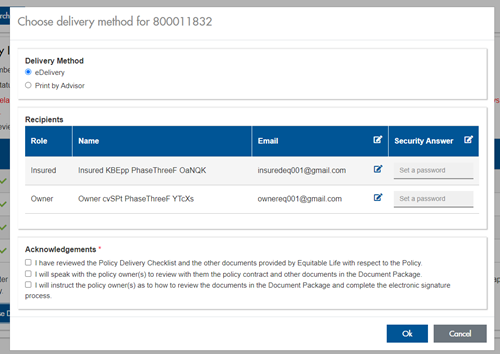
The Password must be between 4 and 100 alpha/numeric characters, and cannot be the Policy number. For multiple signers the password (and email address) must be unique per each signer.
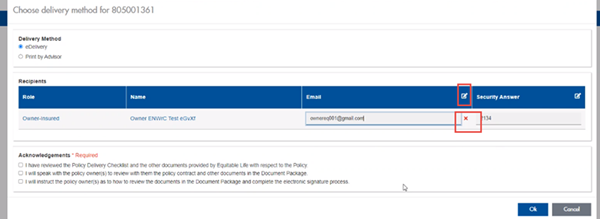
Advisors can now edit and/or update an email address within Contract Delivery, in the event of a bounce back or email change, to keep the eDelivery process moving and avoid delays in processing time. If a lock out occurs, advisors can trigger a resend of the signing email once they add a new valid email address in Contract Delivery. Simply click the pencil icon beside the Email field to enter the valid email address:
Another new feature- in the event a client has declined, the advisor will get an email from Equitable Life®. Click through to EquiNet® within the email to view the message within Contract Delivery that the client provided as the reason for decline under a new “Declined Details” section. This enables you to connect with the client to proceed with the sale by discussing the reasons for decline with them directly.
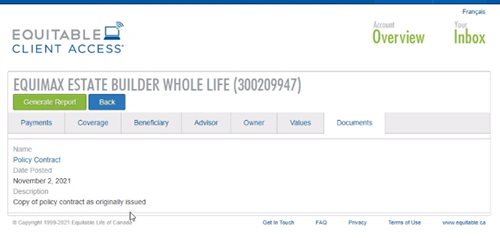
Also new for clients with this enhancement, policy owners of a policy created after January 15 will be able to see a PDF copy of their policy within client access. Note: this PDF copy is as the policy was originally issued.
Resources: -
Protect clients and yourself from cyber attacks
Cyber criminals are targeting advisors’ computers and email accounts. They are targeting advisors because you have detailed financial information about clients. These attacks put you and clients at risk by exposing private financial data, allowing unauthorized withdrawal attempts, and easing identity theft. A breach can lead to financial loss and a damaged reputation.
How to stay safe:
• Use strong security: Turn on multi-factor authentication, change your passwords often, and make sure passwords are unique.
• Install antivirus or internet software: Use trusted programs such as Norton or McAfee to protect your computer.
• Keep everything updated: Make sure your computer’s operating system and software are up to date.
• Get expert help: Ask an IT professional to check your security system.
• Be careful online: Take cybersecurity training to learn about new threats. Don’t click on suspicious links, including from people you don’t know.
• Have cyber insurance: This can help protect you if something goes wrong. You can usually get it through your E&O provider.
Remember: Cyber criminals also target the public, including client email accounts. They may use a client’s email to send you requests that look real. Call clients to confirm emailed requests, especially if someone asks to withdraw money or change banking information.
Our clients trust you with their financial future. Do everything you can to keep their information safe. - [pdf] Health Care Spending Account - Plan members
- Choosing the right funds