

Site Search
466 results for enter now access MAKEMUR.COM Buying someones immediate bail Texas
-
Passkey: The fastest, safest way to log in to Client Access
We’ve upgraded the Client Access® portal to make access easier and more secure.
What’s new?
• Passkey: The easiest way to log in
Passkey is now available across all Equitable portals. With passkey, clients can log in quickly and securely using biometrics like face or fingerprint recognition, eliminating the need for passwords.
• Extra protection for email/password users
For clients who continue to use their email and password, extra security may be required. Clients may be prompted to enter a one-time passcode sent to their email, ensuring only authorized access.
What you need to know:
• Clients sign in to Client Access the same way you do on EquiNet, making it easier to support your clients.
• “Forgot email” is available to help clients recover the email they need to log in.
• Passkey setup is easy and safe. Just follow the prompts when you login. Watch the video to learn how to create a passkey. -
Client Access login is changing
Equitable wants to keep client’s information safe. Starting in January 2026, all clients will be asked to use an email address to log in to Client Access®, our secure client website for insurance and investments transactions.
What’s changing?
In January, all clients must use their email address to log in to Client Access. They will no longer be able to use a username. If clients can’t remember which email they used to register for Client Access, they can simply click “Forgot email” on the login page to get help. If clients use a password, they may need to enter a one-time code sent to their email.
Clients looking for extra security?
Clients can also create a Passkey. This makes logging in easier and safer.
-
Start a Conversation with EZstart – Now Available for Equimax Wealth Accumulator
Looking for an easy way to explain insurance? We have a digital tool to do just that!
Start a Conversation with EZstart™
EZstart helps to commence those initial client conversations. Think of it like a digital brochure: you start a conversation about life goals, enter a few details - and within a few clicks - get a quick quote on your phone or tablet instantly.
We have a NEW EZstart for Equimax Wealth Accumulator® available. Go to the EZstart for Equimax Wealth Accumulator now.
Don’t forget about our other EZstart tools that are available for you. Learn more.
® and TM denote trademarks of The Equitable Life Insurance Company of Canada. - [pdf] Equinet FAQ
- EquiNet-FAQ
-
Manage more details within Contract Delivery for New Business applications
We are excited to announce further enhancements to our eDelivery process to empower you, the advisor, the ability to manage client details more easily within Contract Delivery.
Effective January 15, 2022, advisors will need to create a Password within Contract Delivery when choosing “eDelivery” as the contract delivery method and provide the password to the client to use as their password:
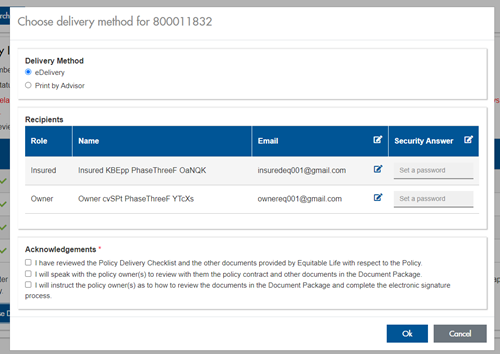
The Password must be between 4 and 100 alpha/numeric characters, and cannot be the Policy number. For multiple signers the password (and email address) must be unique per each signer.
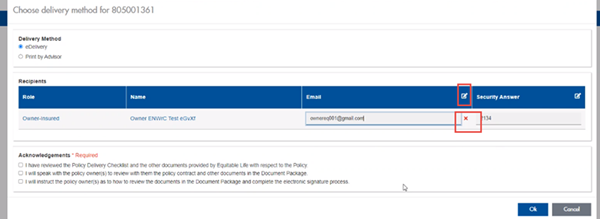
Advisors can now edit and/or update an email address within Contract Delivery, in the event of a bounce back or email change, to keep the eDelivery process moving and avoid delays in processing time. If a lock out occurs, advisors can trigger a resend of the signing email once they add a new valid email address in Contract Delivery. Simply click the pencil icon beside the Email field to enter the valid email address:
Another new feature- in the event a client has declined, the advisor will get an email from Equitable Life®. Click through to EquiNet® within the email to view the message within Contract Delivery that the client provided as the reason for decline under a new “Declined Details” section. This enables you to connect with the client to proceed with the sale by discussing the reasons for decline with them directly.
Also new for clients with this enhancement, policy owners of a policy created after January 15 will be able to see a PDF copy of their policy within client access. Note: this PDF copy is as the policy was originally issued.
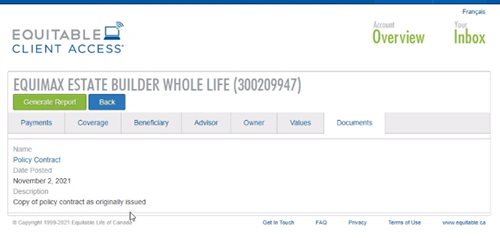
Resources: -
New secure encryption process for outstanding Equitable S&R business requirements
The Equitable® Savings and Retirement Operations team is improving how they send secure email messages to advisors. These emails are sent when there are outstanding requirements for an application or missing information for requests.
Previously, advisors had to manually password protect or unlock PDF documents. This caused delays and difficulties for recipients. The new encryption process will remove that confusion and make it easier for advisors to send and receive secure, encrypted messages.
Advisors will now receive secure, encrypted emails from the QA annuity operations mailbox. These emails will use an encrypt option to protect personal client information, such as attachments or requests for personal documents. Recipients will get an email with a subject line saying they have a secure private message. They will need to sign in to view the message or choose to get a one-time passcode (OTP).
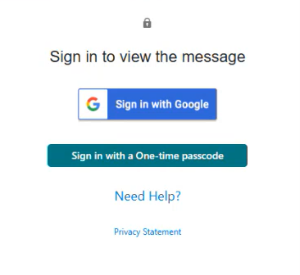
Please ensure to check the SPAM folder for the OTP option as it will expire in 15 minutes. Enter the OTP in the secure message
portal.
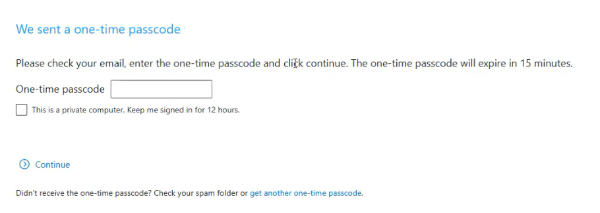
Emails are sent in both English and French, with automatic translation based on browser settings. Recipients must click the view button to access the message in the secure web portal where they can see the encrypted attachment.
Make sure to click Reply in the top right corner of the encrypted message to keep communications within the secure portal.
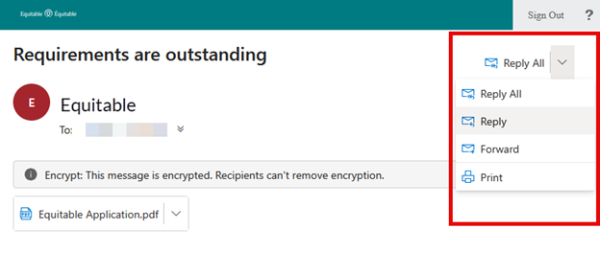
For more information or assistance, please contact your Director, Investment Sales.
Date posted: May 22, 2025 -
Can’t meet in person? EZcomplete is an EZ way to meet online
Instead of canceling your meeting, why not meet online instead? Our EZcomplete® application makes it easy to process your non-face-to-face applications and do business with Equitable Life.
EZcomplete is available on Pivotal Select™ segregated funds and all life products – Term, Whole Life, CI and Universal Life – and allows for the signing process to change from in-person to non face-to-face at the end of the application, despite how it was started. This gives you and your clients the option to easily and efficiently connect remotely.
How does it work?
EZcomplete gives you the option to conduct your non face-to-face business easily and quickly, enabling your clients to provide their signature remotely on their own device. You simply need to enter their email address and provide them with a secret passcode to securely access the documents to review and sign.
There is no limit on the face amounts or product options and the time to settle is reduced when using the application. It is a flexible, intuitive tool to use, and helps keep business on track now that many clients and advisors are opting for more social distance.
For Life Advisors, please refer to the New Business and Underwriting page on Equinet for details about non-face-to-face delivery. - [pdf] How to access in-force illustrations
-
Web Illustration Tool for Universal Life (UL) Insurance now available
The new tool for UL provides greater flexibility and convenience. You will now have access to UL illustrations in the same way that you access and save Whole life web illustrations. It enables you to manage your business on the go from your laptop.
This is the latest step in our commitment to making it easier for you to do business with us, with all our product illustrations now available in a web version. Visit the new web illustration tool here.
Speak to your individual life wholesaler to learn more!