

Site Search
822 results for enter portal now MAKEMUR.COM how to get charges dropped so he can get out Austria
-
New secure encryption process for outstanding Equitable S&R business requirements
The Equitable® Savings and Retirement Operations team is improving how they send secure email messages to advisors. These emails are sent when there are outstanding requirements for an application or missing information for requests.
Previously, advisors had to manually password protect or unlock PDF documents. This caused delays and difficulties for recipients. The new encryption process will remove that confusion and make it easier for advisors to send and receive secure, encrypted messages.
Advisors will now receive secure, encrypted emails from the QA annuity operations mailbox. These emails will use an encrypt option to protect personal client information, such as attachments or requests for personal documents. Recipients will get an email with a subject line saying they have a secure private message. They will need to sign in to view the message or choose to get a one-time passcode (OTP).
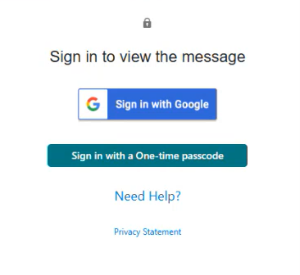
Please ensure to check the SPAM folder for the OTP option as it will expire in 15 minutes. Enter the OTP in the secure message
portal.
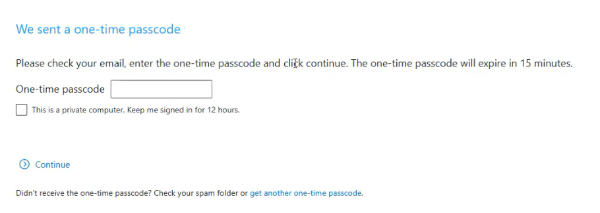
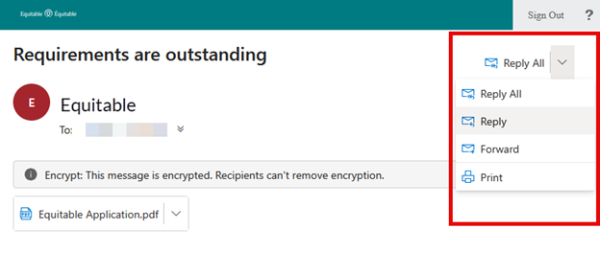
Emails are sent in both English and French, with automatic translation based on browser settings. Recipients must click the view button to access the message in the secure web portal where they can see the encrypted attachment.
Make sure to click Reply in the top right corner of the encrypted message to keep communications within the secure portal.
For more information or assistance, please contact your Director, Investment Sales.
Date posted: May 22, 2025 -
Equitable Life Group Benefits Bulletin – November 2021
In this issue:
- Deadline to opt out of New Brunswick biosimilar program*
- Web Reports Quick Reference Guide now available for plan administrators*
- Reminder: Review manual allocations for HCSAs and/or TSAs*
- Help your clients take advantage of our convenient digital options*
Reminder: Deadline to opt out of New Brunswick biosimilar program*
Earlier this year, we announced via eNews that on Feb. 1, 2022, we are ending coverage for some originator biologic drugs in New Brunswick in response to the province’s Biosimilar Initiative.* These changes will help protect your clients’ plans from additional drug costs while still providing access to equally safe and effective biosimilars.
Do my clients need to take any action?
No action is required if employers want to have the originator biologics excluded from their plan. Plan members taking these targeted originator biologics will be contacted directly to allow them ample time to transition to the biosimilar. Any cost savings associated with the change will be factored in at renewal.
All groups, except myFlex clients, who wish to opt out of this change and maintain coverage of these originator biologics for existing claimants in New Brunswick can submit a policy amendment. Amendments must be submitted no later than Nov. 30, 2021.
Advisors with myFlex Benefits clients who wish to maintain coverage of these originator biologics for New Brunswick plan members should speak to their myFlex Sales Manager to confirm their eligibility to opt out of this change.
Groups that opt out of this change are also opting out of any future changes to our New Brunswick biosimilar initiative. This means that their drug plans will continue to cover any additional originator biologics for which we subsequently end coverage as part of the biosimilar program.
Questions?
If you have a question that isn’t answered here, please contact your Equitable Life Group Account Executive or myFlex Sales Manager.
* The list of affected drugs or conditions is dynamic and may change.Web Reports Quick Reference Guide now available for plan administrators
A Web Reports Quick Reference Guide is now available for plan administrators on EquitableHealth.ca. This new guide offers a listing of our newest reports available on the plan administrator web. It also provides instructions for plan administrators outlining how to pull the report using the plan administrator portal.
The guide is available under the Quick Links section on both the advisor and plan administrator portals on EquitableHealth.ca.Reminder: Review manual allocations for HCSAs and/or TSAs*
If your client’s Health Care Spending Account (HCSA) and/or Taxable Spending Account (TSA) has manual allocations, they need to allocate these amounts to plan members each year. Please review all your plan members’ profiles on EquitableHealth.ca to ensure they have received their allocation(s) for the current benefit year.
If your clients have Plan Administrator update access on EquitableHealth.ca, they can update these amounts online by doing the following:- Select “View certificate”
- Select “Health Care Spending Account” or “Taxable Spending Account”
- Select “Update Allocation” in Task Center
- Enter amount in “Revised Allocation Amount”
- Override Reason – “Plan Administrator Request”
- Select “Save”
- Select “Reports”
- Select “New”
- Select “Next”
- Select “HCSA” or “TSA Totals by Plan Member”
- Select “Next”
- Enter end date of “12/31/2020”
- Select “Next”
- Select “Finish”
- View “Report”
Help your clients take advantage of our convenient digital options*
We have several digital options available to make it easier for your clients to do business with us and for their plan members to access and use their benefits plan. Over 71% of plan administrators are managing their plan online and 78% of plan members are already using our digital tools.
For plan administrators:- Online Plan Member Enrolment tool – allows all groups to add new plan members without the need for paper forms
- Plan Administrator Portal (EquitableHealth.ca) – plan administrators can easily manage their plan anytime and anywhere
- Digital Welcome Kits – personalized welcome kits are delivered to plan members via email
- Easy automated payments – plan administrators can avoid missed payments by setting up pre-authorized debit or electronic funds transfer
- Plan Member Portal (EquitableHealth.ca) – plan members get secure, 24/7 access to their claims history, coverage details and health and wellness resources
- Electronic Claim Payments and Notifications – plan members can get claim updates sooner in their email inbox and payments right into their bank account
- EZClaim Mobile App – submitting claims from a mobile device is fast, easy and secure
- Digital Benefits Cards – plan members no longer have to dig through their wallet – they can download their benefits card on their mobile device
We’ve created a brochure and a video guide to help plan members access and use their digital resources. For further assistance, plan members can visit www.equitable.ca/go/digital. They can also contact our Web Services team at 1.800.265.4556 ext. 283 or groupbenefitsadmin@equitable.ca. -
Crunch the numbers with Equitable Life of Canada
Whether helping your client determine net worth or reviewing to see if your client’s retirement plan is on track, Equitable Life® is here to help with our online calculators. These number crunching tools can help you answer some of those challenging questions you get asked by your clients. From an RSP loan calculator to home budgeting to even figuring out if your client will be a future millionaire, check out our latest tools.
-------------------------------------------------------------------------------------------------------
Elijah welcomed a new baby to his family and needs to reduce the amount of money he is saving for retirement. Is he still going to be able to retire at age 60 like he planned, or will he need to extend his working years until age 65?
Did you know?
Investment returns, unexpected expenses and inflation can all affect your retirement savings. Check out Equitable Life’s How Long How Long Will My Retirement Savings Last Calculator.Share calculators using your Facebook, Twitter or LinkedIn account.
® denotes a registered trademark of The Equitable Life Insurance Company of Canada.
-
Easy and convenient digital options for your clients and their members
During this time of physical distancing, people are looking for ways to interact with their providers virtually. We have several convenient digital options available to make it easier for Plan Members and for Plan Administrators. Below is an overview to refer to when you're meeting with your clients. Or you can download this PDF version
For Plan Administrators:
Plan Administrator Portal (EquitableHealth.ca)
Our secure portal allows Plan Administrators to easily manage their plan anytime and anywhere. Instead of printing and mailing forms, Plan Administrators can make real-time updates at their convenience. The site also makes it easy to view or upload forms and other important documents, retrieve billing information, estimate monthly premium costs, and view announcements, tips and reminders. Plan Administrators can visit www.equitablehealth.ca to activate their account.
Online Plan Member Enrolment
Our Online Plan Member Enrolment tool simplifies the onboarding process for both Plan Administrators and Plan Members and offers a more secure and efficient alternative to traditional paper enrolment. The user-friendly interface allows Plan Members to easily enrol in their benefits plan in just minutes from their computer or mobile device. That saves work for Plan Administrators by eliminating the need to manage paper forms. And since Plan Members receive automatic reminders, it reduces late applicants and eliminates the need to chase down Plan Members for their paperwork. (This option is currently only available for new clients. It will soon be available for existing clients to add new hires.)
Digital Welcome Kits
Instead of paper kits that can easily get lost or quickly become outdated, Plan Members receive personalized welcome kits via an interactive email, including instructions on how to activate their online group benefits account, download their digital benefits card, submit claims from their computer or mobile device, review their coverage details, and explore their health and wellness resources.
Easy automated payments
Automated payments are a convenient way to avoid missed payments, suspended claims and disruption. Plan Administrators simply need to complete thepre-authorized debit formand send to GroupCollection@equitable.ca. Or contact Group Collections about online banking and electronic funds transfer (EFT).
We can help
For assistance, Plan Administrators can contact their Client Relationship Specialist or our Web Services team at 1.800.265.4556 ext. 283 or groupbenefitsadmin@equitable.ca.
For Plan Members:
Plan Member Portal (EquitableHealth.ca)
By logging into EquitableHealth.ca, Plan Members have secure 24/7 access to their personalized Group Benefits account where they can submit claims, view their claims status and history, and review their coverage details from their computer or mobile device. They can also visit Equitable HealthConnector®, our suite of services to help employees stay healthy and productive. They can simply visit www.equitablehealth.ca to activate their Group Benefits account.
Electronic Claim Payments and Notifications
Once Plan Members have activated their Group Benefits account on EquitableHealth.ca, they can easily get set up to receive their claim payments via direct deposit, and their claim notifications via email. Once logged in they simply click “My Information” and enter the required information.
EZClaim Mobile App
Submitting claims is fast, easy and secure with the Equitable EZClaim® mobile app. Plan Members can submit health and dental claims and receive payments directly to their bank account via direct deposit. Most claims are processed within three business days; some are processed in as little as 24 hours. They simply download the EZClaim app for their iPhone®, or Android™ device, fill out the interactive health or dental claim form, attach their receipt and submit.
Digital Benefits Cards
Instead of digging through their wallets, Plan Members can download a digital version of their benefits card on their mobile device via the Equitable EZClaim® Mobile app to easily provide coverage details to health providers.
We can help
We’ve created a video guide to help Plan Members access and use their digital resources. For further assistance, Plan Members can contact our Web Services team at 1.800.265.4556 ext. 283 or groupbenefitsadmin@equitable.ca.
-
How to talk to clients about CI when they don’t want to
Does this sound familiar?
You’re having a chat with your client about Critical Illness insurance. They suddenly interject: “Critical illness insurance isn’t for me.”
“Why is that?” you ask.
“Because….
- Critical Illness insurance is expensive!
- I don’t understand what it covers exactly.
- I have money to cover me if I get sick, so I don’t need this.
- I’m healthy enough.
- It’s not life insurance, so I don’t need it right now.
- I already have disability coverage through my work.”
If you’ve heard any of these responses, and didn’t know how to respond, we can help.
Our Path to Success program covers all these objections and more with simple-to-follow PDFs and videos. You’ll learn conversation strategies and tips on how to navigate the sale. Most importantly, you’ll know exactly what to say the next time a client objects to Critical Illness insurance.
Want to learn more? Check out our CI Path to Success modules here!
Need CE credits? Take our Path to Success program here. - COVID-19 Group Benefits FAQ
-
EXCITING NEWS! Digital Transactions for Universal Life Plans Now Available
We are happy to announce a major update to our digital systems that makes managing Equitable Universal Life (UL) policies easier than ever. Starting now, you can use digital transactions to submit your clients’ instructions to change their UL deposit allocations and transfer funds between accounts.
This update builds on the recent launch of our digital policy loan request on EquiNet® and is another step towards making your Equitable® experience easier and more convenient.
What's New?
In the past, you had to submit written requests for UL deposit allocation changes and account value transfers using the Universal Life Form 693UL (you can still use this method if you prefer).
Now, you can manage these transactions directly through the secure EquiNet advisor portal. This new process also allows clients to securely approve their requested changes by email.
To get started, simply log into your account on EquiNet and go to the Policy Inquiry tab.
We have provided a brief user guide to help you through the steps.
We trust that this digital upgrade will enhance the way you work with Equitable. Stay tuned for more digital enhancements in the near future!
Thank you for your continued support and partnership.
Questions? For more information, please reach out to your wholesaler or our customer service team.
® or TM denotes a trademark of The Equitable Life Insurance Company of Canada.
-
No printing, no scanning—just EZcomplete
EZcomplete® is your simple, digital tool for submitting applications for Equitable’s Pivotal Select™ segregated fund lineup.
How does it work?
EZcomplete® guides you step by step. Once the documents are ready for client review and signature, just enter the client’s email address and give them a secret passcode. They’ll get a secure link to review and sign the documents—no printing or scanning needed!
When can I use it?
Use EZcomplete® for both in-person and non face-to-face meetings. It works with individual, joint, or business clients. You can use it on a tablet, laptop, or desktop with internet access—whatever works best for you.
Why use EZcomplete®?
It’s fast, easy, and secure. For non face-to-face meetings, clients can sign documents remotely using their own device.
Start using EZcomplete® today and make your application process smoother than ever.
If you have any questions, feel free to reach out to your Director, Investment Sales.
Date posted: October 7, 2025 -
Making it easy to do business with us
Online Term illustration now auto-populates the application
We have added a new online illustration for Equitable® Term life insurance illustrations that automatically populates the fields in your Term application.
We’ve designed the online illustration to be intuitive so you can fill in client details with ease.
● Select term plans and coverages of choice, then get an illustration report in minutes.
● You can save your web illustration progress at any time and view it from the online application dashboard.
● We’ve combined the illustration with our online application to make the process seamless. The illustration details you provide will auto-populate in the fields needed to complete the application.
New: You can create a term illustration without logging in to EquiNet.
We are taking another step in the journey towards enhancing the ways we do business.
Check out this update on the new Illustrations page on EquiNet®!
Learn more
Have further questions? Your Equitable Wholesaler is here to help!
® and TM denote trademarks of The Equitable Life Insurance Company of Canada.
-
Dialogue Virtual Healthcare now available to add to Equitable Life benefits plans
We’re pleased to announce we are partnering with Dialogue, Canada’s leading virtual health provider, to offer unlimited and on-demand virtual access to primary healthcare practitioners.
Virtual Healthcare is the latest addition to our HealthConnector suite of health and wellness services. It is available to add to all Equitable Life benefits plans for an additional cost as of July 1, 2023.Features of Dialogue Virtual Healthcare
Available 24/7, 365 days a year, Dialogue Virtual Healthcare provides access to unlimited non-urgent medical care for a wide range of health concerns. Plan members get fast access to the largest, most experienced and bilingual medical team in Canada for non-urgent medical issues. They also benefit from in-app prescription renewals and refills, personalized follow-ups after every consultation, and concierge-level navigation support for all referrals to in-person specialists when needed.
Dialogue’s industry-leading platform provides an all-in-one patient journey to address health issues, reducing long wait times and time away for doctor appointments. Plan members and their families can access Dialogue Virtual Healthcare through the secure web portal or mobile app. The Dialogue medical team includes doctors, nurse practitioners and nurses. Plan members can use the service even if they’re already receiving care from a family doctor.
For your clients
Benefits of Virtual Healthcare
By providing access to Virtual Healthcare, plan sponsors can help to:-
Drive employee engagement;
-
Reduce absenteeism related to in-person medical appointments;
-
Manage chronic health issues;
-
Attract and retain top talent; and
-
Build a healthier workforce.
By providing easier access to primary healthcare practitioners, Virtual Healthcare can offer extra health and wellness support for plan members. It also supports members that may experience barriers to accessing in-person healthcare, such as:-
Living in a remote location;
-
Work or family obligations during standard medical clinic hours;
-
Mobility challenges related to a disability; and
-
Transportation challenges.
Click the link to learn more about Dialogue Virtual Healthcare : Welcome to Dialogue!Questions?
To learn more about how your clients can add Virtual Healthcare to their benefits plan, please contact your Group Account Executive or myFlex Sales Manager. -