

Site Search
723 results for check quick PROBLEMGO.COM Buying a get out of jail now pay later plan Poprad
-
New publication: CLHIA consumer guide for critical illness
In February, the Canadian Life and Health Insurance Association (CLHIA) published a new consumer guide for critical illness. This guide covers what clients need to know about critical illness.
Some of the topics include:
● What critical illness insurance covers in Canada
● If critical illness insurance is the right choice for a client
● What critical illness insurance policies may or may not include
● Plan types and offerings
● And more!
Equitable is committed to helping clients make informed decisions about their insurance needs. You can find links to the CLHIA critical illness consumer guide on equitable.ca and through EquiNet > Individual Insurance > Critical Illness. You can also find a link to the CLHIA agent guide for critical illness on EquiNet.
Share this with clients in addition to the great resources below!
Critical illness insurance with Equitable video: View on Vimeo.
Critical illness prospective letter template – simply fill it out and send off to your clients!
Want to earn CE credits? Check out our Critical Illness Path to Success program.
Need more information?
Your Equitable Wholesaler is here to help!
® and TM denote trademarks of The Equitable Life Insurance Company of Canada. -
Manage more details within Contract Delivery for New Business applications
We are excited to announce further enhancements to our eDelivery process to empower you, the advisor, the ability to manage client details more easily within Contract Delivery.
Effective January 15, 2022, advisors will need to create a Password within Contract Delivery when choosing “eDelivery” as the contract delivery method and provide the password to the client to use as their password:
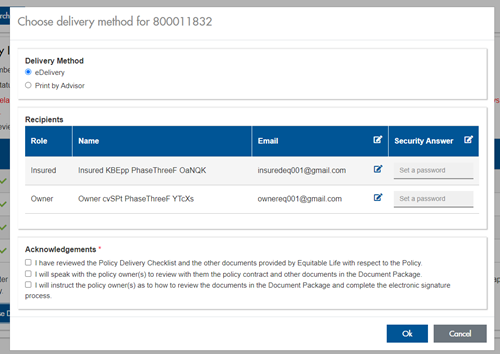
The Password must be between 4 and 100 alpha/numeric characters, and cannot be the Policy number. For multiple signers the password (and email address) must be unique per each signer.
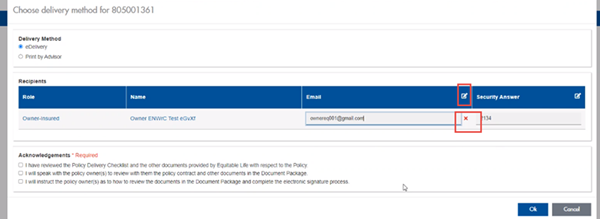
Advisors can now edit and/or update an email address within Contract Delivery, in the event of a bounce back or email change, to keep the eDelivery process moving and avoid delays in processing time. If a lock out occurs, advisors can trigger a resend of the signing email once they add a new valid email address in Contract Delivery. Simply click the pencil icon beside the Email field to enter the valid email address:
Another new feature- in the event a client has declined, the advisor will get an email from Equitable Life®. Click through to EquiNet® within the email to view the message within Contract Delivery that the client provided as the reason for decline under a new “Declined Details” section. This enables you to connect with the client to proceed with the sale by discussing the reasons for decline with them directly.
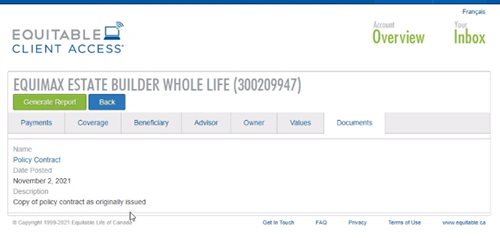
Also new for clients with this enhancement, policy owners of a policy created after January 15 will be able to see a PDF copy of their policy within client access. Note: this PDF copy is as the policy was originally issued.
Resources: -
Things keep getting EZer with Equitable and EZtransact!
Equitable® continues to make great strides with our digital self-serve tool, EZtransact®. To keep this momentum, we’ve given EZtransact a fresh new look and feel, with additional transaction management changes and a new dashboard to enhance your online transaction experience! This refresh embraces our new brand, as we continue to focus on making it easier for you to do business with us.
What’s new with this update?
New dashboard for client search- The existing client search screen has been replaced with a new user-friendly dashboard.
- Upon accessing EZtransact, all contracts associated with the user’s EquiNet ID will be displayed.
- Users can refine the results and search by client name or contract number.
- Transactions submitted through EZtransact within the last 12 months are available, including their status.
- Transactions that have received all signatures will now allow the user to download a copy of the signed request and any supporting documents uploaded by the user.
- Transactions that are pending client signatures will allow the user to manage and track the e-signature process:
- Signing packages can be resent to clients who have not completed their e-signature.
- Clients can be unlocked through the dashboard if locked out due to too many invalid attempts.
- Advisor and dealer/MGA stakeholders have been removed from signing information and review screens.
- Users are no longer required to provide an email address for the dealer/MGA to submit a transaction.
Date published: October 3, 2024 -
Equitable Life Group Benefits Bulletin – May 2020
In this issue:
- Digital options for your clients and their plan members*
- Alberta delaying biosimilar initiative*
- Yukon increasing insurance premium tax*
- Manitoba and New Brunswick relaxing drug limits*
- Free guide to accessing virtual healthcare*
- Homeweb for plan members who are losing coverage*
*Indicates content that will be shared with your clients
Easy and convenient digital resources for your clients and their plan membersDuring this time of physical distancing, people are looking for ways to interact with their providers virtually. We have several convenient digital tools available to make it easier for your clients and their plan members.
For plan administrators:
Plan administrator portal (EquitableHealth.ca)Our secure portal allows plan administrators to easily manage their plan anytime and anywhere. Instead of printing and mailing forms, they can make real-time updates at their convenience. The site also makes it easy to:
- View or upload forms and other important documents;
- Retrieve billing information;
- Estimate monthly premium costs; and
- View announcements, tips and reminders.
Plan administrators can visit www.equitablehealth.ca to activate their account.
Digital Welcome Kits
Instead of paper kits that can easily get lost or quickly become outdated, plan members receive personalized welcome kits via an interactive email, including instructions on how to:
- Activate their online group benefits account;
- Download their digital benefits card;
- Submit claims from their computer or mobile device;
- Review their coverage details; and
- Explore health and wellness resources.
Easy automated payments
Automated payments are a convenient way to avoid missed payments, suspended claims and disruption. Plan administrators simply complete the pre-authorized debit form and send to GroupCollections@equitable.ca. Or contact Group Collections about online banking and electronic funds transfer (EFT).
We can help
For assistance, plan administrators can contact their Client Relationship Specialist or our Web Services team at 1.800.265.4556 ext. 283 or groupbenefitsadmin@equitable.ca.
For plan members:
Plan member portal (EquitableHealth.ca)By logging into EquitableHealth.ca, plan members have secure 24/7 access to their personalized Group Benefits account. They can:
- View and submit claims;
- Review their coverage details; and
- Access health and wellness resources.
Electronic claims payment and notifications
Once plan members have activated their Group Benefits account on EquitableHealth.ca, they can easily set up receiving their claim payments via direct deposit, and their claim notifications via email.
EZClaim Mobile App
Submitting claims is fast, easy and secure with the Equitable EZClaim® mobile app for iOS and Android devices. Plan members can view and submit health and dental claims and review their coverage details.
Digital Benefits Cards
Instead of digging through their wallets, plan members can download a digital version of their benefits card to their mobile device.
We can help
We’ve created a video guide to help plan members access and use their digital resources. For further assistance, plan members can contact our Web Services team at 1.800.265.4556 ext. 283 or groupbenefitsadmin@equitable.ca.
Alberta government delaying biosimilar initiativeAs we announced in the February 2020 issue of eNews, the Alberta Biosimilar Initiative will require patients using several originator biologic drugs to switch to a biosimilar in order to maintain coverage through their Alberta government sponsored drug plan.
Due to the increased demands the COVID-19 pandemic is placing on healthcare providers, the Alberta government has postponed the switching requirement. Affected patients will now have until January 15, 2021 to switch to the biosimilar version of their drug in order to maintain provincial coverage.
We continue to investigate appropriate options to help ensure this provincial change does not unreasonably impact Equitable Life groups and patients and will keep you informed.
For more information about the Alberta Biosimilars Initiative, consult the Alberta government website.
Yukon increasing Insurance Premium TaxThe Yukon Government has announced that it plans to increase its Insurance Premium Tax rates effective January 1, 2021. The premium tax rates for group life and accident and sickness insurance are expected to increase from 2% to 4%. The new tax rates will be applied to premiums paid on or after January 1, 2021.
Manitoba and New Brunswick relaxing drug limitsIn order to protect the drug supply during the COVID-19 crisis, residents of most provinces were temporarily limited to receiving a 30-day supply of drugs when filling a prescription. Normally, doctors prescribe a 90-day supply for most maintenance-type drugs.
The Government of Manitoba and the Government of New Brunswick are now relaxing this 30-day limit for prescription drugs where shortages do not exist. They will address potential shortages of specific drugs if necessary.
As the situation continues to evolve, there may continue to be changes to provincial legislation and prescription limits. Plan members should speak to their pharmacist for the most up to date information.
Free guide to accessing virtual healthcareWith many health clinics closed and the healthcare system under strain, people are looking to access a doctor and other health providers virtually.
As we announced previously, we’ve made it easier for plan members to find the information they need using our Guide to Accessing Virtual Healthcare. This online resource provides information about and links to a range of virtual health services they need to take care of their health and the health of their family during these challenging times.
The Guide also indicates which services are covered by public health plan, so there’s no cost to the patient to access them if they provide their valid provincial health card.
We will continue to update the Guide as more virtual healthcare providers and services become available.The Guide is available on both EquitableHealth.ca and Equitable.ca.
Homeweb for plan members who are losing coverageWe know these are difficult times for Canadian employers and their employees. As businesses temporarily suspend operations, some employers have had to make the difficult decision to temporarily lay off employees or put their benefits coverage on hold.
That’s why we were pleased to announce that Homewood Health® and Equitable Life will extend access to Homeweb, a personalized online mental health and wellness portal, for up to 120 days for plan members who have temporarily lost their benefits coverage due to COVID-19.
Employees and their family members will continue to have access to the Homeweb website and mobile app, including:
- iVolve, online self-directed Cognitive Behavioural Therapy;
- Resources to support themselves and their family members through the COVID-19 pandemic;
- An interactive online Health Risk Assessment; and
- An online library of tools, assessments and e-courses.
This will allow businesses undergoing financial hardship to provide some support to employees who are temporarily without benefits coverage.
- [pdf] Service you can count on
- [pdf] Pay Instruction Changes
- EZCOMPLETE TRAINING AND RESOURCES
-
WFG KYC and Trade Ticket documents are now part of EZcomplete
Equitable Life® wants to help you get on with your day. Effective June 11, 2022, WFG’s KYC* and Trade Ticket documents will be integrated into the highly rated EZcomplete® online application tool. This means no more completing these documents separately and uploading them to EZcomplete.
By integrating the KYC and Trade Ticket with EZcomplete:-
these documents will automatically populate with information collected in the EZcomplete process,
-
necessary signatures will be captured, and
-
these documents will be sent to WFG’s back office on your behalf.
Once the application has been submitted, signed documents will be available for advisors, clients, and joint clients to download. It is that easy.
Get on with your day with Equitable Life. Log in to EZcomplete today.
Speak to your Regional Investment Sales Manager to learn more.
* KYCs on corporately owned policies are not currently supported
® denotes a trademark of The Equitable Life Insurance Company of Canada. -
-
Elevate your business with industry best practices and needs-based selling
Keeping your business aligned with industry best practices is vital for your success. It not only supports the fair treatment of clients – it also helps you meet certain market conduct requirements and Equitable’s expectations for needs-based selling.
The Financial Services Regulatory Authority of Ontario (FSRA) has a program that checks how well advisors follow the Insurance Act and its conduct rules. FSRA looks at how well advisors follow industry best practices and fair treatment of clients guidance (see CLHIA’s guidance document, “The Approach”). Their focus is on key areas such as giving sound advice, managing conflicts of interest, and putting clients’ needs first. FSRA selects advisors’ client files and looks for documentation that indicates needs-based selling.
In December 2024, FSRA released its latest Market Conduct Supervision Report. It highlights the need for advisors to follow certain rules and industry best practices. The report found five key areas where improvement is needed:
1. Missing notes from client meetings and calls
2. Inadequate advisor disclosure
3. Missing sales illustrations for different product options
4. Missing insurance needs analysis
5. Missing policy delivery receipts
By following industry best practices and keeping thorough records, you show your commitment to providing clients with the solutions they need. For example, taking notes during client meetings helps you track all discussions that support your recommendations. Having an insurance needs analysis shows you are providing clients with suitable advice to buy the solutions that best meet their needs.
Resources: Equitable® has resources that can help improve your business practices and help you treat clients fairly. We encourage you to check these out:
1. PPT: “Ensuring a Compliant, Needs-based Insurance Sale”. The steps to follow in needs-based selling and the records to keep.
Get CE credits! We offer the above as a self-study course that qualifies for 1 Continuing Education (CE) credit. Access it here: https://equitable-life-education.teachable.com/. (Use your contracted email to log in).
2. Client File Reference: The records to keep when selling investments, life insurance, or critical illness insurance, including key documents insurers and regulators look for during compliance audits.
3. Investor Profile Questionnaires: These will help you document your sales recommendations for:
● Universal Life (UL) sales: 1190.pdf, and
● Pivotal Select (Segregated Fund) sales: 1165.pdf
Questions? Contact your Equitable wholesaler. They are ready to support your success!