

Site Search
553 results for click main PROBLEMGO.COM Need to pay a prosecutor to nolle prosequi my case Szeged
- Policy Change and Conversions eDelivery - Quick Tips and Tricks
- Compensation Inquiry
-
Changes to the Compensation Inquiry section on EquiNet
The Compensation Inquiry Section from EquiNet is only available on Microsoft Edge. Please follow the instructions below:
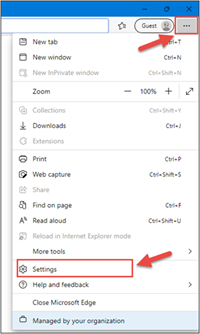
1. Open Microsoft Edge, click on the three dots in the top right corner and select ‘Settings’.
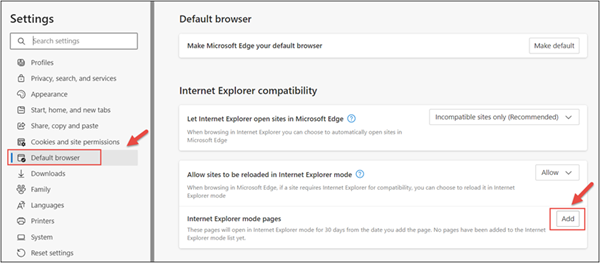
2. In the Settings menu, locate ‘Default browser’ and click on ‘Add’ in Internet Explorer mode pages.
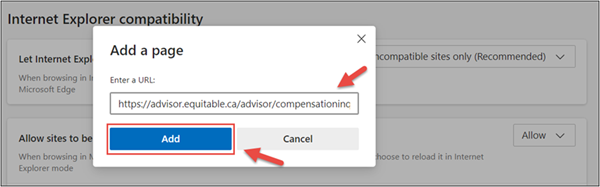
3. Enter the URL https://advisor.equitable.ca/advisor/compensationinquiry and click on ‘Add’.
4. Login into EquiNet using Microsoft Edge and you will be able to access ‘Compensation Inquiry’.
This configuration expires in 30 days, if you want to continue accessing ‘Compensation Inquiry’ after 30 days, you will need to redo the steps above.
If you encounter problems configuring, call our support line at 1.800.722.6615 ext. 8888 - II - Large case markets
- Large case markets
- Individual Wealth case studies
- [pdf] Activate your group benefits account
-
Request standard in-force illustrations with the click of a button
At Equitable®, we are making continuous improvements to our advisor and client services. We are excited to share an upcoming enhancement.
What’s new?
Beginning on August 15, 2024 , you and your clients will be able to request standard, current in-force illustrations—at any time—for your clients’ whole life and universal life policies with the click of a button.
Currently, standard in-force illustrations for whole life and universal life policies are autogenerated only on policy anniversaries. These in-force illustrations will no longer be autogenerated after August 15, 2024.
Please note: For specialized illustrations—such as those with segregated funds, D2000/D2000+ policies, policies where the insured’s age falls outside existing illustration parameters, or policies that were originally from Clarica—you will still need to use the in-force illustration request form for whole life or universal life policies.
How do I access this?
You can request an in-force illustration by logging into EquiNet® and going to the Policy Details page via Policy Inquiry. Under the Coverage tab, you will now see a button called Inforce Illustration Request. Click the button to request the illustration. Learn more about how to access here.
-
2025 Holiday hours Individual Insurance
Thank you for your trust and partnership with Equitable. Wishing you a joyful holiday season and a successful year ahead.
Client Care Centre holiday hours
Dec 24, 2025: 8:30 a.m. – 3:00 p.m. ET
Dec 25–26, 2025: CLOSED
Dec 29–31, 2025: 8:30 a.m. – 7:30 p.m. ET
Jan 1, 2026: CLOSED
Individual Insurance deadlines
• Underwriting evidence due: Dec 10, 2025
• Final settle documents due: Dec 22, 2025
• Policy settlement by: Dec 30, 2025
Field Payroll
• Second last pay period: Dec 17–23, 2025 (Statements Dec 24)
• Last pay period: Dec 24–31, 2025 (Statements Jan 2, 2026)
• First pay of 2026: Jan 1–6, 2026 (Statements Jan 7)
Note: All requirements must be received by Head Office by the above dates to guarantee year-end settlement. Late submissions will be processed as quickly as possible, but settlement by year-end cannot be guaranteed.
Looking for Individual Wealth holiday hours? Please click here.
- Chinese Markets