

Site Search
766 results for browse now MAKEMUR.COM early release from jail payment options
- [pdf] Invest with Equitable
-
Start a Conversation with EZstart – Now Available for Equimax Wealth Accumulator
Looking for an easy way to explain insurance? We have a digital tool to do just that!
Start a Conversation with EZstart™
EZstart helps to commence those initial client conversations. Think of it like a digital brochure: you start a conversation about life goals, enter a few details - and within a few clicks - get a quick quote on your phone or tablet instantly.
We have a NEW EZstart for Equimax Wealth Accumulator® available. Go to the EZstart for Equimax Wealth Accumulator now.
Don’t forget about our other EZstart tools that are available for you. Learn more.
® and TM denote trademarks of The Equitable Life Insurance Company of Canada. -
Most employers staying the course on benefits during COVID-19
With businesses suffering hardship due to COVID-19, employers are turning to you for advice on their benefits plans during these difficult times. We’ve received numerous questions from advisors about changes our clients are making to their plans during this crisis.
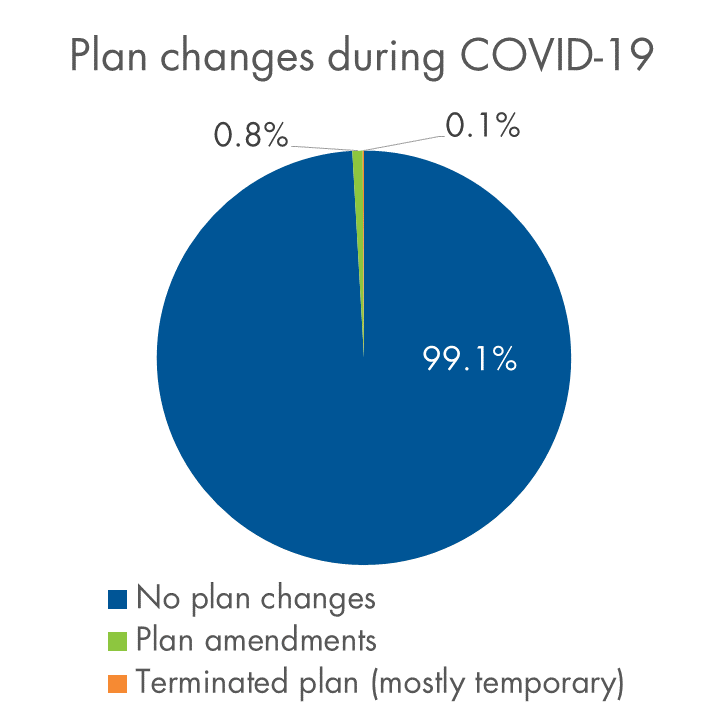
So far, the vast majority of clients are standing pat and taking a wait-and-see approach. Plan amendments have been the exception – fewer than 1% of our clients have made COVID-19-related amendments as of mid-April. Almost all are clients with fewer than 50 lives.
We know that many of our clients have experienced layoffs, but hardly any have cancelled benefits. Fewer than 0.1% have terminated benefits to date.
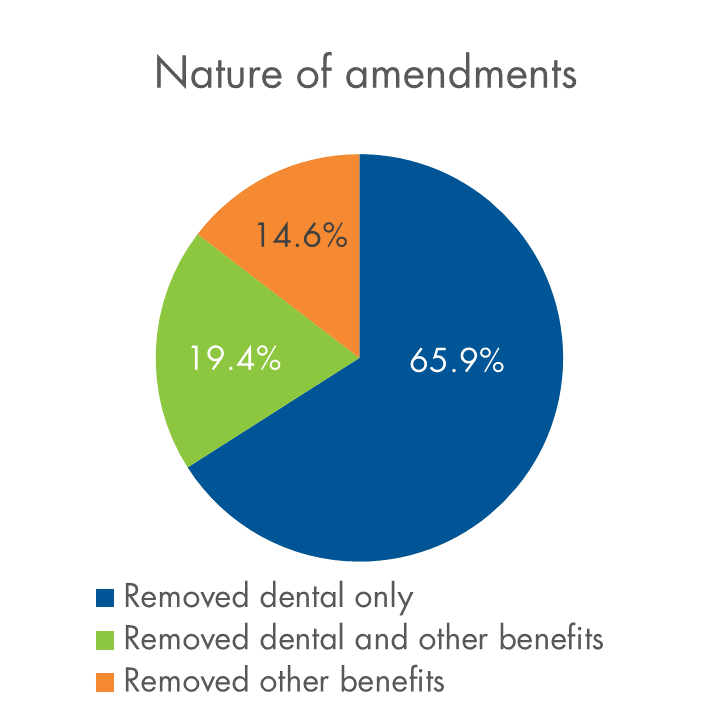
Below is a snapshot of plan amendments and terminations relative to our overall block, and an overview of the types of amendments we’re seeing.
COVID-19-related plan changes on Equitable Life’s block of businessAs of April 15, 2020
Have clients who need to make a change?
We know this is a difficult time for Canadian employers. If you have a client who needs to make a change to their plan, please contact your Group Account Executive or myFlex Sales Manager. We have a range of options to help them manage, and changes can be made quickly. The average turnaround time for COVID-19-related amendments is currently about four days.
We’re happy to work with each employer to understand the options that suit their specific situation best.
- About
- [pdf] myFlex - How it works, what to consider
- About
-
Manage more details within Contract Delivery for New Business applications
We are excited to announce further enhancements to our eDelivery process to empower you, the advisor, the ability to manage client details more easily within Contract Delivery.
Effective January 15, 2022, advisors will need to create a Password within Contract Delivery when choosing “eDelivery” as the contract delivery method and provide the password to the client to use as their password:
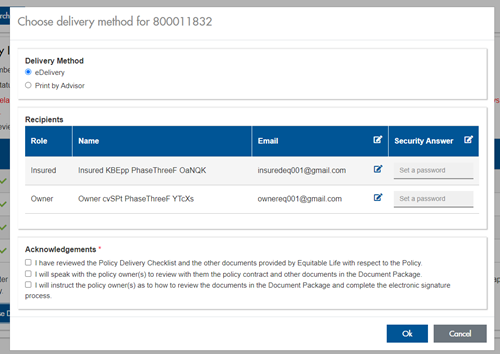
The Password must be between 4 and 100 alpha/numeric characters, and cannot be the Policy number. For multiple signers the password (and email address) must be unique per each signer.
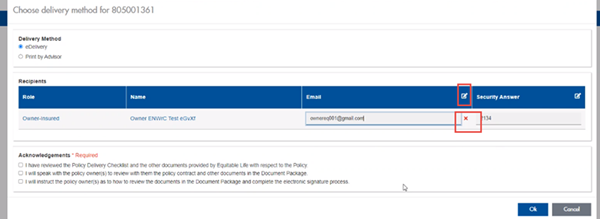
Advisors can now edit and/or update an email address within Contract Delivery, in the event of a bounce back or email change, to keep the eDelivery process moving and avoid delays in processing time. If a lock out occurs, advisors can trigger a resend of the signing email once they add a new valid email address in Contract Delivery. Simply click the pencil icon beside the Email field to enter the valid email address:
Another new feature- in the event a client has declined, the advisor will get an email from Equitable Life®. Click through to EquiNet® within the email to view the message within Contract Delivery that the client provided as the reason for decline under a new “Declined Details” section. This enables you to connect with the client to proceed with the sale by discussing the reasons for decline with them directly.
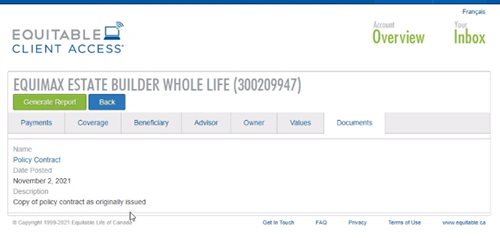
Also new for clients with this enhancement, policy owners of a policy created after January 15 will be able to see a PDF copy of their policy within client access. Note: this PDF copy is as the policy was originally issued.
Resources: -
The value of Equitable Life’s EZcomplete online application for Pivotal Select
Necessity is the mother of invention. And COVID-19 has taken Equitable Life’s® EZcomplete® online application to the next level. Prior to the pandemic, EZcomplete was touted as being convenient and easy to use. Well, it is. But now…it is so much more.
Whether secure in an office or safe at home, EZcomplete’s non face-to-face capabilities include an alternative to physical verification. EZcomplete simply requires verification of ID using a third-party service provider. The third-party service provider completes the verification behind the scenes using information that was already required to complete an application. By removing the physical ID requirements, the ID verification process has been automated and simplified.
EZcomplete’s electronic signature functionality is also easy and secure. To enable a remote signature, your client just provides an e-mail address. Your client will receive a link and security code that you provide. The client enters the code, reviews the application and e-signs the documents.
Step by step directions ensure you have the right details without any confusing or unnecessary questions. Highlighted fields alert you to any missing information, eliminating any extra work or effort. The immediate processing also helps make it an attractive resource.
Whether selling segregated funds face to face or from the comfort of home, Equitable Life’s EZcomplete online application and Pivotal Select™ segregated fund line up provide the solution for even the most rattled and weary investor. Learn more, visit EquiNet or contact your Regional Investment Sales Manager.
-
Savings & Retirement Policy and Procedure updates regarding Electronic Signatures
We have updated our policies and procedures regarding electronic signatures in the Savings and Retirement department. We are now able to accept electronically signed documents, from all major third-party signing vendors.
Including esign@equitable.ca as a non-signing reviewer is the preferred method as it ensures the security embedded documents are accurately and immediately available for Equitable. We will be automatically notified when signing is complete and will download eSigned forms immediately for processing. Including esign@equitable.ca as a non-signing reviewer is secure, quick, and efficient. Documents no longer need to be emailed to us – eSigned documents are sent directly to us once all signatures are completed, therefore you do not need to notify us once the documents are signed.
When esign@equitable.ca is not used to submit electronically signed documents, the following criteria are required:- The original signed form and audit trail with all the security features intact
- The email address used to sign must match what is in our files (as provided on the application, for electronic policy delivery or through previous communication). If an email address has changed, or we don’t have an email contact for the signer, we will follow up for confirmation.
A guide on how to use esign@equitable.ca can be found here.
Please note that Equitable does not accept digital signatures (images or fonts of a signature which are not stamped).
Date posted: June 13, 2024 -
Things keep getting EZer with Equitable and EZtransact!
Equitable® continues to make great strides with our digital self-serve tool, EZtransact®. To keep this momentum, we’ve given EZtransact a fresh new look and feel, with additional transaction management changes and a new dashboard to enhance your online transaction experience! This refresh embraces our new brand, as we continue to focus on making it easier for you to do business with us.
What’s new with this update?
New dashboard for client search- The existing client search screen has been replaced with a new user-friendly dashboard.
- Upon accessing EZtransact, all contracts associated with the user’s EquiNet ID will be displayed.
- Users can refine the results and search by client name or contract number.
- Transactions submitted through EZtransact within the last 12 months are available, including their status.
- Transactions that have received all signatures will now allow the user to download a copy of the signed request and any supporting documents uploaded by the user.
- Transactions that are pending client signatures will allow the user to manage and track the e-signature process:
- Signing packages can be resent to clients who have not completed their e-signature.
- Clients can be unlocked through the dashboard if locked out due to too many invalid attempts.
- Advisor and dealer/MGA stakeholders have been removed from signing information and review screens.
- Users are no longer required to provide an email address for the dealer/MGA to submit a transaction.
Date published: October 3, 2024