

Site Search
743 results for access here PROBLEMGO.com Need a bondsman who takes payment plans for release today
- 2026 Elite Advisor Program
- [pdf] Equitable GIF Fund Facts
- [pdf] A closer look at life insurance
-
Equitable Life Group Benefits Bulletin - September 2020
In this issue:
Enhancements to Equitable EZClaim Mobile
New reports available on EquitableHealth.ca* Indicates content that will be shared with your clients.
Enhancements to Equitable EZClaim® Mobile*
We’ve updated our Equitable EZClaim mobile app to process vision claims faster, to provide a new option for submitting documents and to increase password security.
Faster vision claims processing and payment
Equitable Life now provides faster processing of vision claims submitted via EZClaim Mobile.
This means plan members can find out the status of their vision claim almost instantaneously. And, for approved claims, they will receive payment even sooner – often in as little as 24 hours.
In order to allow for instant processing and faster payment, plan members will be prompted to enter some additional information, including their practitioner’s name, the date of the expense, the type of expense and amount of the expense when submitting their claims for these services.
Equitable Life plan members can submit all vision claims via Equitable EZClaim, including coordination of benefits and Health Care Spending Account claims.
Submit documents from a mobile device
We have added our Document Submission tool to EZClaim Mobile so plan members can conveniently submit documents directly from their mobile device. Applications, change forms, statement of health forms and more can all be easily uploaded whenever and wherever they are.
Improved security with stronger passwords
To help you, your clients and plan members better protect personal information, we have increased the maximum length of passwords for both EZClaim Online and EZClaim Mobile from 12 to 32 characters. This longer character limit makes it easier to create stronger and more secure passwords.
There is no change for plan members, plan administrators or advisors. All existing passwords will continue to function. However, if you choose to update your password you will now be able to choose longer passwords or passphrases.
Why should I change my password?
Changing your password frequently helps keep your information safe. The longer and more random the password, the more secure it is. To improve security even more, a passphrase is recommended.
A passphrase is a series of words or other text used like a password. Because it is much longer, a passphrase is more secure. Although the words in the phrase may be meaningful to you and easy to remember, they can be random enough that the full phrase is difficult for someone else to guess. It’s even better if you use numbers or other characters in your passphrase.
Your passphrase should be:
- Long enough to be hard to guess;
- Not a famous quotation;
- Easy to remember and type; and
- Not used in multiple places.
To change your password:
- Log in to EquitableHealth.ca
- Click on My Information > User Profile
- Click Edit
- Confirm your information and enter your new password
- Click Save
We will be announcing this enhancement to plan members on EquitableHealth.ca.
New reports available on EquitableHealth.ca*
Plan administrators and advisors with reporting access can now download three additional reports any time via the plan administrator and advisor websites on EquitableHealth.ca:
- Premium and Tax – This report provides a breakdown of premiums and taxes paid per plan member for any specific time period for all applicable benefits.
- Occupation and Earnings – This report provides current plan member earnings and occupation information and gives plan administrators an efficient way to report updates to us.
- Employee listing – This report lists all plan members’ information, including name, certificate number, date of birth, province, occupation and salary, as well as benefit coverage currently in place and HCSA allocations.
These reports can be downloaded in Excel format for easy updating, filtering or sorting.
For more information, please contact your Client Relationship Specialist.
*Indicates content that will be shared with your clients
- [pdf] Get started online
-
Can’t meet in person? EZcomplete is an EZ way to meet online
Instead of canceling your meeting, why not meet online instead? Our EZcomplete® application makes it easy to process your non-face-to-face applications and do business with Equitable Life.
EZcomplete is available on Pivotal Select™ segregated funds and all life products – Term, Whole Life, CI and Universal Life – and allows for the signing process to change from in-person to non face-to-face at the end of the application, despite how it was started. This gives you and your clients the option to easily and efficiently connect remotely.
How does it work?
EZcomplete gives you the option to conduct your non face-to-face business easily and quickly, enabling your clients to provide their signature remotely on their own device. You simply need to enter their email address and provide them with a secret passcode to securely access the documents to review and sign.
There is no limit on the face amounts or product options and the time to settle is reduced when using the application. It is a flexible, intuitive tool to use, and helps keep business on track now that many clients and advisors are opting for more social distance.
For Life Advisors, please refer to the New Business and Underwriting page on Equinet for details about non-face-to-face delivery. -
Manage more details within Contract Delivery for New Business applications
We are excited to announce further enhancements to our eDelivery process to empower you, the advisor, the ability to manage client details more easily within Contract Delivery.
Effective January 15, 2022, advisors will need to create a Password within Contract Delivery when choosing “eDelivery” as the contract delivery method and provide the password to the client to use as their password:
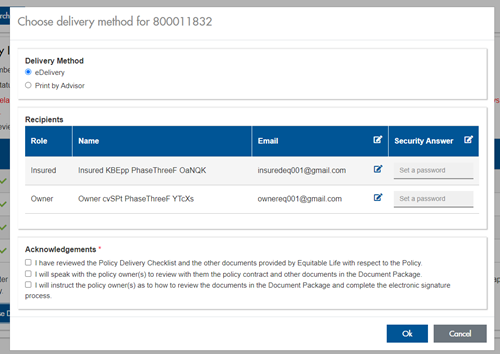
The Password must be between 4 and 100 alpha/numeric characters, and cannot be the Policy number. For multiple signers the password (and email address) must be unique per each signer.
Advisors can now edit and/or update an email address within Contract Delivery, in the event of a bounce back or email change, to keep the eDelivery process moving and avoid delays in processing time. If a lock out occurs, advisors can trigger a resend of the signing email once they add a new valid email address in Contract Delivery. Simply click the pencil icon beside the Email field to enter the valid email address:
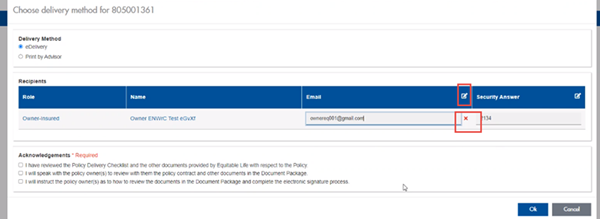
Another new feature- in the event a client has declined, the advisor will get an email from Equitable Life®. Click through to EquiNet® within the email to view the message within Contract Delivery that the client provided as the reason for decline under a new “Declined Details” section. This enables you to connect with the client to proceed with the sale by discussing the reasons for decline with them directly.
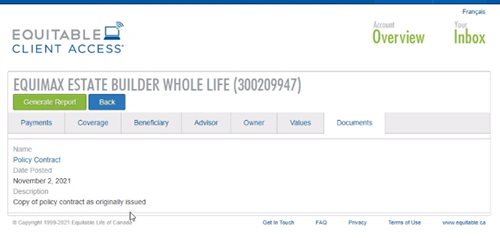
Also new for clients with this enhancement, policy owners of a policy created after January 15 will be able to see a PDF copy of their policy within client access. Note: this PDF copy is as the policy was originally issued.
Resources: -
New secure encryption process for outstanding Equitable S&R business requirements
The Equitable® Savings and Retirement Operations team is improving how they send secure email messages to advisors. These emails are sent when there are outstanding requirements for an application or missing information for requests.
Previously, advisors had to manually password protect or unlock PDF documents. This caused delays and difficulties for recipients. The new encryption process will remove that confusion and make it easier for advisors to send and receive secure, encrypted messages.
Advisors will now receive secure, encrypted emails from the QA annuity operations mailbox. These emails will use an encrypt option to protect personal client information, such as attachments or requests for personal documents. Recipients will get an email with a subject line saying they have a secure private message. They will need to sign in to view the message or choose to get a one-time passcode (OTP).
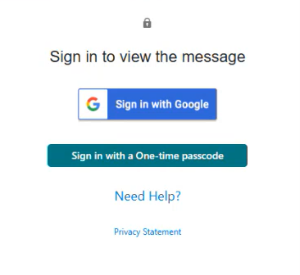
Please ensure to check the SPAM folder for the OTP option as it will expire in 15 minutes. Enter the OTP in the secure message
portal.
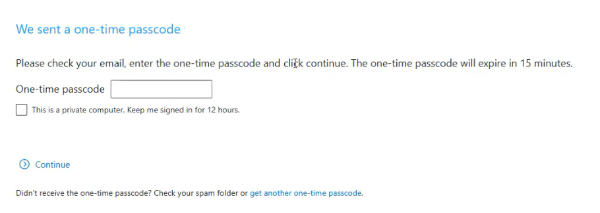
Emails are sent in both English and French, with automatic translation based on browser settings. Recipients must click the view button to access the message in the secure web portal where they can see the encrypted attachment.
Make sure to click Reply in the top right corner of the encrypted message to keep communications within the secure portal.
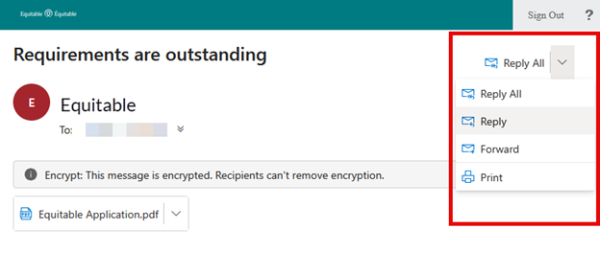
For more information or assistance, please contact your Director, Investment Sales.
Date posted: May 22, 2025 -
New online course available
Boost your knowledge and earn CE Credits
Looking to deepen your understanding of Universal Life insurance and get a new CE Credit?
Equitable is excited to offer a new addition to our online learning center: The mechanics of Universal Life. Whether you are new to the concept or looking to refresh your expertise, this course will help provide the knowledge you need to start conversations with clients.
Our CE credit courses allow you to learn at your own pace and earn CE credits quickly and easily.
Available Courses:
• The mechanics of Universal Life *NEW*
• Introduction to Whole Life Insurance
• Participating Whole Life for the Children’s Market – A head start for tomorrow
• Path to Success - Expert Advice on Navigating CI Sales
• Ensuring a Compliant, Needs-based Insurance Sale
• Where UL Fits in your product portfolio
• Building your business with Critical Illness insurance
• Harness the Power of Whole Life Cash Value
A few important notes before you get started:
• The programs are hosted on Teachable: https://equitable-life-education.teachable.com
• Username: Please use your email address that you are contracted with
• Password: Equitable
• Please use Google Chrome to access the courses
You can earn CE credits right away when you complete these courses.
Start earning CE Credits!
Check out the individual insurance online learning centre on EquiNet to stay up to date on new courses.
All courses are accredited by Alberta Insurance Council, Insurance Council of Manitoba, The Institute for Advanced Financial Education, and Chambre de la sécurité financière*.
Questions?
Contact your local wholesaler.
Are you having trouble logging in?
Email equitableiimarketing@equitable.ca for assistance. -
Boost your knowledge and earn CE credits
Need continuing education credits?
Equitable is happy to offer online courses focusing on insurance. The courses allow you to learn at your own pace and earn CE credits quickly and easily. You can earn CE credits right away when you complete these courses. All courses are accredited by Alberta Insurance Council, Insurance Council of Manitoba, The Institute for Advanced Financial Education, and Chambre de la sécurité financière*.
Existing courses:
1. Building your business with critical illness insurance
2. Ensuring a Compliant, Needs-based Insurance Sale
3. Harness the power of whole life cash value
4. Introduction to whole life insurance
5. Path to Success - Expert Advice on Navigating CI Sales
6. Participating whole life for the children's market: A head start for tomorrow
7. The mechanics of universal life
8. Where UL Fits in your Product Portfolio
A few important notes before you get started:
• The programs are hosted on Teachable: https://equitable-life-education.teachable.com/
• Username: Please use your email address that you are contracted with
• Password: Equitable
• Please use Google Chrome to access the courses
Start Earning CE Credits!
Check out the individual insurance online learning centre on EquiNet to stay up to date on new courses.
Questions?
Contact your local wholesaler.
Are you having trouble logging in or accessing certificates?
Email equitableiimarketing@equitable.ca for assistance.
*Please select the course with “QC credits” in the title for La Chambre credits.