

Site Search
594 results for access source MAKEMUR.COM Paying to get out of pretrial detention Alcatraz Federal Penitentiary
-
February 2026 eNews
In this issue:
Save time and add protection — log in to your Equitable account with a passkey*
New form offers a simpler way for clients to submit special claims*
2026 dental fee guide updates*
*Indicates content that will be shared with your clients.
Save time and add protection — log in to your Equitable account with a passkey
Passkeys offer an easier, faster way for you and your clients to log in to EquitableHealth.ca®. They also add an extra layer of account protection.
Easy set-up. Secure access.
If you haven’t created a passkey yet – now is a great time. You can create one on both your computer and mobile device.
When you set up a passkey on your mobile device, you’ll use biometrics –your face or fingerprint–to log in. This verifies your identity, so only you can access your account on your device.
Setting up a passkey on your computer is slightly different. You may have more options to verify your identity, such as biometrics, a personal identification number (PIN) or a password.
To learn more about passkeys, visit Equitable.ca/effortless.You hold the ‘key’ to further protecting your account
You’re the only one who can create passkeys. We can’t create them for you.
The set-up process is quick and easy. The videos below guide you through creating a passkey on your mobile device and computer.


If you use the same email address to log in to your accounts on EquitableHealth.ca, EquiNet® and Equitable Client Access®, you can use the same passkey. Equitable Client Access is our secure site for Individual Insurance and Individual Wealth clients.
New form offers a simpler way for clients to submit special claims
Equitable has simplified the special claim process for clients by introducing an interactive Special Claims Services form.
The new form, which replaces our previous online calculator, automatically calculates the fees and taxes based on province, so clients can clearly see the total of a special claim – and how much they need to pay.
What is a special claim?
A plan sponsor can submit a claim for Special Claims Services – sometimes referred to as Cost Plus – to pay for a plan member’s health and dental expenses that are either not included or not covered in full by their group benefits plan.
When submitting the claim, the plan sponsor also pays us for the cost of the expense, plus a service fee and taxes. Then, we reimburse the plan member or another designated payee.
Anything eligible under a health-care spending account (HCSA) is eligible under Special Claims Services. Our HCSA list of eligible expenses matches the Canada Revenue Agency’s list of eligible medical expenses that can be claimed on a tax return.
When a plan sponsor submits a special claim, there is no impact to the claims experience, pooling or taxes. Given that every situation is unique, however, the plan sponsor is responsible for consulting with an accountant on tax impacts and/or claim limitations that may apply.
For more information on Special Claims Services, check out this brochure or email SpecialClaimsServices@equitable.ca.
2026 dental fee guide updates
Several Canadian dental associations have published their 2026 fee guides. We use these guides to help set benefits reimbursement limits for dental procedures.
For your reference, here is the list of this year’s fee increases for general practitioners.
Source: Canadian Life and Health Insurance Association (CLHIA) 2026 Dental Fee Increase Guide
If you have any questions, please contact your Group Account Executive. - Client Access
-
Equitable Life Group Benefits Bulletin – November 2021
In this issue:
- Deadline to opt out of New Brunswick biosimilar program*
- Web Reports Quick Reference Guide now available for plan administrators*
- Reminder: Review manual allocations for HCSAs and/or TSAs*
- Help your clients take advantage of our convenient digital options*
Reminder: Deadline to opt out of New Brunswick biosimilar program*
Earlier this year, we announced via eNews that on Feb. 1, 2022, we are ending coverage for some originator biologic drugs in New Brunswick in response to the province’s Biosimilar Initiative.* These changes will help protect your clients’ plans from additional drug costs while still providing access to equally safe and effective biosimilars.
Do my clients need to take any action?
No action is required if employers want to have the originator biologics excluded from their plan. Plan members taking these targeted originator biologics will be contacted directly to allow them ample time to transition to the biosimilar. Any cost savings associated with the change will be factored in at renewal.
All groups, except myFlex clients, who wish to opt out of this change and maintain coverage of these originator biologics for existing claimants in New Brunswick can submit a policy amendment. Amendments must be submitted no later than Nov. 30, 2021.
Advisors with myFlex Benefits clients who wish to maintain coverage of these originator biologics for New Brunswick plan members should speak to their myFlex Sales Manager to confirm their eligibility to opt out of this change.
Groups that opt out of this change are also opting out of any future changes to our New Brunswick biosimilar initiative. This means that their drug plans will continue to cover any additional originator biologics for which we subsequently end coverage as part of the biosimilar program.
Questions?
If you have a question that isn’t answered here, please contact your Equitable Life Group Account Executive or myFlex Sales Manager.
* The list of affected drugs or conditions is dynamic and may change.Web Reports Quick Reference Guide now available for plan administrators
A Web Reports Quick Reference Guide is now available for plan administrators on EquitableHealth.ca. This new guide offers a listing of our newest reports available on the plan administrator web. It also provides instructions for plan administrators outlining how to pull the report using the plan administrator portal.
The guide is available under the Quick Links section on both the advisor and plan administrator portals on EquitableHealth.ca.Reminder: Review manual allocations for HCSAs and/or TSAs*
If your client’s Health Care Spending Account (HCSA) and/or Taxable Spending Account (TSA) has manual allocations, they need to allocate these amounts to plan members each year. Please review all your plan members’ profiles on EquitableHealth.ca to ensure they have received their allocation(s) for the current benefit year.
If your clients have Plan Administrator update access on EquitableHealth.ca, they can update these amounts online by doing the following:- Select “View certificate”
- Select “Health Care Spending Account” or “Taxable Spending Account”
- Select “Update Allocation” in Task Center
- Enter amount in “Revised Allocation Amount”
- Override Reason – “Plan Administrator Request”
- Select “Save”
- Select “Reports”
- Select “New”
- Select “Next”
- Select “HCSA” or “TSA Totals by Plan Member”
- Select “Next”
- Enter end date of “12/31/2020”
- Select “Next”
- Select “Finish”
- View “Report”
Help your clients take advantage of our convenient digital options*
We have several digital options available to make it easier for your clients to do business with us and for their plan members to access and use their benefits plan. Over 71% of plan administrators are managing their plan online and 78% of plan members are already using our digital tools.
For plan administrators:- Online Plan Member Enrolment tool – allows all groups to add new plan members without the need for paper forms
- Plan Administrator Portal (EquitableHealth.ca) – plan administrators can easily manage their plan anytime and anywhere
- Digital Welcome Kits – personalized welcome kits are delivered to plan members via email
- Easy automated payments – plan administrators can avoid missed payments by setting up pre-authorized debit or electronic funds transfer
- Plan Member Portal (EquitableHealth.ca) – plan members get secure, 24/7 access to their claims history, coverage details and health and wellness resources
- Electronic Claim Payments and Notifications – plan members can get claim updates sooner in their email inbox and payments right into their bank account
- EZClaim Mobile App – submitting claims from a mobile device is fast, easy and secure
- Digital Benefits Cards – plan members no longer have to dig through their wallet – they can download their benefits card on their mobile device
We’ve created a brochure and a video guide to help plan members access and use their digital resources. For further assistance, plan members can visit www.equitable.ca/go/digital. They can also contact our Web Services team at 1.800.265.4556 ext. 283 or groupbenefitsadmin@equitable.ca. - [pdf] Claimant Statement for Individuals
-
COVID-19 testing: Find the information you need
This news item has also been posted to the plan administrator and plan member sections of EquitableHealth.ca
The Ontario government recently announced it has expanded access to COVID-19 testing to include select pharmacies throughout the province. As the pandemic continues, it’s important to know how to access testing if you’re experiencing signs and symptoms of COVID-19 or suspect you have been exposed to the virus.
Guidelines for who should get tested and how to access testing vary across the country, so it can be difficult to know what applies in your jurisdiction.
To help make it easier, we’ve provided links to COVID-19 testing resources for each province and territory. The resources include self assessments, guidelines for who should get tested, how to access testing, and testing locations.
- [pdf] Benefits of segregated funds in a TFSA
- About
-
Manage more details within Contract Delivery for New Business applications
We are excited to announce further enhancements to our eDelivery process to empower you, the advisor, the ability to manage client details more easily within Contract Delivery.
Effective January 15, 2022, advisors will need to create a Password within Contract Delivery when choosing “eDelivery” as the contract delivery method and provide the password to the client to use as their password:
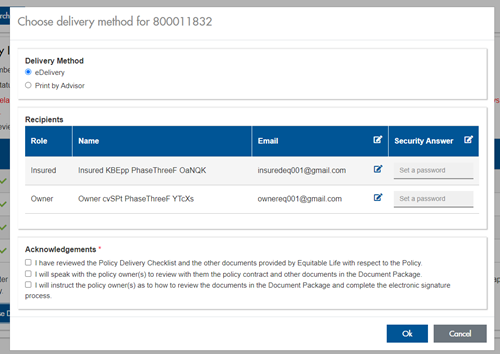
The Password must be between 4 and 100 alpha/numeric characters, and cannot be the Policy number. For multiple signers the password (and email address) must be unique per each signer.
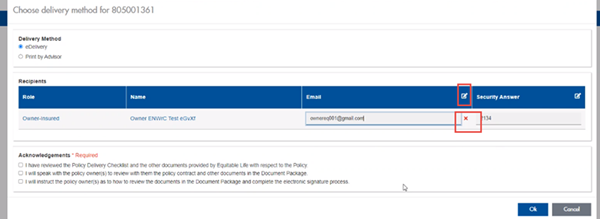
Advisors can now edit and/or update an email address within Contract Delivery, in the event of a bounce back or email change, to keep the eDelivery process moving and avoid delays in processing time. If a lock out occurs, advisors can trigger a resend of the signing email once they add a new valid email address in Contract Delivery. Simply click the pencil icon beside the Email field to enter the valid email address:
Another new feature- in the event a client has declined, the advisor will get an email from Equitable Life®. Click through to EquiNet® within the email to view the message within Contract Delivery that the client provided as the reason for decline under a new “Declined Details” section. This enables you to connect with the client to proceed with the sale by discussing the reasons for decline with them directly.
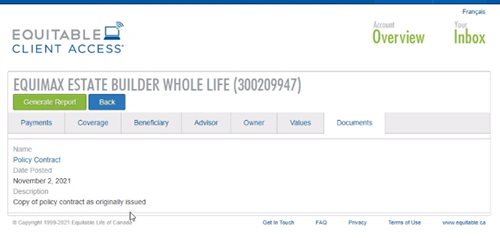
Also new for clients with this enhancement, policy owners of a policy created after January 15 will be able to see a PDF copy of their policy within client access. Note: this PDF copy is as the policy was originally issued.
Resources: -
Boost your knowledge and earn CE credits
Need continuing education credits?
Equitable is happy to offer online courses focusing on insurance. The courses allow you to learn at your own pace and earn CE credits quickly and easily. You can earn CE credits right away when you complete these courses. All courses are accredited by Alberta Insurance Council, Insurance Council of Manitoba, The Institute for Advanced Financial Education, and Chambre de la sécurité financière*.
Existing courses:
1. Building your business with critical illness insurance
2. Ensuring a Compliant, Needs-based Insurance Sale
3. Harness the power of whole life cash value
4. Introduction to whole life insurance
5. Path to Success - Expert Advice on Navigating CI Sales
6. Participating whole life for the children's market: A head start for tomorrow
7. The mechanics of universal life
8. Where UL Fits in your Product Portfolio
A few important notes before you get started:
• The programs are hosted on Teachable: https://equitable-life-education.teachable.com/
• Username: Please use your email address that you are contracted with
• Password: Equitable
• Please use Google Chrome to access the courses
Start Earning CE Credits!
Check out the individual insurance online learning centre on EquiNet to stay up to date on new courses.
Questions?
Contact your local wholesaler.
Are you having trouble logging in or accessing certificates?
Email equitableiimarketing@equitable.ca for assistance.
*Please select the course with “QC credits” in the title for La Chambre credits. -
There is still time for your clients to contribute to their Tax-Free Savings Account
If you have clients that have not contributed to their Tax-Free Savings Account (TFSA) this year, great news… there is still time!
You know that an Equitable Life® TFSA is a great way to save. Each year residents of Canada who are at least 18 years of age are eligible to invest up to $6,000* into their TFSA, in addition to any previously unused contribution room. Deposits made into a TFSA are made with after-tax dollars. This means that withdrawals can be made at any time on a tax-free basis.
Interested in increasing an existing Pre-Authorized Debit (PAD) TFSA deposit?
Clients with an existing PAD (or who had one in the previous six months), can go online to make any adjustments to a scheduled deposit to their TFSA. Clients can simply login to Equitable Life’s Client Access®. Client Access is Equitable’s secure online client site that connects clients to tools and policy information.
Consider a one-time deposit or set up a PAD?
To get started with one-time deposit, clients simply log in to their online bank account and select the option to add a new bill/payee and search for Equitable Life Savings Plan. The Equitable Life savings plan policy number will serve as the account number.
Clients that complete their deposits using online banking do not have to worry about mailing a cheque or missing the deadline. Deposits are applied based on the investment direction on file.
If you have clients that would like to set up a PAD, simply complete Form #378. For details on how to submit forms during COVID-19, refer to the NEW APPLICATIONS & TRANSACTION AUTHORIZATION REQUIREMENTS webpage.
If you have any questions, please reach out to your local Regional Investment Sales Manager or Advisor Services at 1.866.884.7427 Monday to Friday, 8:30 a.m. to 7:30 p.m. ET or email savingsretirement@equitable.ca.
*The annual TFSA limit is set by Canada Revenue Agency (CRA) and is currently $6,000. Your notice of assessment will tell you if you have unused contribution room from previous years. Contributions over the maximum will be charged a monthly penalty of 1% by CRA.
® denotes a trademark of The Equitable Life Insurance Company of Canada