

Site Search
265 results for click official MAKEMUR.COM pay for clemency or pardon HMP Channings Wood
-
Changes to the Compensation Inquiry section on EquiNet
The Compensation Inquiry Section from EquiNet is only available on Microsoft Edge. Please follow the instructions below:
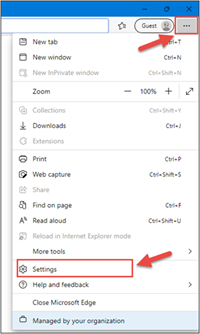
1. Open Microsoft Edge, click on the three dots in the top right corner and select ‘Settings’.
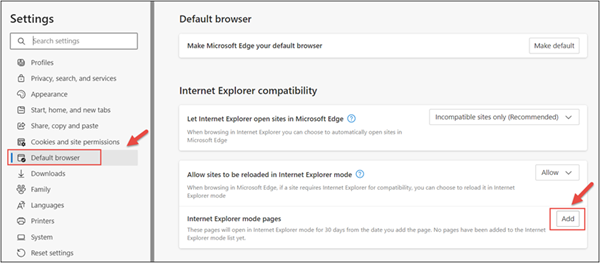
2. In the Settings menu, locate ‘Default browser’ and click on ‘Add’ in Internet Explorer mode pages.
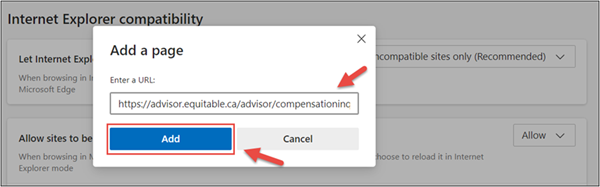
3. Enter the URL https://advisor.equitable.ca/advisor/compensationinquiry and click on ‘Add’.
4. Login into EquiNet using Microsoft Edge and you will be able to access ‘Compensation Inquiry’.
This configuration expires in 30 days, if you want to continue accessing ‘Compensation Inquiry’ after 30 days, you will need to redo the steps above.
If you encounter problems configuring, call our support line at 1.800.722.6615 ext. 8888 -
Equitable Life's COVID-19 Information Page
Get the latest news and information from Equitable Life by bookmarking this page. Check back often for updates.Click here for news related to Savings and Retirement.
-
Request standard in-force illustrations with the click of a button
At Equitable®, we are making continuous improvements to our advisor and client services. We are excited to share an upcoming enhancement.
What’s new?
Beginning on August 15, 2024 , you and your clients will be able to request standard, current in-force illustrations—at any time—for your clients’ whole life and universal life policies with the click of a button.
Currently, standard in-force illustrations for whole life and universal life policies are autogenerated only on policy anniversaries. These in-force illustrations will no longer be autogenerated after August 15, 2024.
Please note: For specialized illustrations—such as those with segregated funds, D2000/D2000+ policies, policies where the insured’s age falls outside existing illustration parameters, or policies that were originally from Clarica—you will still need to use the in-force illustration request form for whole life or universal life policies.
How do I access this?
You can request an in-force illustration by logging into EquiNet® and going to the Policy Details page via Policy Inquiry. Under the Coverage tab, you will now see a button called Inforce Illustration Request. Click the button to request the illustration. Learn more about how to access here.
- Marketing material
- Equitable and Cloud DX
- Policy Change eDelivery Scenarios
- Sales Strategies
-
Update: Improved Employee Assistance from Homewood Health
As we announced in June, we are expanding our relationship with Homewood Health to help you meet the mental health and wellness needs of your employees and their families. Beginning Oct. 1, 2019, Homewood will be the new provider of both our Employee and Family Assistance Program (EFAP) and our online health and wellness services.
Following the transition to Homewood, plan members will benefit from added features:
- Signing in to Homewood Health online allows the platform to customize content unique to your interests.
- All plan members will have access to a Health Risk Assessment to help identify health and wellness barriers.
- i-Volve, Homewood's online cognitive behavioural therapy program is available for all plan members to help them manage anxiety and depression.
Learn more about Homewood Health and how they will be providing your plan members with exceptional EFAP and online health and wellness resources.
What does the transition to Homewood mean for you and your plan members?
We will be working with you in the coming months to facilitate the transition and support your employees. Most importantly, there will be no disruption of service delivery to employees who are currently in short-term counselling with our current EFAP provider.
The transition timeline
Groups without an EFAP
Online health and wellness resources will be available through EquitableHealth.ca just as they are now. Here's what you can expect in the coming months.
September
- We will send plan administrators an email with more details about the resources available to assist in the transition, including:
- How to register for Homewood Health online
- A video orientation for plan members
October
- October 1st – plan members can access the Homewood online resources! They simply need to visit homeweb.ca/Equitable to sign up and create their unique login.
The transition timeline
Groups with an EFAP
We’ve created a helpful infographic that outlines the steps involved in the transition to the Homewood Health EFAP over the coming months. Please save or print it for easy reference. Below are some of the highlights.
August
- We will send plan administrators an email with official notice that the enrolment certificate for our current EAP provider, LifeWorks, will terminate on Sept. 30, 2019, and that Homewood Health Inc. will be our new Employee Assistance Program provider as of Oct. 1.
September
- Homewood will send you a welcome email, including how to access the EFAP, who to contact for support and where to find resources to help share the news with plan members.
- Homewood will follow up directly to answer any questions you may have.
- Homewood will begin offering orientation and training sessions for both plan administrators and plan members. These will be running throughout the fall so you can attend at your convenience.
October
- October 1st – plan members can access the Homewood EFAP and online resources! They simply need to visit homeweb.ca/Equitable to sign up and create their unique login.
- Orientation and training sessions will continue to be available for both plan administrators and plan members throughout October.
Learn More
The resources listed below answer common questions about Homewood and our EFAP transition:
If you have a question that is not addressed here, please contact your Group Account Executive or myFlex Sales Manager.
-
Equitable Life Group Benefits Bulletin – January 2022
Short-term disability coverage for plan members with COVID-19*
Please note: This announcement applies only to groups with short-term disability coverage through Equitable Life
As the COVID-19 pandemic continues, and the situation evolves, we continue to adjust our practices to ensure ongoing support for our plan members.
PCR tests no longer required for COVID-related STD claims
Some provinces have recently restricted access to COVID-19 PCR testing to only high-risk individuals. To ensure your clients' eligible plan members receive their short-term disability benefits in a timely manner, we no longer require a positive PCR test for plan members submitting COVID-19-related STD claims.
Plan members who are experiencing symptoms of COVID-19 or who have tested positive for the virus (either with a PCR test or with an at-home rapid test) and are unable to work from home should complete the Short Term Disability Plan Member COVID-19 Claim Form (#421A).
They should indicate the date of the onset of symptoms or date of their positive test result. Where applicable, they should also indicate the date they have been cleared by public health to end their self-isolation. The form includes an attestation that the information they have provided is accurate.
The employer needs to complete the Short Term Disability Employer COVID-19 Claim Form (#421B). They should indicate the expected return-to-work date according to their provincial health guidelines, or using the date provided by a public health official.
Waiting periods for COVID-related STD claims
To support your clients' plan members during the initial stages of the pandemic, we waived the STD waiting period if a plan member’s absence was due to symptoms or a diagnosis of COVID-19. Now that COVID-19 has become the “new normal,” we are returning to our standard practices and treating the virus as we would any other illness.
Effective Jan. 1, 2022, standard waiting periods will apply for COVID-related STD claims, according to the terms of the Group policy. This ensures that all plan members submitting a STD claim are treated fairly, no matter what the cause of the claim.
Eligible plan members will receive STD benefits up to a maximum of 10 days from the date of the onset of symptoms or a positive COVID-19 test result, minus the waiting period.
For example, if the plan has a five-day waiting period, and the plan member returns to work nine days after a positive test result, they would be eligible for four days of benefits payments.
If the claimant is still unwell after 10 days, then the standard Short Term Disability Claim Form (#421) needs to be completed.
If a plan member is admitted to hospital, benefits will be paid following the waiting period applicable to hospital claims. - COVID-19 Group Benefits FAQ