

Site Search
662 results for access page now MAKEMUR.com Need to hire someone to get my IRS audit to stop
- [pdf] How to access in-force illustrations
- [pdf] Your guide to Coverage2go
-
Savings & Retirement Policy and Procedure updates regarding Electronic Signatures
We have updated our policies and procedures regarding electronic signatures in the Savings and Retirement department. We are now able to accept electronically signed documents, from all major third-party signing vendors.
Including esign@equitable.ca as a non-signing reviewer is the preferred method as it ensures the security embedded documents are accurately and immediately available for Equitable. We will be automatically notified when signing is complete and will download eSigned forms immediately for processing. Including esign@equitable.ca as a non-signing reviewer is secure, quick, and efficient. Documents no longer need to be emailed to us – eSigned documents are sent directly to us once all signatures are completed, therefore you do not need to notify us once the documents are signed.
When esign@equitable.ca is not used to submit electronically signed documents, the following criteria are required:- The original signed form and audit trail with all the security features intact
- The email address used to sign must match what is in our files (as provided on the application, for electronic policy delivery or through previous communication). If an email address has changed, or we don’t have an email contact for the signer, we will follow up for confirmation.
A guide on how to use esign@equitable.ca can be found here.
Please note that Equitable does not accept digital signatures (images or fonts of a signature which are not stamped).
Date posted: June 13, 2024 -
Manage more details within Contract Delivery for New Business applications
We are excited to announce further enhancements to our eDelivery process to empower you, the advisor, the ability to manage client details more easily within Contract Delivery.
Effective January 15, 2022, advisors will need to create a Password within Contract Delivery when choosing “eDelivery” as the contract delivery method and provide the password to the client to use as their password:
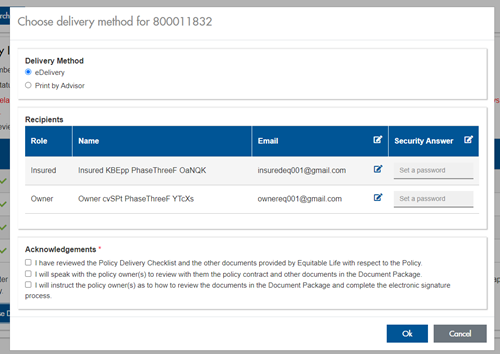
The Password must be between 4 and 100 alpha/numeric characters, and cannot be the Policy number. For multiple signers the password (and email address) must be unique per each signer.
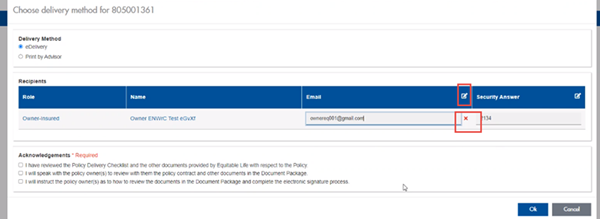
Advisors can now edit and/or update an email address within Contract Delivery, in the event of a bounce back or email change, to keep the eDelivery process moving and avoid delays in processing time. If a lock out occurs, advisors can trigger a resend of the signing email once they add a new valid email address in Contract Delivery. Simply click the pencil icon beside the Email field to enter the valid email address:
Another new feature- in the event a client has declined, the advisor will get an email from Equitable Life®. Click through to EquiNet® within the email to view the message within Contract Delivery that the client provided as the reason for decline under a new “Declined Details” section. This enables you to connect with the client to proceed with the sale by discussing the reasons for decline with them directly.
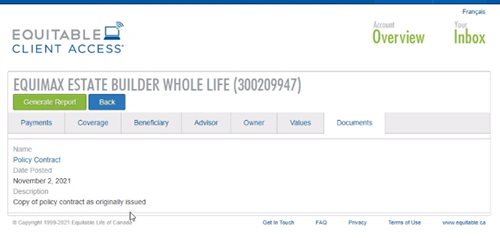
Also new for clients with this enhancement, policy owners of a policy created after January 15 will be able to see a PDF copy of their policy within client access. Note: this PDF copy is as the policy was originally issued.
Resources: -
EquiLiving offers more options to clients facing a covered Critical Illness condition
Consider these statistics…1 in 2 Canadians will develop cancer in their lifetimes1. They’re just numbers…until the day someone you know is diagnosed, someone who didn’t see it coming. Then it becomes very real - no longer incidence statistics, but costs. Today more people than ever are surviving and living with not only just the physical, but also the financial effects of their illness.
We’re there to help when illness strikes
NEW! EquiLiving® plans and riders have recently been enhanced including:
● 20 pay options with coverage to age 75 or coverage for life
● Support from Cloud DX to help monitor a client’s well-being from treatment to recovery.
● Added Acquired Brain Injury as a covered critical condition
● 30-day survival period removed for all non-cardiovascular covered conditions
● No age restriction to claim for Loss of Independent Existence (LOIE)
● EquiLiving Benefit now pays the higher of the EquiLiving Benefit or the Return of Premium Rider Benefit (not including Return of Premium on Death)
● And so much more …
Learn more
● CI product enhancement video
● Visit our launch event page with product change details and more
● Marketing Materials
Please contact your Regional Sales Manager for more information.
1 www.cancer.ca
-
Equitable Life Group Benefits Bulletin – October 2020
In this issue:
- Group benefits enrolment just got a lot easier*
- Critical Illness added to myFlex Benefits® selection tool**
- ASO dental available down to 3 lives
- QDIPC updates terms and conditions for 2021*
*Indicates content that will be shared with your clients
**Indicates content that will be shared with myFlex Benefits groups onlyGroup benefits enrolment just got a lot easier*
Our Online Plan Member Enrolment tool now makes it simple to add new employees to the benefits plan.
Enrolling new plan members can be overwhelming – for both you, your clients and their employees. It’s challenging to ensure plan members complete the necessary paperwork before the enrolment deadline, and time consuming to manually load new members.
That’s why we’re updating our plan member enrolment experience. Beginning November 2nd, 2020, all Equitable Life groups will be able to easily enrol new employees in the benefits plan with our Online Plan Member Enrolment Tool.
Benefits of Online Plan Member Enrolment
Our Online Plan Member Enrolment tool offers a more secure and efficient option to traditional paper enrolment. Employees are able to enrol in their benefits plan in just minutes from their computer or mobile device.
The user-friendly interface was built with the plan member in mind. They can easily enter all their enrolment information, including dependent details, banking information for direct deposit of claim payments and details for coordination of benefits. They can even designate their beneficiary electronically.
The online enrolment tool also lessens the effort for plan administrators to onboard new hires. The tool reduces errors and rework that can occur due to spelling mistakes or missing information on paper forms. And the days of chasing plan members for their paper enrolment forms are gone. Once they enter a few employee details, our system will automatically send out an email to each plan member, inviting them to enrol in their benefits program. And there will be no need to send reminders or follow up with employees about their benefits enrolment. It’s all done automatically.
Online plan member enrolment is available to all traditional and myFlex Benefits plan administrators with update access beginning November 2nd, 2020. Plan administrators just choose “New” from the “Certificate” view in EquitableHealth.ca to get started.
This enhancement is for plan administrators who have update access on EquitableHealth.ca. If your clients are not sure if they have update access, they can contact their Equitable Life Client Relationship Specialist or myFlex Benefits Team for support.
Learn More
We’ve created Online Plan Member Enrolment User Guides to support your clients and their plan members with this new tool:
- Online Plan Member Enrolment 1-page flyer
- Plan Member Online Plan Member Enrolment Quick Reference Guide
- myFlex Plan Member Online Plan Member Enrolment Quick Reference Guide
We’re also offering a series of webinars to help your clients learn about Online Plan Member Enrolment. Plan administrators will receive an invitation with links to register for the time that best suits their schedule.
Help your clients spend less time administering group benefits. Contact your Group Account Executive or myFlex Sales Manager to learn more about our enhanced online plan member enrolment.
Critical Illness added to myFlex Benefits selection tool*
For many employers, mandatory Critical Illness (CI) coverage is an important part of their group benefits package. It provides proactive protection against life-altering illness, helping give plan members and their families a sense of security.
While CI is available on myFlex Benefits plans, it was not built into our benefits selection tool since there is no action required by the plan member.
Beginning November 2nd, 2020, we are adding a CI page to the myFlex Benefits selection tool that appears when this coverage is included as part of the plan. There are no options to choose – plan members simply review their CI coverage and carry on with the benefits selection process. It keeps the process smooth, while ensuring plan members fully appreciate their employer’s contributions.
Adding CI to the benefits selection tool also simplifies the budgeting process for employers. Now that CI is included in the selection tool, employers no longer need to break out the amount billed for CI from their contribution per employee when loading flex allocations.
To learn more about our myFlex Benefits selection tool or Critical Illness coverage for myFlex Benefits, contact your myFlex Sales Manager.
ASO dental available down to 3 lives
Beginning November 2nd, 2020, groups with as few as three full-time employees will be able to self-insure their Equitable Life dental benefits with an Administrative Services Only (ASO) funding arrangement.
Currently, dental benefits are only available on an ASO basis for groups with 20 lives or more.
In an ASO arrangement, Equitable Life administers the benefits plan but does not insure it. The plan sponsor pays for all eligible claims, as well as the expenses of administering the plan.
Why ASO?
Choosing an ASO funding arrangement allows plan sponsors to save on premiums. With a traditional insured funding arrangement, a portion of every premium dollar includes a charge for the risk that the insurer is assuming to cover the claims.
With an ASO arrangement, the plan sponsor assumes all risk, so they avoid the risk charge. And since dental claims are usually more predictable than other benefits, there is typically less risk involved in covering those claims.
For more information, contact your Group Account Executive or myFlex Sales Manager.
QDIPC updates terms and conditions for 2021*
Every year, the Quebec Drug Insurance Pooling Corporation (QDIPC) reviews the terms and conditions for the high-cost pooling system in the province. Based on its latest review, QDIPC is revising its pooling levels and fees for 2021 to reflect trends in the volume of claims submitted to the pool, particularly catastrophic claims.
Size of group (# of certificates) Threshold per certificate 2021 Annual factor (without dependents) Annual factor (with dependents) Fewer than 25 $8,000 $251.00 $691.00 25 - 49 $16,500 $165.00 $455.00 50 - 124 $32,500 $94.00 $258.00 125 - 249 $47,500 $68.00 $187.00 250 - 499 $72,000 $49.00 $135.00 500 - 999 $95,000 $40.00 $111.00 1,000 - 3,999 $120,000 $35.00 $95.00 4,000 - 5,999 $300,000 $16.00 $44.00 6,000 and over Free market - Groups not subject to Quebec Industry Pooling Free market - Groups not subject to Quebec Industry Pooling Free market - Groups not subject to Quebec Industry Pooling We will apply the new pooling levels and fees to future renewal calculations that involve Quebec plan members.
-
EZcomplete now displays Critical Illness insurance premiums
We have exciting news about EquiLiving® Critical Illness EZcomplete® applications. Effective April 22, 2023, EZcomplete will calculate and display critical illness insurance premiums automatically! This will save you time during the application process.
EZcomplete will calculate and show both the yearly and monthly premium amounts as you complete the application – this is similar to other Equitable Life insurance products. This means you do not need to run a separate illustration to determine and input the premium amount into EZcomplete anymore.
To learn more about Critical Illness, the Equitable way, visit our Critical Illness page on EquiNet or contact your local wholesaler.
® and TM denote trademarks of The Equitable Life Insurance Company of Canada.
- [pdf] A better group benefits experience
- [pdf] Daily/Guaranteed Interest Account Application - TFSA
-
Can’t meet in person? EZcomplete is an EZ way to meet online
Instead of canceling your meeting, why not meet online instead? Our EZcomplete® application makes it easy to process your non-face-to-face applications and do business with Equitable Life.
EZcomplete is available on Pivotal Select™ segregated funds and all life products – Term, Whole Life, CI and Universal Life – and allows for the signing process to change from in-person to non face-to-face at the end of the application, despite how it was started. This gives you and your clients the option to easily and efficiently connect remotely.
How does it work?
EZcomplete gives you the option to conduct your non face-to-face business easily and quickly, enabling your clients to provide their signature remotely on their own device. You simply need to enter their email address and provide them with a secret passcode to securely access the documents to review and sign.
There is no limit on the face amounts or product options and the time to settle is reduced when using the application. It is a flexible, intuitive tool to use, and helps keep business on track now that many clients and advisors are opting for more social distance.
For Life Advisors, please refer to the New Business and Underwriting page on Equinet for details about non-face-to-face delivery.