

Site Search
433 results for click to access MAKEMUR.com Buying dropped charges to secure a release California
-
Have you heard about Equitable Client Access?
Equitable Client Access® allows clients to self-serve on some of the more popular requests. Thousands of clients have already signed up for Equitable Client Access and are enjoying the benefits of accessing their secure information 24/7.
• Does your client need to change or stop existing Pre-Authorized payment (PAD)? Equitable Client Access can do that.
• Does your client need to change a withdrawal date for a PAD? Equitable Client Access can do that too.
• Address or banking information changes? Equitable Client Access has your clients covered.
• Does your client need to change her beneficiary from Aunt Flora to Uncle Ned? Equitable Client Access can even do that.
Equitable Client Access is a secure online client site that connects clients with policy information, right at their fingertips. In addition to the self-serve features, Equitable Client Access can also provide:
• Insurance coverage and guarantees
• Investment allocation, performance and market values
• Transaction history
• Statements and letters
• Advisor contact information, along with so much more.
If your clients have not signed up for Equitable Client Access, direct them to client.equitable.ca - it only takes a few minutes to set up an account, and connects your clients with their policy information online – anytime!
Have a question about Equitable Client Access? Want to tell your client how to go paperless? Check out our updated FAQ or contact your Regional Investment Sales Manager today.
-
Easy and convenient digital options for your clients and their members
During this time of physical distancing, people are looking for ways to interact with their providers virtually. We have several convenient digital options available to make it easier for Plan Members and for Plan Administrators. Below is an overview to refer to when you're meeting with your clients. Or you can download this PDF version
For Plan Administrators:
Plan Administrator Portal (EquitableHealth.ca)
Our secure portal allows Plan Administrators to easily manage their plan anytime and anywhere. Instead of printing and mailing forms, Plan Administrators can make real-time updates at their convenience. The site also makes it easy to view or upload forms and other important documents, retrieve billing information, estimate monthly premium costs, and view announcements, tips and reminders. Plan Administrators can visit www.equitablehealth.ca to activate their account.
Online Plan Member Enrolment
Our Online Plan Member Enrolment tool simplifies the onboarding process for both Plan Administrators and Plan Members and offers a more secure and efficient alternative to traditional paper enrolment. The user-friendly interface allows Plan Members to easily enrol in their benefits plan in just minutes from their computer or mobile device. That saves work for Plan Administrators by eliminating the need to manage paper forms. And since Plan Members receive automatic reminders, it reduces late applicants and eliminates the need to chase down Plan Members for their paperwork. (This option is currently only available for new clients. It will soon be available for existing clients to add new hires.)
Digital Welcome Kits
Instead of paper kits that can easily get lost or quickly become outdated, Plan Members receive personalized welcome kits via an interactive email, including instructions on how to activate their online group benefits account, download their digital benefits card, submit claims from their computer or mobile device, review their coverage details, and explore their health and wellness resources.
Easy automated payments
Automated payments are a convenient way to avoid missed payments, suspended claims and disruption. Plan Administrators simply need to complete thepre-authorized debit formand send to GroupCollection@equitable.ca. Or contact Group Collections about online banking and electronic funds transfer (EFT).
We can help
For assistance, Plan Administrators can contact their Client Relationship Specialist or our Web Services team at 1.800.265.4556 ext. 283 or groupbenefitsadmin@equitable.ca.
For Plan Members:
Plan Member Portal (EquitableHealth.ca)
By logging into EquitableHealth.ca, Plan Members have secure 24/7 access to their personalized Group Benefits account where they can submit claims, view their claims status and history, and review their coverage details from their computer or mobile device. They can also visit Equitable HealthConnector®, our suite of services to help employees stay healthy and productive. They can simply visit www.equitablehealth.ca to activate their Group Benefits account.
Electronic Claim Payments and Notifications
Once Plan Members have activated their Group Benefits account on EquitableHealth.ca, they can easily get set up to receive their claim payments via direct deposit, and their claim notifications via email. Once logged in they simply click “My Information” and enter the required information.
EZClaim Mobile App
Submitting claims is fast, easy and secure with the Equitable EZClaim® mobile app. Plan Members can submit health and dental claims and receive payments directly to their bank account via direct deposit. Most claims are processed within three business days; some are processed in as little as 24 hours. They simply download the EZClaim app for their iPhone®, or Android™ device, fill out the interactive health or dental claim form, attach their receipt and submit.
Digital Benefits Cards
Instead of digging through their wallets, Plan Members can download a digital version of their benefits card on their mobile device via the Equitable EZClaim® Mobile app to easily provide coverage details to health providers.
We can help
We’ve created a video guide to help Plan Members access and use their digital resources. For further assistance, Plan Members can contact our Web Services team at 1.800.265.4556 ext. 283 or groupbenefitsadmin@equitable.ca.
- About
-
Request standard in-force illustrations with the click of a button
At Equitable®, we are making continuous improvements to our advisor and client services. We are excited to share an upcoming enhancement.
What’s new?
Beginning on August 15, 2024 , you and your clients will be able to request standard, current in-force illustrations—at any time—for your clients’ whole life and universal life policies with the click of a button.
Currently, standard in-force illustrations for whole life and universal life policies are autogenerated only on policy anniversaries. These in-force illustrations will no longer be autogenerated after August 15, 2024.
Please note: For specialized illustrations—such as those with segregated funds, D2000/D2000+ policies, policies where the insured’s age falls outside existing illustration parameters, or policies that were originally from Clarica—you will still need to use the in-force illustration request form for whole life or universal life policies.
How do I access this?
You can request an in-force illustration by logging into EquiNet® and going to the Policy Details page via Policy Inquiry. Under the Coverage tab, you will now see a button called Inforce Illustration Request. Click the button to request the illustration. Learn more about how to access here.
- [pdf] The Right Time To Buy And Sell
- Compensation Inquiry
-
Changes to the Compensation Inquiry section on EquiNet
The Compensation Inquiry Section from EquiNet is only available on Microsoft Edge. Please follow the instructions below:
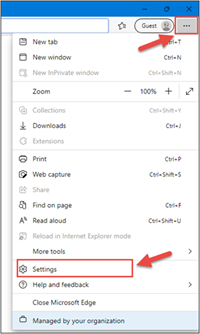
1. Open Microsoft Edge, click on the three dots in the top right corner and select ‘Settings’.
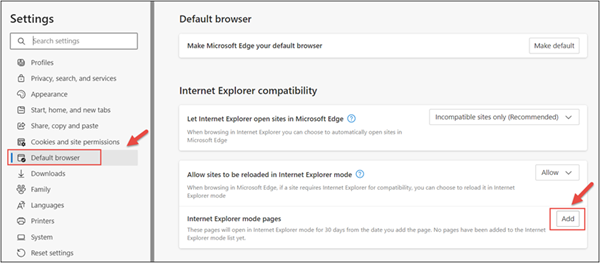
2. In the Settings menu, locate ‘Default browser’ and click on ‘Add’ in Internet Explorer mode pages.
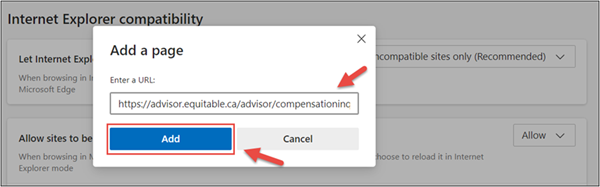
3. Enter the URL https://advisor.equitable.ca/advisor/compensationinquiry and click on ‘Add’.
4. Login into EquiNet using Microsoft Edge and you will be able to access ‘Compensation Inquiry’.
This configuration expires in 30 days, if you want to continue accessing ‘Compensation Inquiry’ after 30 days, you will need to redo the steps above.
If you encounter problems configuring, call our support line at 1.800.722.6615 ext. 8888 - [pdf] Pivotal Solutions Fund Facts
- Equitable and Cloud DX
-
Equimax® Participating Whole Life – A whole life solution for everyone
Recently, we made some exciting changes for Equimax Estate Builder® and Equimax Wealth Accumulator®.
These enhancements, launched in February, make Equimax the preferred solution for clients and their families. In particular, buying a whole life solution for children gives them a head start for tomorrow. Life insurance on a child gives them:
- Permanent insurance at children’s rates
- A stable tax-advantaged investment option
- A boost in financial planning
Watch our new Equimax for Children video to learn more. View on Vimeo or YouTube.
Plus, visit our Equimax product page on EquiNet®, then click on the Marketing Materials tab for the latest Equimax marketing materials.
Need more information? Please contact your local wholesaler.
® denotes trademarks of The Equitable Life Insurance Company of Canada.