

Site Search
656 results for open now MAKEMUR.com how to get inmate released early for money Federal Detention Center Oakdale
-
Taking the guess work out of market volatility with Equitable Life
Investing during market highs and market lows can leave even the most seasoned investors scratching their heads. Knowing when to buy and when to sell is not easy, but disciplined investing can be.
Dollar cost averaging with Equitable Life® is designed to provide a long-term investment solution. This strategy helps take the guesswork out of knowing when to get into the market. It can also provide consistency for a long-term financial plan regardless of whether there is a lot or a little to invest.
And for a limited time only, we’ve increased the initial commission for the CB5 sales option from 5.6% to 7.0% on Pivotal Select™ segregated funds*, effective from May 20 to August 31, 2022.** During this time, advisors earn the increased full initial commission even if funds are placed into Equitable Life Money Market Fund to start the PAC.
For more information on dollar cost averaging, please contact your Equitable Life Regional Investment Sales Manager.
* Applies to FundSERV trades occurring between May 20 and August 31, 2022. Initial commission on non-FundSERV trades occurring between May 20 to August 31, 2022 increases from 4% to 5%. Initial commission is subject to a chargeback.
** Equitable Life reserves the right to end the campaign at any time and without notice.
™or ® denotes a registered trademark of The Equitable Life Insurance Company of Canada.
- How to videos
- [pdf] Get started online
-
Manage more details within Contract Delivery for New Business applications
We are excited to announce further enhancements to our eDelivery process to empower you, the advisor, the ability to manage client details more easily within Contract Delivery.
Effective January 15, 2022, advisors will need to create a Password within Contract Delivery when choosing “eDelivery” as the contract delivery method and provide the password to the client to use as their password:
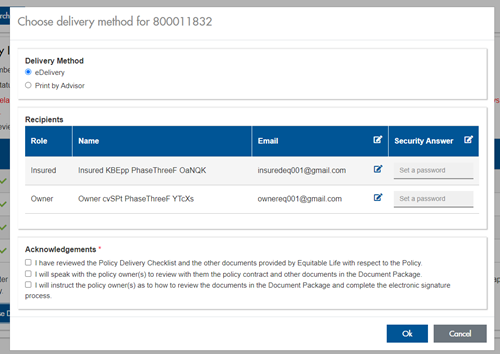
The Password must be between 4 and 100 alpha/numeric characters, and cannot be the Policy number. For multiple signers the password (and email address) must be unique per each signer.
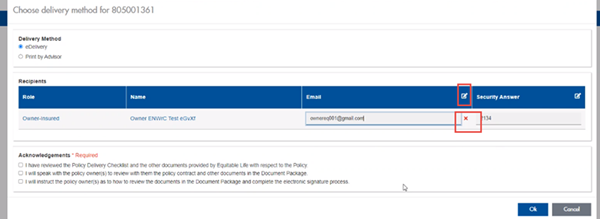
Advisors can now edit and/or update an email address within Contract Delivery, in the event of a bounce back or email change, to keep the eDelivery process moving and avoid delays in processing time. If a lock out occurs, advisors can trigger a resend of the signing email once they add a new valid email address in Contract Delivery. Simply click the pencil icon beside the Email field to enter the valid email address:
Another new feature- in the event a client has declined, the advisor will get an email from Equitable Life®. Click through to EquiNet® within the email to view the message within Contract Delivery that the client provided as the reason for decline under a new “Declined Details” section. This enables you to connect with the client to proceed with the sale by discussing the reasons for decline with them directly.
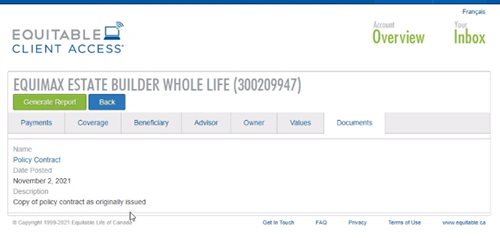
Also new for clients with this enhancement, policy owners of a policy created after January 15 will be able to see a PDF copy of their policy within client access. Note: this PDF copy is as the policy was originally issued.
Resources: -
Make your next audit a breeze
New – Online CE Course: Ensuring a Compliant, Needs-based Insurance sale
When regulators and auditors come knocking on your door, make sure you are prepared. Well documented, needs-based sales evidence may help protect you and demonstrate that you were acting in your clients’ interest.
Make your next audit a breeze with the tips you will learn in this course and earn CE credits at the same time (AIC, Advocis and ICM credits available only).
“The Approach” to supporting suitable, needs-based sales
The CLHIA recommends six supporting elements to make a suitable, needs-based sale. Equitable® created this reference presentation, “Ensuring a Compliant, Needs-based Insurance Sale” that leverages The Approach to explain the requirements for each step, along with the documentation to retain in the client file.
Get started now
A few important notes:
● This program is hosted on Teachable: https://equitable-life-education.teachable.com/
● Username: Please use your email that you are contracted with.
● Password: Equitable
● Please use Google Chrome to access the courses.
.png "Get-started-now!-button-(3).png")
Looking for more CE accredited training courses?
Check out our new individual insurance online learning centre on EquiNet® to stay up to date on new courses and find out more information on the topics provided.
Questions?
Contact your local wholesaler.
Are you having trouble logging in?
Email equitablelifemarketing@equitable.ca for assistance.
-
Things keep getting EZer with Equitable and EZtransact!
Equitable® continues to make great strides with our digital self-serve tool, EZtransact®. To keep this momentum, we’ve given EZtransact a fresh new look and feel, with additional transaction management changes and a new dashboard to enhance your online transaction experience! This refresh embraces our new brand, as we continue to focus on making it easier for you to do business with us.
What’s new with this update?
New dashboard for client search- The existing client search screen has been replaced with a new user-friendly dashboard.
- Upon accessing EZtransact, all contracts associated with the user’s EquiNet ID will be displayed.
- Users can refine the results and search by client name or contract number.
- Transactions submitted through EZtransact within the last 12 months are available, including their status.
- Transactions that have received all signatures will now allow the user to download a copy of the signed request and any supporting documents uploaded by the user.
- Transactions that are pending client signatures will allow the user to manage and track the e-signature process:
- Signing packages can be resent to clients who have not completed their e-signature.
- Clients can be unlocked through the dashboard if locked out due to too many invalid attempts.
- Advisor and dealer/MGA stakeholders have been removed from signing information and review screens.
- Users are no longer required to provide an email address for the dealer/MGA to submit a transaction.
Date published: October 3, 2024 -
EZtransact enhancements: New “Internal Transfer” and “Other Institution” options
At Equitable®, we’re always looking for ways to make it easier to support clients. That’s why we’re excited to share new enhancements in EZtransact® that give you more flexibility and simplify transfer processes.
What’s new
As of January 22, EZtransact now offers:
• Internal Transfers that streamline digital movement of investments between eligible client accounts within Individual Wealth.
• An “Other Institution” option when you’re initiating an external transfer. This means you can request transfers from financial institutions that are not listed in our existing dropdown menu.
These enhancements remove the need for manual workarounds and help ensure transfers are captured clearly and accurately the first time.
These updates support:
• Advisors working with Individual Wealth clients
• Clients who need to move investments either within Equitable or from another financial institution
To transfer funds between existing Equitable contracts, simply go to EZtransact, select Make a Transfer on the policy you want to receive the funds, and view your client’s existing contracts all in one place.
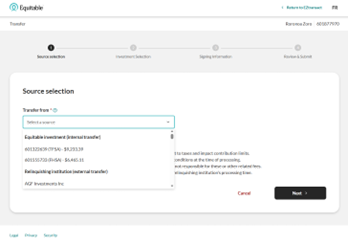
Use the new “Other Institution” option to start transfers from any financial institution, even if it’s not part of the standard list.
You’ll see these enhancements in the “Make a Transfer” flow within EZtransact on EquiNet®. It appears right at the point where you select the financial institution for the transfer.
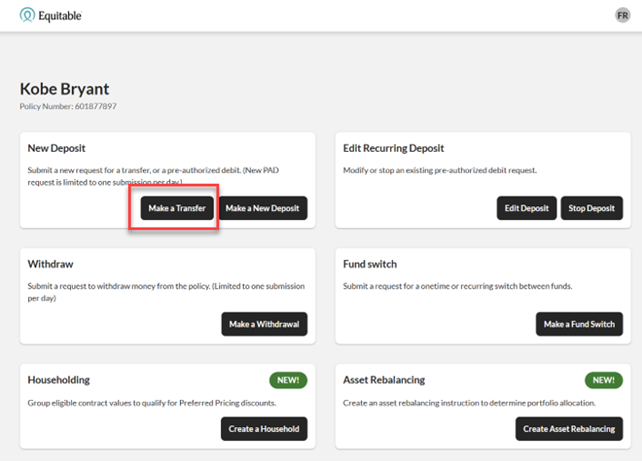
These updates are designed to:
• Give you more flexibility when managing external transfers
• Remove the need for manual steps or workaround solutions
• Help reduce errors that can happen during manual processing
• Improve efficiency for you and deliver a smoother experience for clients
You asked, and we listened! Keep providing us with your feedback on our digital tools. When we grow together, success is mutual. Get to know EZtransact! If you have any questions, please contact your Director, Investment Sales.
Date posted: April 1, 2026 -
Getting a tax refund is exciting, but should it be?
Do clients know that when a tax refund is issued, it means they are giving the government an interest-free loan? If a client receives a tax refund, it may mean the client’s employer is withholding too much tax. Here’s how to change that.
The client can complete and submit Canada Revenue Agency (CRA) form T1213 (Request to Reduce Tax Deductions at Source).
The client will indicate which regular deductions and non-refundable tax credits to qualify for. These would include things like regular Registered Retirement Savings Plans contributions, childcare expenses, etc. When approved by the CRA, the client will see more money on every pay. A client might even want to make this request to reduce the tax withheld if a large bonus or vacation pay is anticipated.
Encourage clients to use the additional cash flow to increase monthly contributions, support a Retirement Savings Plan or Tax-Free Savings Account or repay an investment loan. Increasing savings each year – even by a small amount – can have a substantial impact on retirement savings. For additional questions, contact your Regional Investment Sales Manager. - Recent Updates
- About