

Site Search
492 results for launch portal now MAKEMUR.com hire someone to make false child abuse accusations
-
Welcome EZtransact from Equitable Life
On July 28, 2021, Savings & Retirement is launching online transactions for segregated funds. A new way to make managing your client’s policies quick and convenient. With a growing need for digital solutions, Equitable Life’s new EZtransact eliminates the hassle of filling out forms, facilitating signatures yourself, submitting copies to your MGA and being tied down to business hours for submitting transactions.
Available on EquiNet's secure website, EZtransact’s first service will allow advisors to setup a one-time or recurring deposit or edit an existing pre-authorized debit already in place. In just five simple steps, EZtransact:- Collects the deposit details,
- Pre-populates pre-existing relevant details,
- Alerts you to any missing information,
- Facilitates the signing process and
- Sends a copy of the transaction to your MGA, eliminating any need for duplicate copies, or additional steps.
“We are excited to be able to launch a new digital solution for our advisors”, said Vice-President, Savings and Retirement, Judy Williams. “We feel this new application complements our existing highly rated EZcomplete® online application process. With both solutions available to advisors, we are making it even easier to do business with Equitable Life”.
If you are already registered with EquiNet, go online today, and give EZtransact a try. If you are not registered, contact your local Regional Investment Sales Manager or, call our Advisor Services Team to have a Regional Investment Sales Manager in your area contact you.
To learn more, click here.
® and TM denote trademarks of The Equitable Life Insurance Company of Canada
-
Easy and convenient digital options for your clients and their members
During this time of physical distancing, people are looking for ways to interact with their providers virtually. We have several convenient digital options available to make it easier for Plan Members and for Plan Administrators. Below is an overview to refer to when you're meeting with your clients. Or you can download this PDF version
For Plan Administrators:
Plan Administrator Portal (EquitableHealth.ca)
Our secure portal allows Plan Administrators to easily manage their plan anytime and anywhere. Instead of printing and mailing forms, Plan Administrators can make real-time updates at their convenience. The site also makes it easy to view or upload forms and other important documents, retrieve billing information, estimate monthly premium costs, and view announcements, tips and reminders. Plan Administrators can visit www.equitablehealth.ca to activate their account.
Online Plan Member Enrolment
Our Online Plan Member Enrolment tool simplifies the onboarding process for both Plan Administrators and Plan Members and offers a more secure and efficient alternative to traditional paper enrolment. The user-friendly interface allows Plan Members to easily enrol in their benefits plan in just minutes from their computer or mobile device. That saves work for Plan Administrators by eliminating the need to manage paper forms. And since Plan Members receive automatic reminders, it reduces late applicants and eliminates the need to chase down Plan Members for their paperwork. (This option is currently only available for new clients. It will soon be available for existing clients to add new hires.)
Digital Welcome Kits
Instead of paper kits that can easily get lost or quickly become outdated, Plan Members receive personalized welcome kits via an interactive email, including instructions on how to activate their online group benefits account, download their digital benefits card, submit claims from their computer or mobile device, review their coverage details, and explore their health and wellness resources.
Easy automated payments
Automated payments are a convenient way to avoid missed payments, suspended claims and disruption. Plan Administrators simply need to complete thepre-authorized debit formand send to GroupCollection@equitable.ca. Or contact Group Collections about online banking and electronic funds transfer (EFT).
We can help
For assistance, Plan Administrators can contact their Client Relationship Specialist or our Web Services team at 1.800.265.4556 ext. 283 or groupbenefitsadmin@equitable.ca.
For Plan Members:
Plan Member Portal (EquitableHealth.ca)
By logging into EquitableHealth.ca, Plan Members have secure 24/7 access to their personalized Group Benefits account where they can submit claims, view their claims status and history, and review their coverage details from their computer or mobile device. They can also visit Equitable HealthConnector®, our suite of services to help employees stay healthy and productive. They can simply visit www.equitablehealth.ca to activate their Group Benefits account.
Electronic Claim Payments and Notifications
Once Plan Members have activated their Group Benefits account on EquitableHealth.ca, they can easily get set up to receive their claim payments via direct deposit, and their claim notifications via email. Once logged in they simply click “My Information” and enter the required information.
EZClaim Mobile App
Submitting claims is fast, easy and secure with the Equitable EZClaim® mobile app. Plan Members can submit health and dental claims and receive payments directly to their bank account via direct deposit. Most claims are processed within three business days; some are processed in as little as 24 hours. They simply download the EZClaim app for their iPhone®, or Android™ device, fill out the interactive health or dental claim form, attach their receipt and submit.
Digital Benefits Cards
Instead of digging through their wallets, Plan Members can download a digital version of their benefits card on their mobile device via the Equitable EZClaim® Mobile app to easily provide coverage details to health providers.
We can help
We’ve created a video guide to help Plan Members access and use their digital resources. For further assistance, Plan Members can contact our Web Services team at 1.800.265.4556 ext. 283 or groupbenefitsadmin@equitable.ca.
-
Guides for completing Individual Insurance forms now on EquiNet
We have recently added guides to provide detailed instructions on how to fill out forms on EquiNet. You can find them on the Individual Forms page, directly underneath the applicable form. In the coming weeks, we will be adding more guides for additional forms, so make sure to check the Forms page for solutions that help you work smarter.
View our newly posted guides:- 671OC Guide (Guide to Completing an Ownership Change Form)
- 594 Guide (Guide to Completing Business Information Form)
- 1710 Guide (Guide to Completing Verification of Identity for Policy Owners)
Additional guides for the following forms will be available soon: - [pdf] WL & Annuity - Child's 10 Pay
-
Celebrating our most popular Pivotal Select funds
In August 2022, Equitable® launched 12 new segregated funds in Pivotal Select’s Investment Class (75/75). We wanted to bring some new innovative solutions to the product, including six sustainable investment funds. To say the launch of these funds was successful would be an understatement.
The funds are quickly becoming some of the most popular funds in Pivotal Select™, and their performance in 2023 was impressive. Equitable wants to celebrate these funds and encourage clients to consider them for their portfolios.
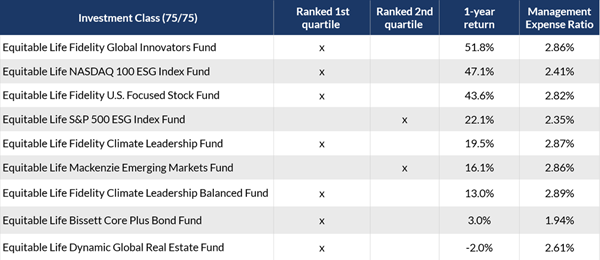
As of February 29, 2024, nine out of the 12 funds received a 1st quartile ranking for their 1-year return and two more were 2nd quartile. The table below shows the new funds that ranked in the top two quartiles for their 1-year returns.
Access additional fund performance information
If you haven’t looked at these funds yet, now is the time. Speak to clients about their investment options and see if these funds fit within their investment portfolio.
Talk to your Director, Investment Sales today for more information.Disclaimer
Any amount that is allocated to a segregated fund is invested at the risk of the contractholder and may increase or decrease in value. Segregated fund values change frequently, and past performance does not guarantee future results. Investors do not purchase an interest in underlying securities or funds, but rather, an individual variable insurance contract issued by The Equitable Life Insurance Company of Canada. There are risks involved with investing in segregated funds. Please read the Contract and Information Folder before investing for a description of risks relevant to each segregated fund and for a complete description of product features and guarantees. Copies of the Contract and Information Folder are available on equitable.ca.
Management Expense Ratios (MERs) are based on figures as of February 29, 2024, and are unaudited. MERs may vary at any time. The MER is the combination of the management fee, insurance fee, operating expenses, HST, and any other applicable non-income tax for the fund and for the underlying fund. For clients with larger contract values, a Management Fee Reduction may be available through the Preferred Pricing Program. For details, please see the Pivotal Select Contract and Information Folder.
® and TM denote trademarks of The Equitable Life Insurance Company of Canada.
Posted April 18, 2024
-
Two options for supporting plan members during the pandemic
We know these are difficult times. In addition to concerns about their health and the health of their family, working Canadians are worried about their jobs and their finances. Fortunately, through our partnership with Homewood Health®, we have two options for employers to support their employees through this crisis.
Below is an overview to refer to when you're meeting with your clients. Or you can download this PDF version.
Homewood Online (Homeweb)
All Equitable Life® clients and their plan members have access to Homeweb, a personalized online mental health and wellness portal. Accessible via the web or mobile app, Homeweb includes an online library of interactive tools, assessments, e-courses and resources to support plan members through the pandemic.
Homewood Health Employee and Family Assistance Program (EFAP)
Employers can provide additional support by adding the Homewood Health EFAP. In addition to full access to Homeweb, it offers confidential short-term counselling through a national network of mental health professionals, plus other resources and tools.
To make it easier to understand the options, here’s a detailed summary of what’s included with each:
Service Description Homeweb EFAP Homeweb.ca A secure and personalized online portal that includes hundreds of articles and resources, including e-books, toolkits, self-assessments, podcasts and more. 
Homeweb Mobile App One of Canada’s newest EFAP mobile apps that allows users to access every one of Homewood’s online tools and resources wherever they are. i-Volve Cognitive Behavioural Therapy Tool An online self-directed treatment tool that helps coach plan members to identify, challenge and overcome anxious thoughts, behaviours and emotions. Online Health Risk Assessment An online tool that helps plan members identify and address their health and wellness risks and barriers. Short-Term Counselling Short-term counselling provided face-to-face, by phone, email, chat or video through a national network of counsellors and clinical professionals. Life Smart Coaching A suite of telephonic and online services including coaching and resources to help employees manage their life balance, finances, health and career. Online resources only. Trauma response Prompt, compassionate and effective response to traumatic events, consisting of one three-hour block with one counsellor at one location per year. Legal Resources One-on-one consultation with a lawyer for guidance on issues such as family law, civil litigation, real estate and immigration. Online resources only. Key Person Advice Line (KPAL) Designed for HR, managers and supervisors, this service provides Online Management Resources and Workplace Situation Professional Support. Resource Locator Online childcare and eldercare resources locators. For more information, please contact your Group Account Executive or myFlex Sales Manager.
- [pdf] Transferring wealth to an adult child - case study
- Product at a glance
-
Equimax® Participating Whole Life – A whole life solution for everyone
Recently, we made some exciting changes for Equimax Estate Builder® and Equimax Wealth Accumulator®.
These enhancements, launched in February, make Equimax the preferred solution for clients and their families. In particular, buying a whole life solution for children gives them a head start for tomorrow. Life insurance on a child gives them:
- Permanent insurance at children’s rates
- A stable tax-advantaged investment option
- A boost in financial planning
Watch our new Equimax for Children video to learn more. View on Vimeo or YouTube.
Plus, visit our Equimax product page on EquiNet®, then click on the Marketing Materials tab for the latest Equimax marketing materials.
Need more information? Please contact your local wholesaler.
® denotes trademarks of The Equitable Life Insurance Company of Canada.
-
THREE new ways to help make your Savings & Retirement business run smoother
As of August 20, 2022, EZcomplete® will include several new features that allow applications to be completed faster and easier:
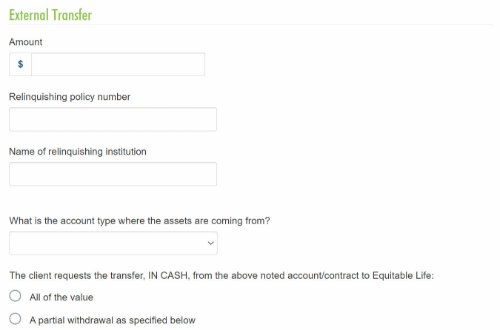
1. Prefilled Fund Transfer Form
The transfer form will be generated with the information from EZcomplete and included in the EZcomplete signing package, saving you time.
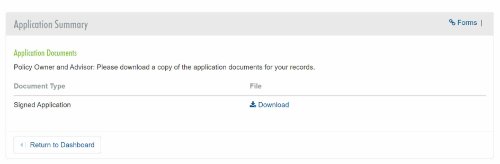
2. Client eSignature Audit History and Document Download
If you choose the e-signature option for the client, you’ll be able to download a copy of the e-signed transfer forms and the signature audit history.
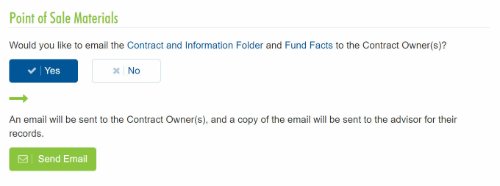
3. Email the Client Contract Info and Fund Facts Before Signing
You'll now be able to email Point of Sale materials (Contract & Info Folder and Fund Facts) to clients before they provide their e-signature.
Log in to EZcomplete today!
Speak to your Regional Investment Sales Manager to learn more!