

Site Search
433 results for click to access MAKEMUR.com Buying dropped charges to secure a release California
-
Client Access login is changing
Equitable wants to keep client’s information safe. Starting in January 2026, all clients will be asked to use an email address to log in to Client Access®, our secure client website for insurance and investments transactions.
What’s changing?
In January, all clients must use their email address to log in to Client Access. They will no longer be able to use a username. If clients can’t remember which email they used to register for Client Access, they can simply click “Forgot email” on the login page to get help. If clients use a password, they may need to enter a one-time code sent to their email.
Clients looking for extra security?
Clients can also create a Passkey. This makes logging in easier and safer.
-
New secure encryption process for outstanding Equitable S&R business requirements
The Equitable® Savings and Retirement Operations team is improving how they send secure email messages to advisors. These emails are sent when there are outstanding requirements for an application or missing information for requests.
Previously, advisors had to manually password protect or unlock PDF documents. This caused delays and difficulties for recipients. The new encryption process will remove that confusion and make it easier for advisors to send and receive secure, encrypted messages.
Advisors will now receive secure, encrypted emails from the QA annuity operations mailbox. These emails will use an encrypt option to protect personal client information, such as attachments or requests for personal documents. Recipients will get an email with a subject line saying they have a secure private message. They will need to sign in to view the message or choose to get a one-time passcode (OTP).
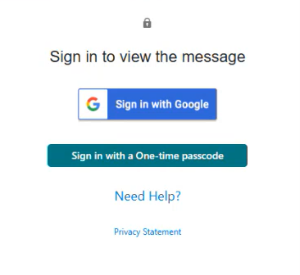
Please ensure to check the SPAM folder for the OTP option as it will expire in 15 minutes. Enter the OTP in the secure message
portal.
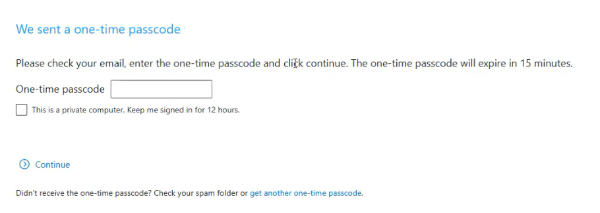
Emails are sent in both English and French, with automatic translation based on browser settings. Recipients must click the view button to access the message in the secure web portal where they can see the encrypted attachment.
Make sure to click Reply in the top right corner of the encrypted message to keep communications within the secure portal.
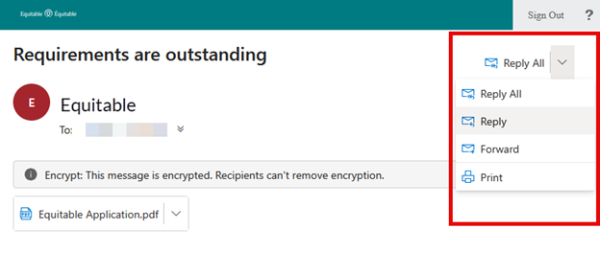
For more information or assistance, please contact your Director, Investment Sales.
Date posted: May 22, 2025 -
Manage your business virtually with Equitable Life
As an advisor, we know that physical distancing and self-isolation are proving to challenge the business as usual practise. The good news is that Equitable Life® is here to help. Our self-serve and online tools and resources for Savings and Retirement advisors can assist in maintaining a certain degree of daily activity.
Online Banking
Help your clients during this time of isolation and self-distancing by letting them know about banking online. Online banking is an easy and convenient way for your clients to make additional contributions to non-registered savings plans, Tax-Free Savings Accounts or even last-minute contributions to a Retirement Savings Plan.
Deposits will be made according to the instructions on file. Advisors will receive the regular commissions for any deposits made. Please note that all deposits must originate from the policy owner's bank account.
For more information on using online banking including financial institutions currently registered for direct deposit with Equitable Life, click here.
EZcomplete for non face to face
We know that business still needs to happen, even in times of uncertainty. EZcomplete® can help with that. With our non face-to-face functionality, EZcomplete allows you to remotely connect with your clients. Once the online application is complete, EZcomplete sends your client a passcode that gives secure access to review documents and allows your client to provide an electronic signature. You only need to provide your client’s email address.
EZcomplete makes the process of completing non face-to-face applications more convenient and doing business with Equitable Life EZ. For more information on EZcomplete, click here.
Limited Trading Authorization
Need to make some fund adjustments for your client? Limited Trading Authorization (LTA) is built into the Pivotal SelectTM and Guaranteed Interest Account applications to simplify the process of submitting client requests. Alternatively, the Limited Trading Authorization Form # 14 can be completed. Discretionary trading is not permitted. The advisor must have documented the client’s instructions in the client file. To learn more, click here.
Client Access
Does your client need to make changes to a pre-authorized deposit or beneficiary information, address or banking information? Does your client have a Client Access® account? Client Access is Equitable’s secure online client site that connects clients to tools and policy information. To create a new Equitable Client Access account, your client will need to reference the policy number(s). By registering for Equitable Client Access, policyholders and annuitants can make changes and view information such as:
Details of investment holdings including:-
Up-to-date market value of investments;
-
Guaranteed Interest Account (GIA) maturity dates and values;
-
Premium amounts, death and maturity guarantees and beneficiary information; and
-
Recent account activity.
Details of Payout Annuities including:
-
Next payment date;
-
Annual income and payment guarantee details; and
-
Beneficiary and Annuitant information.
There is also a secure inbox where copies of statements and other correspondence are available. To learn more, click here.
Need help with any of these resources? Contact our Advisor Services team Monday to Friday 8:30 a.m. – 7:30 p.m. ET at 1.866.884.7427 or email savingsretirement@equitable.ca, or your local Regional Investment Sales Manager. -
-
Deposits to the Fidelity Special Situations mutual fund are being limited but the segregated fund is
Fidelity Investments® recently said they would no longer accept deposits from new investors into the Fidelity® Special Situations Fund. This notice however does not affect Equitable Life® clients.
The Special Situations Fund will continue to be open to new and existing Equitable Life clients. This includes clients with Pivotal Select™, Pivotal Solutions* or Personal Investment Portfolio segregated funds contracts.
Why is Fidelity limiting access to the mutual fund?
This award-winning mutual fund has grown significantly and now has $3.6 billion of managed assets. To preserve the integrity of the fund’s investment strategy, Fidelity® decided to limit inflows to the fund. Limiting the amount of managed assets held within the fund allows the fund’s portfolio manager to focus on what he does best - finding special situation investment opportunities and capitalizing on positive change within companies and industries across Canada and around the world.
If you like the Special Situations mutual fund, you will value the Equitable Life Fidelity® Special Situations segregated fund. Segregated funds are similar to mutual funds but offer different features and guarantees. To learn about these features, check out the Investment Advantage. To learn more about the Special Situations segregated fund, click here.
For more information about Equitable Life’s segregated funds, speak to your Regional Investment Sales Manager or visit our segregated funds page on EquiNet®.
References:
Fidelity’s press release announcing the limited fund closure
Fidelity® Special Situations portfolio management strategy, webinar featuring Mark Schmehl, Portfolio Manager.
*No Load, Deferred Sales Charge, Pivotal Solutions II
® or ™ denotes a trademark of The Equitable Life Insurance Company of Canada, except as noted below.
Fidelity and Fidelity Investments are registered trademarks of 483A Bay Street Holdings LP. Used with permission. - [pdf] Authorization to Release Evidence
- Navigating the current market
-
Dialogue Virtual Healthcare now available to add to Equitable Life benefits plans
We’re pleased to announce we are partnering with Dialogue, Canada’s leading virtual health provider, to offer unlimited and on-demand virtual access to primary healthcare practitioners.
Virtual Healthcare is the latest addition to our HealthConnector suite of health and wellness services. It is available to add to all Equitable Life benefits plans for an additional cost as of July 1, 2023.Features of Dialogue Virtual Healthcare
Available 24/7, 365 days a year, Dialogue Virtual Healthcare provides access to unlimited non-urgent medical care for a wide range of health concerns. Plan members get fast access to the largest, most experienced and bilingual medical team in Canada for non-urgent medical issues. They also benefit from in-app prescription renewals and refills, personalized follow-ups after every consultation, and concierge-level navigation support for all referrals to in-person specialists when needed.
Dialogue’s industry-leading platform provides an all-in-one patient journey to address health issues, reducing long wait times and time away for doctor appointments. Plan members and their families can access Dialogue Virtual Healthcare through the secure web portal or mobile app. The Dialogue medical team includes doctors, nurse practitioners and nurses. Plan members can use the service even if they’re already receiving care from a family doctor.
For your clients
Benefits of Virtual Healthcare
By providing access to Virtual Healthcare, plan sponsors can help to:-
Drive employee engagement;
-
Reduce absenteeism related to in-person medical appointments;
-
Manage chronic health issues;
-
Attract and retain top talent; and
-
Build a healthier workforce.
By providing easier access to primary healthcare practitioners, Virtual Healthcare can offer extra health and wellness support for plan members. It also supports members that may experience barriers to accessing in-person healthcare, such as:-
Living in a remote location;
-
Work or family obligations during standard medical clinic hours;
-
Mobility challenges related to a disability; and
-
Transportation challenges.
Click the link to learn more about Dialogue Virtual Healthcare : Welcome to Dialogue!Questions?
To learn more about how your clients can add Virtual Healthcare to their benefits plan, please contact your Group Account Executive or myFlex Sales Manager. -
- [pdf] Consent and Authorization for Release of Medical Information to Advisor
-
Equitable Life Group Benefits Bulletin - September 2020
In this issue:
Enhancements to Equitable EZClaim Mobile
New reports available on EquitableHealth.ca* Indicates content that will be shared with your clients.
Enhancements to Equitable EZClaim® Mobile*
We’ve updated our Equitable EZClaim mobile app to process vision claims faster, to provide a new option for submitting documents and to increase password security.
Faster vision claims processing and payment
Equitable Life now provides faster processing of vision claims submitted via EZClaim Mobile.
This means plan members can find out the status of their vision claim almost instantaneously. And, for approved claims, they will receive payment even sooner – often in as little as 24 hours.
In order to allow for instant processing and faster payment, plan members will be prompted to enter some additional information, including their practitioner’s name, the date of the expense, the type of expense and amount of the expense when submitting their claims for these services.
Equitable Life plan members can submit all vision claims via Equitable EZClaim, including coordination of benefits and Health Care Spending Account claims.
Submit documents from a mobile device
We have added our Document Submission tool to EZClaim Mobile so plan members can conveniently submit documents directly from their mobile device. Applications, change forms, statement of health forms and more can all be easily uploaded whenever and wherever they are.
Improved security with stronger passwords
To help you, your clients and plan members better protect personal information, we have increased the maximum length of passwords for both EZClaim Online and EZClaim Mobile from 12 to 32 characters. This longer character limit makes it easier to create stronger and more secure passwords.
There is no change for plan members, plan administrators or advisors. All existing passwords will continue to function. However, if you choose to update your password you will now be able to choose longer passwords or passphrases.
Why should I change my password?
Changing your password frequently helps keep your information safe. The longer and more random the password, the more secure it is. To improve security even more, a passphrase is recommended.
A passphrase is a series of words or other text used like a password. Because it is much longer, a passphrase is more secure. Although the words in the phrase may be meaningful to you and easy to remember, they can be random enough that the full phrase is difficult for someone else to guess. It’s even better if you use numbers or other characters in your passphrase.
Your passphrase should be:
- Long enough to be hard to guess;
- Not a famous quotation;
- Easy to remember and type; and
- Not used in multiple places.
To change your password:
- Log in to EquitableHealth.ca
- Click on My Information > User Profile
- Click Edit
- Confirm your information and enter your new password
- Click Save
We will be announcing this enhancement to plan members on EquitableHealth.ca.
New reports available on EquitableHealth.ca*
Plan administrators and advisors with reporting access can now download three additional reports any time via the plan administrator and advisor websites on EquitableHealth.ca:
- Premium and Tax – This report provides a breakdown of premiums and taxes paid per plan member for any specific time period for all applicable benefits.
- Occupation and Earnings – This report provides current plan member earnings and occupation information and gives plan administrators an efficient way to report updates to us.
- Employee listing – This report lists all plan members’ information, including name, certificate number, date of birth, province, occupation and salary, as well as benefit coverage currently in place and HCSA allocations.
These reports can be downloaded in Excel format for easy updating, filtering or sorting.
For more information, please contact your Client Relationship Specialist.
*Indicates content that will be shared with your clients
- [pdf] UL Transfers & Allocations How To