

Site Search
404 results for click to enter PROBLEMGO.com pay to dismiss case no lawyer needed HMP Doncaster
- COVID-19 Group Benefits FAQ
- EZ Upload
-
Backdating of insurance applications – New rule now in effect
Great news! We are making it even easier for you to do business with Equitable Life®. We now allow backdating of life insurance applications by up to 364 days. Previously, the maximum backdating period was six (6) months.
Backdating can result in lower total premiums for the client over the life of a policy based on their younger age at time of application. But clients must pay all the premiums due for the backdated period up front. Thus, backdating is only beneficial when the total premium savings over the life of the policy are greater than the premium due for the backdated period.
To request backdating beyond six (6) months (up to 364 days)
No special approval is needed. Simply add a note to the Advisor Sheet requesting backdating or contact us at any time prior to policy issue. This step is only necessary when backdating beyond six (6) months as the application will automatically prompt to save age within the 6-month period.
Note: The maximum backdating period for critical illness (CI) applications remains unchanged at three (3) months.
Questions? Please contact your Equitable Life Regional Sales Manager for more information.
-
2022 brings a new year of retirement savings opportunities
As a new year begins, you will start to reach out to your clients about the upcoming Retirement Savings Plan deadline, March 1, 2022. This year, connect with your clients through social media, video chats, emails or even in-person. Try Equitable’s Case Studies, Prospecting Letters, Video and Equitable Blog on EquiNet® to make the most of your meetings. Designed for each specific target group, these sales strategies can help initiate a conversation about retirement savings goals.
To learn more about Retirement Savings Plans, click here. -
EZcomplete Non-Face-to-Face enhancement
An EZ way to conduct your out-of-town businessYou asked for it, we built it: a solution for your non face-to-face business. EZcomplete® allows you to conduct your non face-to-face business easily and quickly with your clients providing their signature remotely on their own device.
How does it work?
EZcomplete walks you through the electronic signature process. EZcomplete allows your clients to sign remotely using their own device for non-face-to-face applications. You only need to enter their email address and provide them with a secret passcode to securely access the documents to review and sign.
Just another reason to do business with Equitable Life®
EZcomplete makes it easy to process your non-face-to-face applications and do business with Equitable Life.
Login to EquiNet® and click on the EZcomplete icon on the menu bar
® denotes a trademark of The Equitable Life Insurance Company of Canada.
-
Manage more details within Contract Delivery for New Business applications
We are excited to announce further enhancements to our eDelivery process to empower you, the advisor, the ability to manage client details more easily within Contract Delivery.
Effective January 15, 2022, advisors will need to create a Password within Contract Delivery when choosing “eDelivery” as the contract delivery method and provide the password to the client to use as their password:
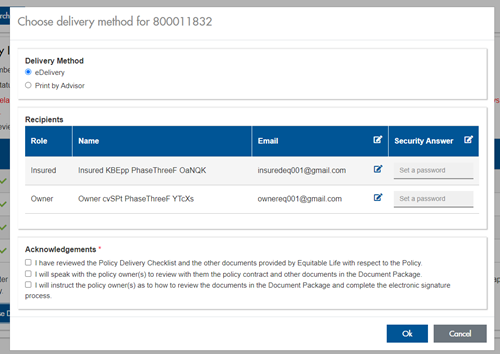
The Password must be between 4 and 100 alpha/numeric characters, and cannot be the Policy number. For multiple signers the password (and email address) must be unique per each signer.
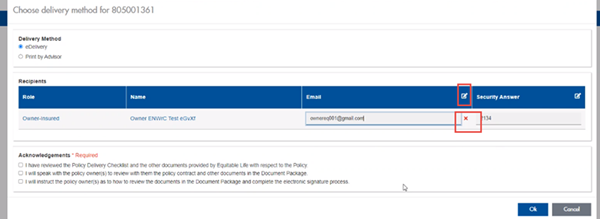
Advisors can now edit and/or update an email address within Contract Delivery, in the event of a bounce back or email change, to keep the eDelivery process moving and avoid delays in processing time. If a lock out occurs, advisors can trigger a resend of the signing email once they add a new valid email address in Contract Delivery. Simply click the pencil icon beside the Email field to enter the valid email address:
Another new feature- in the event a client has declined, the advisor will get an email from Equitable Life®. Click through to EquiNet® within the email to view the message within Contract Delivery that the client provided as the reason for decline under a new “Declined Details” section. This enables you to connect with the client to proceed with the sale by discussing the reasons for decline with them directly.
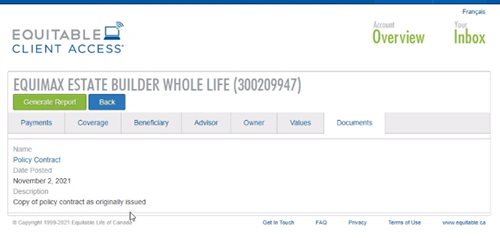
Also new for clients with this enhancement, policy owners of a policy created after January 15 will be able to see a PDF copy of their policy within client access. Note: this PDF copy is as the policy was originally issued.
Resources: -
New secure encryption process for outstanding Equitable S&R business requirements
The Equitable® Savings and Retirement Operations team is improving how they send secure email messages to advisors. These emails are sent when there are outstanding requirements for an application or missing information for requests.
Previously, advisors had to manually password protect or unlock PDF documents. This caused delays and difficulties for recipients. The new encryption process will remove that confusion and make it easier for advisors to send and receive secure, encrypted messages.
Advisors will now receive secure, encrypted emails from the QA annuity operations mailbox. These emails will use an encrypt option to protect personal client information, such as attachments or requests for personal documents. Recipients will get an email with a subject line saying they have a secure private message. They will need to sign in to view the message or choose to get a one-time passcode (OTP).
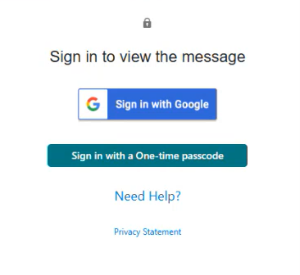
Please ensure to check the SPAM folder for the OTP option as it will expire in 15 minutes. Enter the OTP in the secure message
portal.
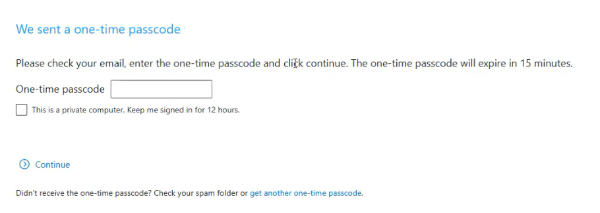
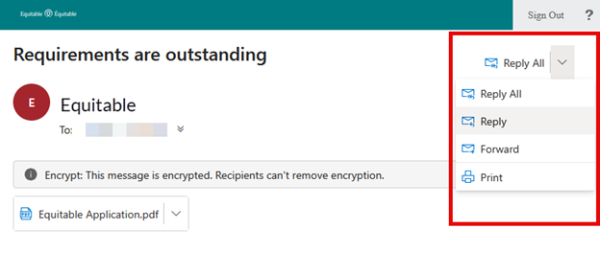
Emails are sent in both English and French, with automatic translation based on browser settings. Recipients must click the view button to access the message in the secure web portal where they can see the encrypted attachment.
Make sure to click Reply in the top right corner of the encrypted message to keep communications within the secure portal.
For more information or assistance, please contact your Director, Investment Sales.
Date posted: May 22, 2025 -
NEW MARKETING MATERIAL! Flexibility for supplemental income with Equimax
Equitable has created a new piece to help you understand our new Equimax® illustration feature, Paid-Up Additions (PUA) to Cash Dividends, now available!
Did you know Equimax clients can switch from the PUA dividend option to the cash dividend option by simply requesting a dividend option change?1,2
You can illustrate this for paid-up 10 pay and 20 pay Equimax plans! Show clients how they can build in added flexibility and use their policy to create a source of future supplemental income by simply changing the dividend option to cash.3
Illustration Considerations:
● Works with Equimax Estate Builder® or Equimax Wealth Accumulator®.
● Illustrate the Excelerator Deposit Option (EDO) to help build the policy values while the PUA dividend option is in effect. EDO payments can’t be made once the policy is switched to the cash dividend option.
● If a client needs temporary insurance coverage – like mortgage protection - illustrate term riders for how long they are needed to meet the specific goal.3
● If critical illness coverage is needed our competitively priced 20 pay critical illness riders are a great fit to provide paid-up critical illness coverage.3
Clients should apply for the coverage they need. This concept is about flexibility to create a future source of supplemental income.
Want to learn more? Check out our new marketing piece: Flexibility for supplemental income with Equimax (2077).
For more information, reach out to your local wholesaler.
® and TM denote trademarks of The Equitable Life Insurance Company of Canada.
1 Dividends are not guaranteed and are paid at the sole discretion of the Board of Directors. Dividends may be subject to taxation. Dividends will vary based on the actual investment returns in the participating account as well as mortality, expenses, lapse, claims experience, taxes, and other experience of the participating block of policies.
2 To request a change to the dividend option complete and submit form 558 (Request for Withdrawal of Dividends, Change in Option, or Premium Offset). A client can request a change to the cash dividend option from any other dividend option regardless of the premium type or whether premiums continue to be payable, subject to our current administration rules and guidelines. Some dividend option changes are subject to underwriting. Underwriting is not required to change from the PUA to cash dividend option, however, underwriting is required to change from the cash dividend option to the PUA dividend option.
3 This concept is intended to illustrate a one-time switch to cash dividends once premiums are no longer payable for the policy (including premiums for riders). Premiums are paid with after-tax dollars and dividends paid in cash are subject to taxation. If premiums are payable there will be tax savings for the client to use the before-tax cash dividend to reduce the premium instead of taking it entirely as a cash payment. This concept is intended for longer term planning, not to meet short term cash needs by switching back and forth between the PUA and cash options. Clients should consider a policy loan or a cash withdrawal to meet short-term cash needs; policy loans and cash withdrawals may be subject to taxation.
-
May 2026 eNews
In this issue:
-
Save the date: Group benefits advisor roadshow is returning to a city near you
-
One-time passcodes will be added to our login experience this week*
-
Delisted service providers: What clients need to know*
-
Keeping plan member information up to date*
*Indicates content we will share with your clients.
Save the date: Group benefits advisor roadshow is returning to a city near you
Mark your calendars—our annual group benefits advisor roadshow will be travelling across Canada this fall.
Watch your inbox for an invitation with more details soon. In the meantime, here’s our full list of event dates and cities.
-
Monday, Sept. 28 – Vancouver, BC
-
Tuesday, Sept. 29 – Edmonton, AB
-
Wednesday, Sept. 30 – Calgary, AB
-
Thursday, Oct. 1 – Saskatoon, SK
-
Friday, Oct. 2 – Winnipeg, MB
-
Tuesday, Oct. 6 – Halifax, NS
-
Wednesday, Oct. 7 – Ottawa, ON
-
Thursday, Oct. 8 – Markham, ON
-
Tuesday, Oct. 20 – London, ON
-
Wednesday, Oct. 21 – Kitchener, ON
-
Thursday, Oct. 22 – Oakville, ON
One-time passcodes will be added to our login experience this week
Starting next week, anyone who logs in to EquitableHealth.ca® or the Equitable EZClaim® mobile app with an email address and password may also need to enter a one-time passcode to access their account. The one-time passcode will be provided by email.
Adding this form of multi-factor authentication (MFA) to our login process will further enhance our digital security and help safeguard your account and our clients’ personal data.
Don’t forget—you can create a passkey instead.
Passkeys are another form of MFA. They provide a quick, easy and secure way to access your account, using either biometrics—your face or fingerprint—or a PIN authenticator to confirm your identity.
Anyone who uses a passkey to log in to their account will never be required to enter a one-time passcode.
In case you get questions…
If a client asks you about these changes to our login process, consider sharing this fact sheet with them. The fact sheet highlights the value of adding MFA to the login process and describes the differences between logging in with a one-time passcode versus a passkey.
More information about one-time passcodes and passkeys is included at equitable.ca/effortless. There, you’ll also find short videos that show how easy it is to create a passkey on your mobile device and computer.
Please reach out to your Group Account Executive if you have any questions.
If you use the same email address to log in to your accounts on EquitableHealth.ca, EquiNet® and Equitable Client Access®, you can use the same passkey. Equitable Client Access is our secure site for Individual Insurance and Individual Wealth clients.
Delisted service providers: What clients need to know
Protecting clients’ group benefits plans is our priority. That’s why we regularly assess healthcare service providers, clinics, facilities and medical suppliers in our network. These reviews help ensure the claims plan members submit meet eligibility requirements.
If our review indicates a provider is not meeting those requirements, we may delist them.
Common reasons we delist providers include:
-
Billing for services that weren’t provided or aren’t medically required
-
Changing information about treatments provided (e.g., service dates or patient names)
-
Incomplete records or treatment notes
-
Lack of cooperation with an audit
-
Suspension of the provider by their licensing college or association
-
Criminal convictions
What clients need to know
If a provider is delisted, we will not accept or process claims for services or supplies they provide. However, plan members can still choose to use delisted providers at their own expense.
We provide clients instructions on where to find our current list of delisted providers in each Plan Administrator eNews announcement. We also encourage them to share the list with their plan members.
Whenever we delist a provider, we try to contact plan members, who have recently submitted claims for their services, to inform them of the change and help prevent future claim submissions. However, plan members are responsible for checking our list of delisted providers before purchasing any product or service to avoid having to pay at their expense. The list is available on EquitableHealth.ca.
If you have questions about our list of delisted service providers or our process of reviewing providers, please contact your Group Account Executive.
Keeping plan member information up to date
Keeping plan member information current helps ensure accurate benefits coverage and premium calculations.
When a plan member’s earnings or occupation changes, the plan administrator must update this information as soon as possible. Updates made before a benefits plan renewal helps ensure renewals are based on current data.
If a plan includes short-term disability (STD) or long-term disability (LTD) benefits, outdated earning information can affect disability claim payments for plan members.
We send an annual reminder to plan administrators before renewal. The email includes step-by-step instructions on how to review and update plan members’ earnings and occupation information.
Three ways to update earnings and occupation information
Plan administrators can review and update plan members’ information by either:
-
Making updates directly through the plan administrator site (update access required),
-
Generating an earnings and occupations worksheet through the plan administrator site (online reporting access required), or
-
Requesting a worksheet by emailing groupbenefitsadmin@equitable.ca.
The worksheet includes instructions on how to submit completed updates to us. If you have any questions, please contact your Client Relationship Specialist or email groupbenefitsadmin@equitable.ca.
-
-
January 2026 eNews
In this issue:
Meet the next generation of myFlex Benefits® for small business
Coming soon: A consistent login experience for Equitable Client Access® and EquitableHealth.ca®
QDIPC updates terms and conditions for 2026**We will share this content with your clients.
Meet the next generation of myFlex Benefits® for small business
Discover the newly enhanced myFlex Benefits®— Equitable’s game-changing solution for small businesses that now includes more flexible, affordable coverage options shaped by advisor feedback.Join our virtual session to see how myFlex Benefits can help your clients grow and thrive.
Webinar: How to grow your block with flexible solutions
Tuesday, Feb. 3 | 10–11 a.m. PT / 1–2 p.m. ET
Register hereThe session will be held in English only.
Coming soon: A consistent login experience for Equitable Client Access and EquitableHealth.ca
Starting this month, users logging in to Equitable Client Access®, the secure website for our Individual Insurance and Wealth clients, will need to enter their email address instead of a username. This change will make the Client Access login experience easier and even more secure.
Streamlining the login experience for group benefits clients
When this change takes effect, clients who use the same email address to log into Client Access and EquitableHealth.ca will use one password for both sites.
If a client updates their password on one site, the password for the other site will also automatically update—so they’ll always use the same credentials for both platforms.
Clients who can’t remember the email address we have on file can click ‘Forgot email’ on the Client Access login page.
For added security, a client logging into Client Access may be prompted to enter a one-time code that’s sent to them via email before they can log in.
We will inform clients who have Client Access and EquitableHealth.ca accounts about these changes via email.
Safer, simpler account access
Logging in doesn’t need to include a password. Clients can save time logging in to Client Access and EquitableHealth.ca by creating a passkey.
Passkeys use a person’s face or fingerprint to quickly authenticate their identity – adding an extra layer of protection to their account and eliminating the need to enter a password. And by logging in to the Client Access site with a passkey, clients won’t be asked to enter a one-time code.
Creating a passkey is easy. The following video shows group benefits clients how to create a passkey to log in to EquitableHealth.ca.
Clients who use the same email address to log into Client Access and EquitableHealth.ca will be able to use the same passkey to access both sites. If someone has registered for both sites with different email addresses, they’ll need to create separate passkeys.

QDIPC updates terms and conditions for 2026
Every year, the Quebec Drug Insurance Pooling Corporation (QDIPC) reviews the terms and conditions for the high-cost pooling system in the province. Based on its latest review, QDIPC is revising its pooling levels and fees for 2026 to reflect trends in the volume of claims submitted to the pool, particularly catastrophic claims. We will apply the new pooling levels and fees to future renewal calculations that involve Quebec plan members.
Please note: QDIPC plans to redefine its group sizes in 2027. For more information on how group sizes will change in 2027, visit QDIPC's Terms and Conditions of Pooling.
If you have any questions, please contact your Group Account Executive.