

Site Search
771 results for click to access MAKEMUR.com how to get goods out of customs without waiting pay
- Equitable and Cloud DX
-
Manage more details within Contract Delivery for New Business applications
We are excited to announce further enhancements to our eDelivery process to empower you, the advisor, the ability to manage client details more easily within Contract Delivery.
Effective January 15, 2022, advisors will need to create a Password within Contract Delivery when choosing “eDelivery” as the contract delivery method and provide the password to the client to use as their password:
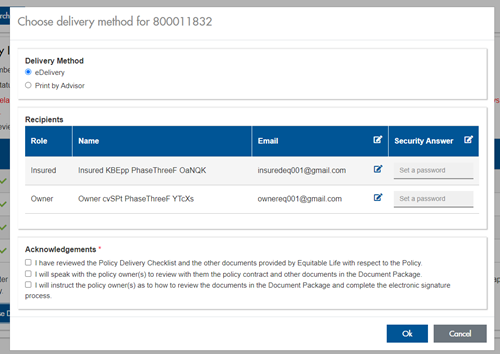
The Password must be between 4 and 100 alpha/numeric characters, and cannot be the Policy number. For multiple signers the password (and email address) must be unique per each signer.
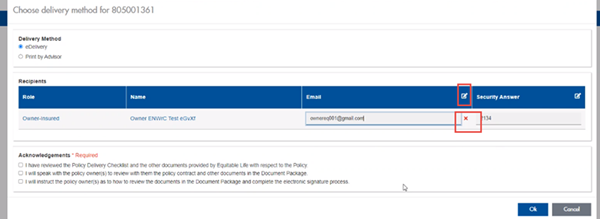
Advisors can now edit and/or update an email address within Contract Delivery, in the event of a bounce back or email change, to keep the eDelivery process moving and avoid delays in processing time. If a lock out occurs, advisors can trigger a resend of the signing email once they add a new valid email address in Contract Delivery. Simply click the pencil icon beside the Email field to enter the valid email address:
Another new feature- in the event a client has declined, the advisor will get an email from Equitable Life®. Click through to EquiNet® within the email to view the message within Contract Delivery that the client provided as the reason for decline under a new “Declined Details” section. This enables you to connect with the client to proceed with the sale by discussing the reasons for decline with them directly.
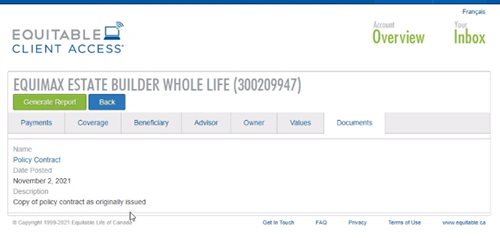
Also new for clients with this enhancement, policy owners of a policy created after January 15 will be able to see a PDF copy of their policy within client access. Note: this PDF copy is as the policy was originally issued.
Resources: -
Equitable Life Group Benefits Bulletin – November 2021
In this issue:
- Deadline to opt out of New Brunswick biosimilar program*
- Web Reports Quick Reference Guide now available for plan administrators*
- Reminder: Review manual allocations for HCSAs and/or TSAs*
- Help your clients take advantage of our convenient digital options*
Reminder: Deadline to opt out of New Brunswick biosimilar program*
Earlier this year, we announced via eNews that on Feb. 1, 2022, we are ending coverage for some originator biologic drugs in New Brunswick in response to the province’s Biosimilar Initiative.* These changes will help protect your clients’ plans from additional drug costs while still providing access to equally safe and effective biosimilars.
Do my clients need to take any action?
No action is required if employers want to have the originator biologics excluded from their plan. Plan members taking these targeted originator biologics will be contacted directly to allow them ample time to transition to the biosimilar. Any cost savings associated with the change will be factored in at renewal.
All groups, except myFlex clients, who wish to opt out of this change and maintain coverage of these originator biologics for existing claimants in New Brunswick can submit a policy amendment. Amendments must be submitted no later than Nov. 30, 2021.
Advisors with myFlex Benefits clients who wish to maintain coverage of these originator biologics for New Brunswick plan members should speak to their myFlex Sales Manager to confirm their eligibility to opt out of this change.
Groups that opt out of this change are also opting out of any future changes to our New Brunswick biosimilar initiative. This means that their drug plans will continue to cover any additional originator biologics for which we subsequently end coverage as part of the biosimilar program.
Questions?
If you have a question that isn’t answered here, please contact your Equitable Life Group Account Executive or myFlex Sales Manager.
* The list of affected drugs or conditions is dynamic and may change.Web Reports Quick Reference Guide now available for plan administrators
A Web Reports Quick Reference Guide is now available for plan administrators on EquitableHealth.ca. This new guide offers a listing of our newest reports available on the plan administrator web. It also provides instructions for plan administrators outlining how to pull the report using the plan administrator portal.
The guide is available under the Quick Links section on both the advisor and plan administrator portals on EquitableHealth.ca.Reminder: Review manual allocations for HCSAs and/or TSAs*
If your client’s Health Care Spending Account (HCSA) and/or Taxable Spending Account (TSA) has manual allocations, they need to allocate these amounts to plan members each year. Please review all your plan members’ profiles on EquitableHealth.ca to ensure they have received their allocation(s) for the current benefit year.
If your clients have Plan Administrator update access on EquitableHealth.ca, they can update these amounts online by doing the following:- Select “View certificate”
- Select “Health Care Spending Account” or “Taxable Spending Account”
- Select “Update Allocation” in Task Center
- Enter amount in “Revised Allocation Amount”
- Override Reason – “Plan Administrator Request”
- Select “Save”
- Select “Reports”
- Select “New”
- Select “Next”
- Select “HCSA” or “TSA Totals by Plan Member”
- Select “Next”
- Enter end date of “12/31/2020”
- Select “Next”
- Select “Finish”
- View “Report”
Help your clients take advantage of our convenient digital options*
We have several digital options available to make it easier for your clients to do business with us and for their plan members to access and use their benefits plan. Over 71% of plan administrators are managing their plan online and 78% of plan members are already using our digital tools.
For plan administrators:- Online Plan Member Enrolment tool – allows all groups to add new plan members without the need for paper forms
- Plan Administrator Portal (EquitableHealth.ca) – plan administrators can easily manage their plan anytime and anywhere
- Digital Welcome Kits – personalized welcome kits are delivered to plan members via email
- Easy automated payments – plan administrators can avoid missed payments by setting up pre-authorized debit or electronic funds transfer
- Plan Member Portal (EquitableHealth.ca) – plan members get secure, 24/7 access to their claims history, coverage details and health and wellness resources
- Electronic Claim Payments and Notifications – plan members can get claim updates sooner in their email inbox and payments right into their bank account
- EZClaim Mobile App – submitting claims from a mobile device is fast, easy and secure
- Digital Benefits Cards – plan members no longer have to dig through their wallet – they can download their benefits card on their mobile device
We’ve created a brochure and a video guide to help plan members access and use their digital resources. For further assistance, plan members can visit www.equitable.ca/go/digital. They can also contact our Web Services team at 1.800.265.4556 ext. 283 or groupbenefitsadmin@equitable.ca. -
Dialogue Virtual Healthcare now available to add to Equitable Life benefits plans
We’re pleased to announce we are partnering with Dialogue, Canada’s leading virtual health provider, to offer unlimited and on-demand virtual access to primary healthcare practitioners.
Virtual Healthcare is the latest addition to our HealthConnector suite of health and wellness services. It is available to add to all Equitable Life benefits plans for an additional cost as of July 1, 2023.Features of Dialogue Virtual Healthcare
Available 24/7, 365 days a year, Dialogue Virtual Healthcare provides access to unlimited non-urgent medical care for a wide range of health concerns. Plan members get fast access to the largest, most experienced and bilingual medical team in Canada for non-urgent medical issues. They also benefit from in-app prescription renewals and refills, personalized follow-ups after every consultation, and concierge-level navigation support for all referrals to in-person specialists when needed.
Dialogue’s industry-leading platform provides an all-in-one patient journey to address health issues, reducing long wait times and time away for doctor appointments. Plan members and their families can access Dialogue Virtual Healthcare through the secure web portal or mobile app. The Dialogue medical team includes doctors, nurse practitioners and nurses. Plan members can use the service even if they’re already receiving care from a family doctor.
For your clients
Benefits of Virtual Healthcare
By providing access to Virtual Healthcare, plan sponsors can help to:-
Drive employee engagement;
-
Reduce absenteeism related to in-person medical appointments;
-
Manage chronic health issues;
-
Attract and retain top talent; and
-
Build a healthier workforce.
By providing easier access to primary healthcare practitioners, Virtual Healthcare can offer extra health and wellness support for plan members. It also supports members that may experience barriers to accessing in-person healthcare, such as:-
Living in a remote location;
-
Work or family obligations during standard medical clinic hours;
-
Mobility challenges related to a disability; and
-
Transportation challenges.
Click the link to learn more about Dialogue Virtual Healthcare : Welcome to Dialogue!Questions?
To learn more about how your clients can add Virtual Healthcare to their benefits plan, please contact your Group Account Executive or myFlex Sales Manager. -
-
Request standard in-force illustrations with the click of a button
At Equitable®, we are making continuous improvements to our advisor and client services. We are excited to share an upcoming enhancement.
What’s new?
Beginning on August 15, 2024 , you and your clients will be able to request standard, current in-force illustrations—at any time—for your clients’ whole life and universal life policies with the click of a button.
Currently, standard in-force illustrations for whole life and universal life policies are autogenerated only on policy anniversaries. These in-force illustrations will no longer be autogenerated after August 15, 2024.
Please note: For specialized illustrations—such as those with segregated funds, D2000/D2000+ policies, policies where the insured’s age falls outside existing illustration parameters, or policies that were originally from Clarica—you will still need to use the in-force illustration request form for whole life or universal life policies.
How do I access this?
You can request an in-force illustration by logging into EquiNet® and going to the Policy Details page via Policy Inquiry. Under the Coverage tab, you will now see a button called Inforce Illustration Request. Click the button to request the illustration. Learn more about how to access here.
-
EZcomplete Non-Face-to-Face enhancement
An EZ way to conduct your out-of-town businessYou asked for it, we built it: a solution for your non face-to-face business. EZcomplete® allows you to conduct your non face-to-face business easily and quickly with your clients providing their signature remotely on their own device.
How does it work?
EZcomplete walks you through the electronic signature process. EZcomplete allows your clients to sign remotely using their own device for non-face-to-face applications. You only need to enter their email address and provide them with a secret passcode to securely access the documents to review and sign.
Just another reason to do business with Equitable Life®
EZcomplete makes it easy to process your non-face-to-face applications and do business with Equitable Life.
Login to EquiNet® and click on the EZcomplete icon on the menu bar
® denotes a trademark of The Equitable Life Insurance Company of Canada.
-
Equitable Life Coronavirus Update – March 13, 2020
As the coronavirus (COVID-19) continues to spread, it’s important that you, your clients and their plan members have the most up-to-date information. We are providing timely updates on any developments that impact your clients and their plan members or their benefits coverage.
Please share this information with your clients. You can direct them to EquitableHealth.ca, where we have posted a version of these updates.
Coronavirus travel coverage*
For groups with Travel Assist coverage
The Public Health Agency of Canada has issued several Travel Health Notices advising Canadians to avoid travel to countries and regions where there have been outbreaks of coronavirus (COVID-19).
A good resource to help your clients and their plan members understand how the spread of the coronavirus may impact their travel plans is the Public Health Agency of Canada’s Coronavirus Travel Advice site. The levels of risk by country and region are regularly updated.
If your clients’ plan members cannot avoid travelling, Public Health recommends they take steps to prevent illness and seek medical attention if they become sick.
Where to find the latest information
The list and level of travel advisories can change at any time. Please check the Government of Canada’s Travel Advisor and Advisory page for the most current information.
If your clients’ plan members have coronavirus symptoms while travelling, please advise them to contact Travel Assist at the numbers listed below for assistance.
Advise plan members to call before they travel
If a plan member is travelling anywhere outside of the province or country and their benefits plan includes Travel Assist, plan administrators should advise them to make sure they’re prepared for a medical emergency by following these steps.
- Check the Government of Canada’s Travel Advisor and Advisory page. Note that it is important to click on the country to check whether any specific regions of that country have travel advisories.
- If they have questions, they should call Travel Assist before they travel for assistance and benefit information.
- Pack their Equitable Life benefits card and provincial health card.
- In a medical emergency, call the Travel Assist 24-Hour Hotline:
- Toll-free Canada/USA: 1.800.321/9998
- Global call collect: 519.742.3287
- Allianz Global Assistance ID #9089
Allianz Global Assistance administers Equitable Life’s Travel Assist benefits. Allianz has an international network of medical facilities, transportation providers, medical correspondents and multilingual administrative agents who aid with medical, legal and most travel-related emergencies 24-hours a day, seven days a week.
Early prescription refills and drug shortages*
In response to concerns about COVID-19 TELUS Health, our pharmacy benefits manager, has announced it is maintaining its standard rules for refills of medication. Plan members can refill their medications when at least two-thirds of the last dispensed supply has been used.
If plan members need more than the maximum supply allowed on their plan, they must pay out-of-pocket for the excess amount. They can then submit a claim to ask for an exception request.
TELUS is taking this position to help maintain access to medication for all patients. They continue to monitor the situation. We will provide an update if it changes.
Drug shortages
TELUS Health monitors for drug shortages and updates their system for any unavailable drugs. This helps to ensure accurate claims payment. If a referenced lowest-cost generic drug is unavailable, claims for drugs in the class will be paid at the next lowest-cost generic alternative available.
*Indicates content that will be shared with your clients
- EZcomplete Training and Resources
-
Sofie wants to provide for her children long after she’s gone with Equitable Generations Universal L
Sofie knows the future is uncertain. As a mom of two children and in her late forties, Sofie wants to continue to help her kids with their life goals as they get older.
She learns that Universal Life insurance from Equitable® is a great fit for her. It has investment options, choices of death benefit and even flexibility on how she pays for her premiums. With the investment option, she can earn tax-advantaged growth*.
Watch our new Universal Life Insurance from Equitable video to learn more. See it on Vimeo
This video can help you talk with clients about Universal Life insurance. It walks them through what it is, how it works, and the affordability and flexibility it features. It highlights just how Universal Life from Equitable is an insurance solution truly designed to meet the needs of clients today and into tomorrow.
Not sure where to start? Send clients this draft prospecting letter which you can personalize specifically for them.
Plus, check out our Universal Life solution page on EquiNet®, then click on the Marketing Materials tab for the latest Universal Life Marketing Materials.
Want to learn more? Ask your Equitable wholesaler!
View on Vimeo
*Subject to the Income Tax Act of Canada.
-
Easy and convenient digital options for your clients and their members
During this time of physical distancing, people are looking for ways to interact with their providers virtually. We have several convenient digital options available to make it easier for Plan Members and for Plan Administrators. Below is an overview to refer to when you're meeting with your clients. Or you can download this PDF version
For Plan Administrators:
Plan Administrator Portal (EquitableHealth.ca)
Our secure portal allows Plan Administrators to easily manage their plan anytime and anywhere. Instead of printing and mailing forms, Plan Administrators can make real-time updates at their convenience. The site also makes it easy to view or upload forms and other important documents, retrieve billing information, estimate monthly premium costs, and view announcements, tips and reminders. Plan Administrators can visit www.equitablehealth.ca to activate their account.
Online Plan Member Enrolment
Our Online Plan Member Enrolment tool simplifies the onboarding process for both Plan Administrators and Plan Members and offers a more secure and efficient alternative to traditional paper enrolment. The user-friendly interface allows Plan Members to easily enrol in their benefits plan in just minutes from their computer or mobile device. That saves work for Plan Administrators by eliminating the need to manage paper forms. And since Plan Members receive automatic reminders, it reduces late applicants and eliminates the need to chase down Plan Members for their paperwork. (This option is currently only available for new clients. It will soon be available for existing clients to add new hires.)
Digital Welcome Kits
Instead of paper kits that can easily get lost or quickly become outdated, Plan Members receive personalized welcome kits via an interactive email, including instructions on how to activate their online group benefits account, download their digital benefits card, submit claims from their computer or mobile device, review their coverage details, and explore their health and wellness resources.
Easy automated payments
Automated payments are a convenient way to avoid missed payments, suspended claims and disruption. Plan Administrators simply need to complete thepre-authorized debit formand send to GroupCollection@equitable.ca. Or contact Group Collections about online banking and electronic funds transfer (EFT).
We can help
For assistance, Plan Administrators can contact their Client Relationship Specialist or our Web Services team at 1.800.265.4556 ext. 283 or groupbenefitsadmin@equitable.ca.
For Plan Members:
Plan Member Portal (EquitableHealth.ca)
By logging into EquitableHealth.ca, Plan Members have secure 24/7 access to their personalized Group Benefits account where they can submit claims, view their claims status and history, and review their coverage details from their computer or mobile device. They can also visit Equitable HealthConnector®, our suite of services to help employees stay healthy and productive. They can simply visit www.equitablehealth.ca to activate their Group Benefits account.
Electronic Claim Payments and Notifications
Once Plan Members have activated their Group Benefits account on EquitableHealth.ca, they can easily get set up to receive their claim payments via direct deposit, and their claim notifications via email. Once logged in they simply click “My Information” and enter the required information.
EZClaim Mobile App
Submitting claims is fast, easy and secure with the Equitable EZClaim® mobile app. Plan Members can submit health and dental claims and receive payments directly to their bank account via direct deposit. Most claims are processed within three business days; some are processed in as little as 24 hours. They simply download the EZClaim app for their iPhone®, or Android™ device, fill out the interactive health or dental claim form, attach their receipt and submit.
Digital Benefits Cards
Instead of digging through their wallets, Plan Members can download a digital version of their benefits card on their mobile device via the Equitable EZClaim® Mobile app to easily provide coverage details to health providers.
We can help
We’ve created a video guide to help Plan Members access and use their digital resources. For further assistance, Plan Members can contact our Web Services team at 1.800.265.4556 ext. 283 or groupbenefitsadmin@equitable.ca.