

Site Search
696 results for go now MAKEMUR.COM Paying to get my daughter out of jail now pay later Leyte Regional Prison
-
Streamline your transactions with EZtransact
Skip the forms and submit more transactions digitally with EZtransact® to see how Equitable® has continued to make it easier for you to do business with us.
What’s new with these updates?
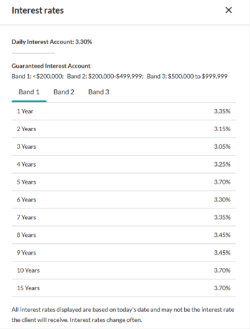
One-time PAD functionality for Daily/Guaranteed Interest AccountWith the recent addition of DIA/GIA PAD to EZcomplete, you can now utilize EZtransact for one-time pre-authorized debits. This means faster processing with one-time deposits for investment instructions to either a DIA and/or GIA (multiple terms) with end-of-term instructions.
Key benefits of these enhancements include:
• enhanced rate guarantees to secure the best rates available for clients,
• daily updated interest rate guide informs you of the latest rates,
• interest rate guarantee valid for three business days, for direct deposits from clients.
Be sure to use EZtransact on your next DIA/GIA one-time deposit request to experience these improvements.
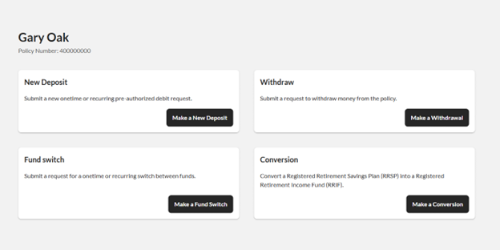
Reduce RSP to RIF conversion timeReduce time and effort submitting Retirement Savings Plan (RSP) to Retirement Income Fund (RIF) conversion requests. EZtransact is continuing to reduce the amount of time it takes advisors to submit conversion requests.
Features include:
• RSP/Spousal RSP to RIF Conversion to effortlessly submit request digitally.
• RIF Calculator to easily calculate your conversions.
Save time with our enhanced digital experience.
Sort & Filter Enhancements
We’ve taken your feedback and made it easier than ever to find the contracts and clients you’re searching for. This improved advisor experience ensures you can:
• Filter “My Clients” By Product Type/ Registration Type
• Sort “My Clients” By Contract Number/ Client Name
• Filter “Transactions” By Transactions Status/ Transaction Type
• Sort “Transactions” By Date
You asked, and we listened! Keep providing us with your feedback on our digital tools. When we grow together, success is mutual.
Get to know EZtransact and accelerate your sales! If you have any questions, please contact your Director, Investment Sales.
Date posted: April 3, 2025 -
Make your next audit a breeze
New – Online CE Course: Ensuring a Compliant, Needs-based Insurance sale
When regulators and auditors come knocking on your door, make sure you are prepared. Well documented, needs-based sales evidence may help protect you and demonstrate that you were acting in your clients’ interest.
Make your next audit a breeze with the tips you will learn in this course and earn CE credits at the same time (AIC, Advocis and ICM credits available only).
“The Approach” to supporting suitable, needs-based sales
The CLHIA recommends six supporting elements to make a suitable, needs-based sale. Equitable® created this reference presentation, “Ensuring a Compliant, Needs-based Insurance Sale” that leverages The Approach to explain the requirements for each step, along with the documentation to retain in the client file.
Get started now
A few important notes:
● This program is hosted on Teachable: https://equitable-life-education.teachable.com/
● Username: Please use your email that you are contracted with.
● Password: Equitable
● Please use Google Chrome to access the courses.
.png "Get-started-now!-button-(3).png")
Looking for more CE accredited training courses?
Check out our new individual insurance online learning centre on EquiNet® to stay up to date on new courses and find out more information on the topics provided.
Questions?
Contact your local wholesaler.
Are you having trouble logging in?
Email equitablelifemarketing@equitable.ca for assistance.
-
New Online Policy Loan Form
Advisors will now have access to a new digital policy loan form on EquiNet™.
On eligible policies, you can launch a customized policy loan form through the Values tab in Policy Inquiry. (login required)
This form is quick and intuitive. You tell us the loan amount, how your client wants to receive the funds, then confirm your client’s contact info and submit! Once your client signs, it is sent for review and processing within our current service standards.
This is the first form to be digitalized and we plan to continue this work with more forms later this year.
® and ™ denotes trademarks of The Equitable Life Insurance Company of Canada. -
Guides for completing Individual Insurance forms now on EquiNet
We have recently added guides to provide detailed instructions on how to fill out forms on EquiNet. You can find them on the Individual Forms page, directly underneath the applicable form. In the coming weeks, we will be adding more guides for additional forms, so make sure to check the Forms page for solutions that help you work smarter.
View our newly posted guides:- 671OC Guide (Guide to Completing an Ownership Change Form)
- 594 Guide (Guide to Completing Business Information Form)
- 1710 Guide (Guide to Completing Verification of Identity for Policy Owners)
Additional guides for the following forms will be available soon: -
Message from Ron Beettam
As COVID-19 continues to spread, we want to reassure you that we remain ready and committed to support you and your clients.
We have a robust and well-tested business continuity plan in place and our business is almost 100% digital. Almost 90% of our employees are now working remotely from home and are maintaining the high level of service you have come to expect from us. We still have a fully functioning Document Services Centre that is managing our incoming and outgoing mail. Our sales and customer service teams remain open to support you and your clients.
Equitable Life’s online application process, EZcomplete®, offers non face-to-face capability and continues to be your go-to resource for managing your business virtually. We are receiving a record number of online applications and are committed to helping you maintain a certain degree of daily activity. EZcomplete® non-face-to-face works for all life, critical illness and segregated fund applications.
Advisors will be pleased to know that we have increased non-medical limits for life insurance. We are also looking at other underwriting changes, digital delivery of life insurance contracts and additional digital payment options.
Our Savings & Retirement advisors will find our new Transaction Authorization Requirements table a valuable resource for submitting forms and documents. Can’t meet with your client in person to get a signature? Not to worry. You can have your client sign a letter of direction and take a picture to authorize a number of transactions.
Transacting in a non face-to-face environment can be a challenge but we will continue to revisit existing processes and look for ways to modify requirements to help you to continue managing your business. All of us are facing an unprecedented number of urgent situations where there is no established protocol. Our commitment to you and your clients is to respond quickly, and to be flexible where we can, tailoring solutions to specific needs.
To stay up-to-date, please refer to Equitable Life’s COVID-19 information page. There you will find the latest information for all lines of business.
As the global situation continues to evolve rapidly, we ask for your patience as our solutions also evolve quickly and accordingly. Rest assured that Equitable Life is unwavering in our support, and we will be here to help you protect what matters most to Canadians.
Ron Beettam, President and CEO -
NEW Jump Around feature available on EZcomplete
One of the most requested features is available on EZcomplete® effective November 19, 2022. We like to call it “jump around”. It’s the ability to jump from one part of the application to another and back again. You no longer have to complete the application one section after another in order. This will allow a lot more flexibility when submitting a policy application.
This functionality is helpful as you can input basic client information ahead of a meeting to review with the client later. After completing the Owner’s step (step 1), you could jump to step five (Subsequent Payment) or step six (Third Party). This allows you the opportunity to easily jump back and add a second owner once you have all their details from the client. You can also return to your dashboard, and when you go back into the application, you will be returned to the owner’s section.
Hitting the Save button will save the information you have inputted already, so after jumping ahead to a different section, you can return to complete those questions knowing your progress will be saved. When you have completed all the necessary fields, hitting the Done button will validate all the information and the step will be complete. A check mark will appear beside each completed and validated step.
Please note, if you go back to a previously validated step and change information you will have to go through all subsequent steps and complete and validate them again by clicking next if nothing has changed or making any necessary changes.
To Equitable Life®, the term EZ really means something! Learn more about how doing business with Equitable Life continues to be easy.
Questions: Please contact your Regional Sales Manager
® denotes a trademark of The Equitable Life Insurance Company of Canada.
-
There is still time for your clients to contribute to their Tax-Free Savings Account
If you have clients that have not contributed to their Tax-Free Savings Account (TFSA) this year, great news… there is still time!
You know that an Equitable Life® TFSA is a great way to save. Each year residents of Canada who are at least 18 years of age are eligible to invest up to $6,000* into their TFSA, in addition to any previously unused contribution room. Deposits made into a TFSA are made with after-tax dollars. This means that withdrawals can be made at any time on a tax-free basis.
Interested in increasing an existing Pre-Authorized Debit (PAD) TFSA deposit?
Clients with an existing PAD (or who had one in the previous six months), can go online to make any adjustments to a scheduled deposit to their TFSA. Clients can simply login to Equitable Life’s Client Access®. Client Access is Equitable’s secure online client site that connects clients to tools and policy information.
Consider a one-time deposit or set up a PAD?
To get started with one-time deposit, clients simply log in to their online bank account and select the option to add a new bill/payee and search for Equitable Life Savings Plan. The Equitable Life savings plan policy number will serve as the account number.
Clients that complete their deposits using online banking do not have to worry about mailing a cheque or missing the deadline. Deposits are applied based on the investment direction on file.
If you have clients that would like to set up a PAD, simply complete Form #378. For details on how to submit forms during COVID-19, refer to the NEW APPLICATIONS & TRANSACTION AUTHORIZATION REQUIREMENTS webpage.
If you have any questions, please reach out to your local Regional Investment Sales Manager or Advisor Services at 1.866.884.7427 Monday to Friday, 8:30 a.m. to 7:30 p.m. ET or email savingsretirement@equitable.ca.
*The annual TFSA limit is set by Canada Revenue Agency (CRA) and is currently $6,000. Your notice of assessment will tell you if you have unused contribution room from previous years. Contributions over the maximum will be charged a monthly penalty of 1% by CRA.
® denotes a trademark of The Equitable Life Insurance Company of Canada -
Grow your guarantee using resets from Equitable Life
Did you know that many of Equitable Life®’s segregated funds contracts, including Pivotal Select™ Estate Class and Protection Class, allow for an annual reset of the death benefit guarantee? Now could be a great time to remind clients to lock-in any gains with a death benefit reset; and increase their Death Benefit guarantee to 100% of the current market value. The ability to lock-in market growth using resets is one of the differences between segregated funds and mutual funds.
To complete a reset, submit the applicable investment direction form. If you have Limited Trading Authorization on file, you can sign the request on your client’s behalf*. The Investment Direction Forms are posted on EquiNet®, or can be found here (by product):
- Pivotal Select (form # 693SEL)
- Personal Investment Portfolio, Pivotal Solutions II or Pivotal Solutions DSC (form # 693ANN)
Be sure to check out the “Growing your Guarantee with Resets” marketing piece which can be shared with your clients. For questions about resets, contact your Regional Investment Sales Manager today.
*Advisors are required to keep notes of their conversation with their client for audit purposes when completing transactions using Limited Trading Authorization. World Financial Group (WFG) advisors are not permitted to use Limited Trading Authorization as per their agreement with WFG.
® and TM denote trademarks of The Equitable Life Insurance Company of Canada
-
Deposits to the Fidelity Special Situations mutual fund are being limited but the segregated fund is
Fidelity Investments® recently said they would no longer accept deposits from new investors into the Fidelity® Special Situations Fund. This notice however does not affect Equitable Life® clients.
The Special Situations Fund will continue to be open to new and existing Equitable Life clients. This includes clients with Pivotal Select™, Pivotal Solutions* or Personal Investment Portfolio segregated funds contracts.
Why is Fidelity limiting access to the mutual fund?
This award-winning mutual fund has grown significantly and now has $3.6 billion of managed assets. To preserve the integrity of the fund’s investment strategy, Fidelity® decided to limit inflows to the fund. Limiting the amount of managed assets held within the fund allows the fund’s portfolio manager to focus on what he does best - finding special situation investment opportunities and capitalizing on positive change within companies and industries across Canada and around the world.
If you like the Special Situations mutual fund, you will value the Equitable Life Fidelity® Special Situations segregated fund. Segregated funds are similar to mutual funds but offer different features and guarantees. To learn about these features, check out the Investment Advantage. To learn more about the Special Situations segregated fund, click here.
For more information about Equitable Life’s segregated funds, speak to your Regional Investment Sales Manager or visit our segregated funds page on EquiNet®.
References:
Fidelity’s press release announcing the limited fund closure
Fidelity® Special Situations portfolio management strategy, webinar featuring Mark Schmehl, Portfolio Manager.
*No Load, Deferred Sales Charge, Pivotal Solutions II
® or ™ denotes a trademark of The Equitable Life Insurance Company of Canada, except as noted below.
Fidelity and Fidelity Investments are registered trademarks of 483A Bay Street Holdings LP. Used with permission. -
Manage more details within Contract Delivery for New Business applications
We are excited to announce further enhancements to our eDelivery process to empower you, the advisor, the ability to manage client details more easily within Contract Delivery.
Effective January 15, 2022, advisors will need to create a Password within Contract Delivery when choosing “eDelivery” as the contract delivery method and provide the password to the client to use as their password:
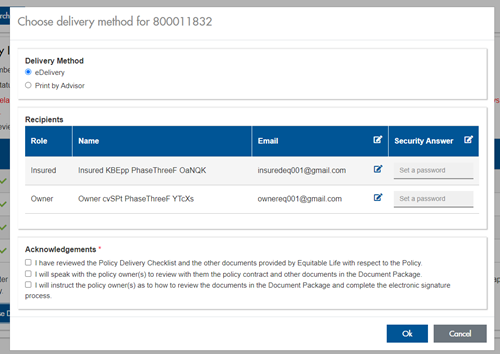
The Password must be between 4 and 100 alpha/numeric characters, and cannot be the Policy number. For multiple signers the password (and email address) must be unique per each signer.
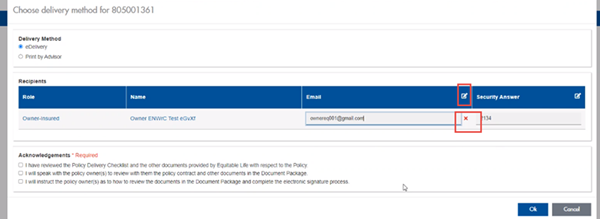
Advisors can now edit and/or update an email address within Contract Delivery, in the event of a bounce back or email change, to keep the eDelivery process moving and avoid delays in processing time. If a lock out occurs, advisors can trigger a resend of the signing email once they add a new valid email address in Contract Delivery. Simply click the pencil icon beside the Email field to enter the valid email address:
Another new feature- in the event a client has declined, the advisor will get an email from Equitable Life®. Click through to EquiNet® within the email to view the message within Contract Delivery that the client provided as the reason for decline under a new “Declined Details” section. This enables you to connect with the client to proceed with the sale by discussing the reasons for decline with them directly.
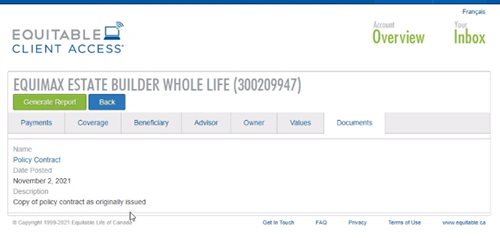
Also new for clients with this enhancement, policy owners of a policy created after January 15 will be able to see a PDF copy of their policy within client access. Note: this PDF copy is as the policy was originally issued.
Resources: